Theater WordPress Theme
by cmsmasters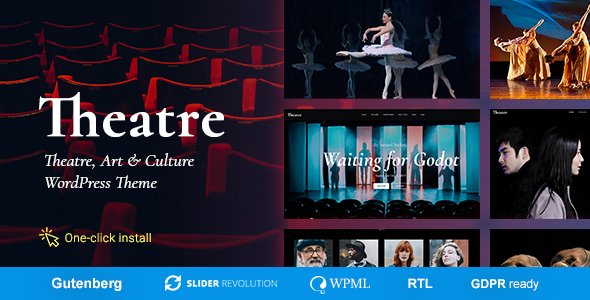
Stuck on your Theater WordPress theme? Let's fix it.
No endless back-and-forth. Just send us the details and we'll get it done.
No obligation · Replies within 1 hour · Quote within 1 day
Setup · Customization · Bug fixes · WooCommerce integration
About Theater WP Theme
Theater is a WordPress theme built by cmsmasters, designed specifically for performing arts venues, drama groups, and entertainment organizations. It ships with a visual page builder, a dedicated events system, and pre-built demo content that covers stage productions, ticket sales, and performer profiles.
The theme supports WooCommerce for selling tickets directly from your site, and includes custom post types for productions, cast members, and schedules. The typography and color options are extensive, giving venues full control over branding without touching code. Built on a solid foundation with cross-browser compatibility and responsive layouts, Theater handles everything from a small local playhouse to a full repertory company website.
Get matched with a Theater developer in under one day
Tell us about your Theater project. Small fixes, Theater theme customization, or a full website build, whatever you need, we've got it covered.
We'll connect you to the right Theater developers, define the scope, and get everything 100% clear.
You'll get one estimate, hire your preferred developer, and start collaborating.
Theater has a steeper learning curve than most multipurpose themes. The cmsmasters page builder behaves differently from Elementor or Gutenberg, and the events system has quirks that catch developers off guard. Work is matched through Codeable, a vetted network of WordPress specialists. Every developer on the platform has passed a strict screening process. You get an expert who has worked inside themes like Theater before, not someone learning on your project.
Pros
- Built-in events and productions system tailored to performing arts organizations
- WooCommerce compatibility allows direct ticket and merchandise sales from the site
- Dedicated custom post types for cast members, productions, and schedules out of the box
- Rich demo content makes initial setup faster for stage and theater venues
- Extensive typography and color controls support strong venue branding without custom CSS
Cons
- The cmsmasters page builder is proprietary and not interchangeable with Gutenberg or Elementor
- Theme updates have been infrequent, raising long-term compatibility concerns with newer WordPress versions
- Performance out of the box is heavy due to bundled scripts and unoptimized asset loading
- Support from cmsmasters can be slow and documentation is limited for advanced customizations
- Migrating away from the cmsmasters builder to a standard block editor is a significant rebuild
Who is Theater for?
Theater and Performing Arts Venues
Theater’s production post type and event calendar make it a natural fit for stage venues. You can list shows, display showtimes, publish cast lists, and sell tickets through WooCommerce. The pre-built layouts cover season pages and individual production pages without starting from scratch.
Independent Film and Screening Events
Screening events and film festivals need clean scheduling tools and strong visual layouts for poster art. Theater handles repeating event formats well, and its full-width image sections work well for cinematic presentation. Custom fields can store director, runtime, and rating details.
Drama Schools and Acting Academies
Drama schools can use Theater to list courses, instructor profiles, and audition schedules. The cast member post type repurposes easily into a faculty directory. Contact forms integrated with Gravity Forms handle audition applications and course enrollment inquiries.
Music and Opera Companies
Opera and orchestral companies need hierarchical event structures: seasons, individual performances, and venue details. Theater supports this through nested taxonomy and custom post relationships. WooCommerce handles tiered ticket pricing for different seating categories.
Comedy Clubs and Live Entertainment Venues
Comedy clubs run frequent rotating lineups and need a fast way to publish weekly show pages. Theater’s event post type supports recurring schedules. Performer bios, show archives, and embedded video from past performances fit naturally within the theme’s existing content blocks.

Customizing Theater
Theater’s customization starts in the WordPress Customizer, where you can control header layouts, color schemes, font pairings, and footer structure. The bundled cmsmasters page builder lets you drag and drop content blocks, but working around its limitations often requires a Theater expert who knows where the theme’s CSS hooks and PHP filters are.
Custom work commonly includes adjusting the events calendar to match a venue’s specific booking flow, integrating third-party ticketing platforms like Ticketmaster or Eventbrite, or building out a cast archive with custom fields. A developer familiar with this theme can also strip out unused features that otherwise slow the site down and cause unnecessary conflicts.
Recommended plugins for Theater
Theater pairs well with several plugins. The Events Calendar adds more scheduling flexibility than the built-in system. WooCommerce handles direct ticket sales. WPML covers multilingual needs for international venues. Contact Form 7 or Gravity Forms work for audition submissions and booking requests.
If site speed is a concern, pairing Theater with proper caching and image optimization is worth doing early. See our WordPress performance service for specifics. For venues that rely on search traffic, structured data and on-page optimization matter. Our WordPress SEO service covers both.
Not sure which plugins to use? This WordPress plugins directory covers the most popular options with reviews and setup guides.
Theater common issues
Theater theme events not showing on the frontend
This usually comes down to a permalink flush or a conflict with a caching plugin. Go to Settings > Permalinks and save without changes to rebuild the rewrite rules. If events still don’t display, check whether the custom post type is set to public in the theme options. A plugin conflict can also suppress the query. Deactivate plugins one at a time to isolate the cause. Persistent issues may need a developer to audit the theme’s query logic. See our WordPress bug fixing service.
Theater WordPress theme slow loading on mobile
Theater loads several scripts and stylesheets on every page by default, including ones not used on mobile. Start by enabling lazy loading for images and deferring non-critical JavaScript. A caching plugin like WP Rocket helps, but Theater’s inline styles can interfere with CSS minification. Test with Query Monitor to identify the heaviest requests. In many cases, removing unused shortcodes from the page builder reduces render-blocking resources significantly. See our WordPress performance service for a full audit.
cmsmasters page builder not working after WordPress update
The cmsmasters builder relies on shortcodes that occasionally break when WordPress core updates change how content is filtered or sanitized. Check the theme and builder version first and apply any pending updates. If shortcodes are rendering as raw text on the frontend, a PHP version mismatch is often the cause. Downgrading PHP temporarily can confirm this. Long-term, this is one of the reasons some Theater sites are migrated to Gutenberg blocks. A developer can assess the scope of that work.
Theater theme WooCommerce tickets layout broken
WooCommerce layout breaks in Theater are typically caused by a WooCommerce template update that overrides the theme’s custom templates. Check WooCommerce > Status > System Status for outdated template warnings. The fix is to update the overridden templates inside the theme’s woocommerce folder to match the current WooCommerce versions. If you are not comfortable editing PHP templates directly, this is a task for a WordPress developer. Our bug fixing service covers WooCommerce template conflicts.
Theater FAQ
cmsmasters updates have been inconsistent for Theater in recent years. The theme still works on current WordPress versions but the proprietary page builder receives minimal maintenance. If you rely on this theme for a production site, it is worth having a developer review compatibility with your current PHP and WordPress versions before updates cause unexpected breakage.
Elementor can be installed alongside Theater, but the two builder systems will conflict if used on the same page. You can use Elementor for new pages while leaving existing cmsmasters builder pages untouched. A full migration to Elementor means rebuilding each page. Many sites do this gradually. A developer familiar with both systems can plan the transition without downtime.
Theater generally functions on current WordPress versions, but some page builder elements and older shortcodes can behave unexpectedly after core updates. PHP 8.x compatibility is the most common friction point. Before updating WordPress or PHP on a live Theater site, test on a staging environment first. Compatibility issues are fixable but need hands-on review.
WooCommerce is the standard approach for ticket sales on a Theater WordPress site. Install WooCommerce, create ticket products, and link them from your event pages. For more complex needs like seat maps or external ticketing integration with platforms like Eventbrite, additional plugins or custom development are required. A developer can connect the right solution to your specific booking workflow.
Yes, but it takes real work. The cmsmasters builder stores content as shortcodes inside the post content, so switching themes will expose raw shortcode text across all your pages. A proper migration means converting that content to blocks or a new builder format page by page. Our WordPress migration service handles this type of theme-to-theme move.
Hire a Theater WordPress Developer
Whether you need a full Theater theme setup, custom post type work, WooCommerce ticket integration, or fixes to a broken layout, we match you with a developer who knows this theme. No guesswork, no junior developers. Get a free estimate with no obligation to hire. You describe the project, get a clear quote, and decide from there.
You'll need a free Codeable account so developers can ask questions and send their quotes.