TheBlogger WordPress Theme WordPress Theme
by pixelwars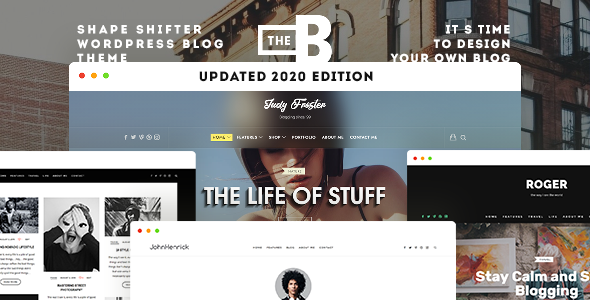
Stuck on your TheBlogger WordPress Theme WordPress theme? Let's fix it.
No endless back-and-forth. Just send us the details and we'll get it done.
No obligation · Replies within 1 hour · Quote within 1 day
Setup · Customization · Bug fixes · WooCommerce integration
About TheBlogger WordPress Theme WP Theme
TheBlogger is a WordPress theme by pixelwars built specifically for content-focused websites. It strips away unnecessary complexity and puts the writing front and center. The layout is clean, the typography is readable, and the structure is designed to keep visitors reading rather than clicking away.
It suits personal bloggers, niche content sites, and editorial publications that want a polished look without hiring a designer for every tweak. The theme includes multiple post formats, customizable header options, and widget-ready sidebars. It works with the WordPress block editor and supports popular plugins without conflicts. If your site lives or dies by its content, TheBlogger gives you a solid foundation to build on.
Get matched with a TheBlogger WordPress Theme developer in under one day
Tell us about your TheBlogger WordPress Theme project. Small fixes, TheBlogger WordPress Theme theme customization, or a full website build, whatever you need, we've got it covered.
We'll connect you to the right TheBlogger WordPress Theme developers, define the scope, and get everything 100% clear.
You'll get one estimate, hire your preferred developer, and start collaborating.
Most TheBlogger customization requests look simple until you’re inside the code. Font changes affect line height. Layout tweaks break on mobile. Plugin conflicts appear after updates. A vetted WordPress developer on Codeable has seen these issues before and knows how to resolve them without creating new ones. You get a fixed-price estimate before any work begins, no hourly surprises, and a developer who knows the theme rather than one learning it on your budget.
Pros
- Clean, typography-first design that keeps readers focused on content
- Multiple post format support including video, gallery, and quote
- Compatible with the WordPress block editor out of the box
- Widget-ready sidebar and footer areas for flexible layout control
- Lightweight codebase that loads fast without heavy framework overhead
Cons
- Limited built-in page builder support requires manual CSS for complex layouts
- Header customization options are basic compared to more recent themes
- No built-in mega menu, which limits navigation on larger content sites
- Color scheme options in the Customizer are restricted to a small preset range
- Documentation is sparse, making self-troubleshooting harder for non-developers
Who is TheBlogger WordPress Theme for?
Personal Lifestyle Blog
TheBlogger suits personal bloggers who want their writing to stand out rather than compete with a cluttered layout. The minimal design keeps attention on the post itself. A TheBlogger WordPress Theme specialist can adjust fonts, colors, and sidebar content to match a personal brand without overcomplicating the visual structure.
Niche Authority Site
Sites built around a specific topic, such as personal finance, fitness, or tech reviews, benefit from TheBlogger’s clean category structure and readable post layouts. An experienced TheBlogger developer can extend the theme to support custom taxonomies, author bios, and related post sections that keep readers on the site longer.
Food and Recipe Blog
Recipe blogs need clear formatting, good image placement, and fast load times. TheBlogger’s post format support and clean layout handle recipe content well. A developer can add structured data markup for recipe schema, which helps individual posts appear in Google’s rich results and drives more targeted search traffic.
Travel Writing Publication
Travel content relies on strong imagery and engaging long-form writing. TheBlogger’s layout handles both without distraction. A TheBlogger WordPress Theme expert can build custom post templates for destination guides, add map embeds cleanly, and optimize image loading so photo-heavy posts don’t slow the site down.
Digital Magazine
Editorial teams publishing regular content across multiple categories need a theme that organizes posts clearly and scales without breaking. TheBlogger provides the foundation. A developer can extend it with custom homepage sections, author archive pages, and category-level design variations that give the site a more professional publication feel.

Customizing TheBlogger WordPress Theme
TheBlogger offers a good range of built-in customization options through the WordPress Customizer, but getting the most out of it often means going beyond the defaults. A TheBlogger WordPress Theme expert can adjust layout widths, rework the header structure, modify font pairings, and fine-tune spacing without touching production files.
Custom post templates, category-specific layouts, and homepage designs that match a specific editorial style all require direct PHP and CSS work. If you want TheBlogger to look and behave exactly as you have in mind rather than close enough, working with a specialist saves significant time. Changes made properly also stay intact through theme updates, which is something DIY edits rarely guarantee.
Recommended plugins for TheBlogger WordPress Theme
TheBlogger pairs well with plugins that extend its core blogging functionality. Adding a caching layer, optimizing image delivery, and cleaning up render-blocking scripts can measurably improve load times. A developer with experience in WordPress performance knows which changes have the biggest impact without breaking the theme’s layout.
For content-heavy blogs, search visibility matters. Schema markup, meta control, and internal linking structure all affect how posts rank. Pairing TheBlogger with a solid SEO setup handled by someone who understands WordPress SEO optimization gives your content the best chance of being found.
Not sure which plugins to use? This WordPress plugins directory covers the most popular options with reviews and setup guides.
TheBlogger WordPress Theme common issues
TheBlogger theme not showing featured images correctly
Featured image display issues in TheBlogger are usually caused by incorrect image sizes registered by the theme. If thumbnails appear cropped incorrectly or don’t show at all, the likely culprits are mismatched image dimensions or a plugin conflict overriding output. Regenerating thumbnails after checking the theme’s registered sizes often resolves it. If the problem persists across templates, it may need a code-level fix. Visit our WordPress bug fixing service for a proper diagnosis.
TheBlogger WordPress theme broken after update
A broken layout after a TheBlogger update usually points to a conflict between the updated theme files and customizations made directly in the theme rather than through a child theme. CSS overrides and template edits get wiped on update. Restoring from a backup and moving customizations into a child theme is the correct fix. If no backup exists, a developer can often reconstruct the changes. Our WordPress bug fixing service covers post-update recovery.
TheBlogger sidebar not displaying on mobile
The TheBlogger sidebar collapsing or disappearing on mobile is typically a CSS media query issue. The theme may be hiding the sidebar below a certain breakpoint as intended, but sometimes the breakpoint fires too early or a plugin adds conflicting styles. Inspect the sidebar container in browser dev tools to identify which rule is hiding it. Adjusting the media query in a child theme stylesheet is the cleanest fix without affecting desktop layout.
TheBlogger theme fonts not loading or wrong font showing
Font loading problems in TheBlogger usually come from one of three places: a Google Fonts block from a browser extension, a caching plugin serving stale CSS, or a theme update that changed the font stack. Check whether the issue appears without caching enabled and in a different browser. If the font is being loaded but overridden, trace the CSS specificity conflict in dev tools. A developer can isolate the cause and apply the correct fix in minutes.
TheBlogger WordPress Theme FAQ
TheBlogger produces clean HTML output, uses proper heading hierarchy, and loads quickly, all of which support good SEO fundamentals. It doesn’t include built-in schema markup or advanced meta controls, so pairing it with a dedicated SEO plugin is recommended. A developer experienced in WordPress SEO optimization can extend the theme’s output to improve structured data and search visibility.
TheBlogger is not built as a WooCommerce theme. Basic WooCommerce functionality will work, but shop pages, product layouts, and cart templates will use WooCommerce’s default styling rather than matching the theme. A developer can add custom WooCommerce template overrides to bring the store pages in line with TheBlogger’s design, but it requires hands-on work.
Creating a child theme for TheBlogger involves creating a new folder in your themes directory, adding a style.css file with the correct header referencing TheBlogger as the parent, and enqueuing the parent styles in functions.php. All customizations then go into the child theme, so updates to TheBlogger don’t overwrite your changes. A developer can set this up quickly and move existing edits across safely.
TheBlogger works with Elementor on individual pages, but it was not designed around a page builder workflow. The theme’s native templates control most of the blog and archive layouts, which page builders don’t override by default. For full-page builder integration, additional configuration is needed. A TheBlogger WordPress Theme developer can set up Elementor to work properly alongside the theme’s existing structure.
Support and update status for TheBlogger depends on pixelwars’s current release activity. Check the theme’s page on ThemeForest or the official source for the last update date and support forum activity. If the theme is no longer actively maintained, that increases the importance of working with a developer who can handle compatibility fixes and security patches independently.
Hire a TheBlogger WordPress Theme Developer
Whether you need a layout adjustment, a custom homepage design, or a full site build on TheBlogger, working with an experienced developer gets it done right the first time. FoxyConcept connects you with specialists through Codeable’s vetted network. You describe the project, get a clear estimate, and decide whether to proceed. No obligation, no risk. Get a Free Estimate and see what’s possible.
You'll need a free Codeable account so developers can ask questions and send their quotes.