TheGov WordPress Theme
by WebGeniusLab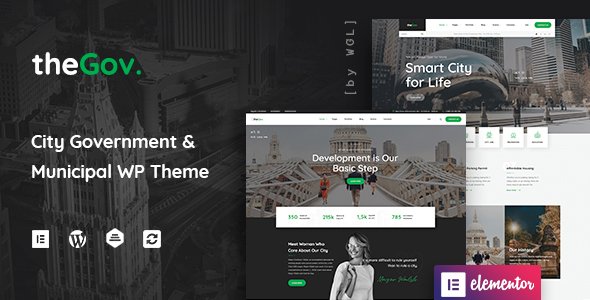
Stuck on your TheGov WordPress theme? Let's fix it.
No endless back-and-forth. Just send us the details and we'll get it done.
No obligation · Replies within 1 hour · Quote within 1 day
Setup · Customization · Bug fixes · WooCommerce integration
About TheGov WP Theme
TheGov is a WordPress theme built by WebGeniusLab specifically for government agencies, municipalities, city councils, and public sector organizations. It ships with a clean, professional layout designed to meet the accessibility and usability expectations visitors bring to official websites.
The theme includes pre-built page templates for departments, elected officials, public notices, events, and document archives. It integrates with Elementor for visual editing and supports WooCommerce for fee payments and permit purchases.
TheGov is built with WCAG accessibility guidelines in mind, which matters for public-facing sites that serve all citizens. It also includes translation support, making it suitable for multilingual municipalities. If your organization needs a credible, structured web presence without starting from scratch, TheGov covers most of that ground out of the box.
Get matched with a TheGov developer in under one day
Tell us about your TheGov project. Small fixes, TheGov theme customization, or a full website build, whatever you need, we've got it covered.
We'll connect you to the right TheGov developers, define the scope, and get everything 100% clear.
You'll get one estimate, hire your preferred developer, and start collaborating.
TheGov is more structured than a general-purpose theme, which is useful, but it also means customization requires someone who understands how the theme’s components fit together. Changing one section without understanding the dependencies can break layouts or remove functionality elsewhere.
Working with a vetted developer through Codeable means you get someone who has worked with municipal and government sites before. You get a free estimate first, with no obligation to proceed. That removes the guesswork from budgeting and keeps the project low risk from the start.
Pros
- Pre-built templates for departments, officials, events, and public notices save significant setup time
- Built with WCAG accessibility guidelines in mind, which is a baseline requirement for public sector sites
- Elementor integration allows non-technical staff to update content without developer help
- WooCommerce compatibility supports fee collection, permit purchases, and other transactional needs
- Translation-ready with WPML support, useful for bilingual or multilingual municipal websites
Cons
- Theme update pace can lag behind core WordPress releases, sometimes creating short-term compatibility gaps
- Heavy reliance on Elementor means swapping page builders later is a significant rebuild
- Demo import requires manual cleanup to remove placeholder content from all department pages
- Some built-in shortcodes are not well documented, making them harder to modify without digging into the code
- Default font and color options are limited without custom CSS or child theme overrides for strict brand compliance
Who is TheGov for?
Municipal Government Websites
TheGov was designed for this use case. City and town websites can use the department directory, official profiles, public notice archive, and events calendar to give residents a clear, organized source of information. Service request forms and fee payment through WooCommerce round out the citizen-facing functionality most municipalities need.
City Council and Local Authority Sites
Council sites need meeting schedules, agenda archives, member profiles, and contact directories. TheGov’s pre-built templates handle all of these without custom development. A developer can extend these with filterable document archives, searchable ordinance databases, or vote records tied to custom post types.
Public Utilities and Service Departments
Water, waste, transit, and utility departments often run separate sites with similar structural needs: news updates, outage notices, payment portals, and service area maps. TheGov’s layout adapts to these use cases with moderate customization, keeping the official tone without requiring a purpose-built theme.
Nonprofit and NGO Organizations
Nonprofits and NGOs working in public interest areas benefit from TheGov’s credibility-first design. Grant listings, project updates, board member profiles, and donation integration through WooCommerce or GiveWP all fit within the theme’s structure without requiring heavy modification.
Educational Institutions and School Districts
School districts and education departments share structural similarities with government sites: department pages, staff directories, calendars, and document libraries. TheGov handles these well, and with role-based editing configured, individual schools or departments can manage their own sections independently.

Customizing TheGov
TheGov works well as a starting point, but most government and public sector sites need adjustments before they go live. Department structures differ, branding requirements vary, and content workflows often need to match internal processes rather than theme defaults.
A TheGov expert can rearrange or extend the department directory, build custom post types for tenders or public notices, and wire up form plugins to handle citizen requests. Header layouts, color schemes, and typography can all be brought in line with official brand guidelines.
More complex work includes building out document download systems, integrating payment gateways for permits or fines, and setting up user roles so different departments can manage their own content without touching the rest of the site. These are straightforward tasks for a developer who knows the theme well.
Recommended plugins for TheGov
TheGov pairs well with several plugins that extend its core functionality. Gravity Forms or WPForms handles citizen intake, complaints, and service requests. The Events Calendar works cleanly with the theme’s events templates for council meetings and public hearings.
For document management, WP Document Revisions is a solid fit. WooCommerce can handle permit or license fee collection. If your site carries significant traffic, pairing TheGov with a proper WordPress performance setup keeps page load times acceptable for all users. For visibility in local search, a structured WordPress SEO strategy ensures residents can find the right department pages.
Not sure which plugins to use? This WordPress plugins directory covers the most popular options with reviews and setup guides.
TheGov common issues
TheGov theme header not displaying correctly after update
Header display issues after a TheGov update are usually caused by a conflict between the updated theme files and cached Elementor data. Start by clearing all caches, then go to Elementor > Tools and run Regenerate CSS and Sync Library. If the header still breaks, check whether a child theme is overriding header templates. If no child theme exists, the update may have overwritten custom header changes made directly in the parent theme files.
TheGov Elementor templates not loading on custom pages
When Elementor templates fail to load on TheGov custom pages, the most common cause is a page set to a non-Elementor template in the page attributes. Check the page template is set to Elementor Canvas or the TheGov full-width option. Also confirm the Elementor plugin is active and updated. If the template loads but appears blank, regenerate Elementor’s CSS files and flush any object cache.
TheGov department page layout broken on mobile
Broken department layouts on mobile usually point to a custom CSS conflict or a missing responsive setting in Elementor. Open the affected section in Elementor and check column widths and padding are not set to fixed pixel values that override mobile breakpoints. TheGov’s department templates use specific column structures, so adding nested sections manually without adjusting mobile settings is a frequent cause of this problem.
TheGov WooCommerce payment page styling not matching theme
WooCommerce checkout and account pages often inherit default WooCommerce styles that conflict with TheGov’s CSS. The fix usually involves adding targeted CSS to the child theme’s stylesheet to align font sizes, button colors, and form field widths with the rest of the site. Some TheGov versions ship with a WooCommerce compatibility file that needs to be enabled manually from the theme settings panel.
TheGov FAQ
Yes, TheGov is a genuine fit for government, municipal, and public sector websites. It includes the structural elements those sites need: department directories, official profiles, public notices, events, and document archives. It is not just a generic theme with a government label. That said, most live government sites will need developer customization to match specific organizational structures and branding requirements.
Yes. TheGov is built around Elementor as its primary page builder. Most of the pre-built templates and demo content are constructed with Elementor widgets and sections. This makes content editing accessible to non-technical staff once the site is set up. It also means Elementor Pro is recommended to unlock the full range of widgets the theme’s layouts rely on.
TheGov works well for nonprofits and NGOs, particularly those operating in public interest or civic spaces. The credible, institutional design suits organizations that need public trust. Board profiles, project listings, grant archives, and event calendars all fit within the theme’s default structure. Donation functionality can be added through WooCommerce or a dedicated plugin like GiveWP.
TheGov uses a custom post type for departments. To add a new one, go to the Departments section in the WordPress admin, create a new entry, and fill in the department details, contact information, and assigned staff. The department will then appear in the directory template automatically. For custom department page layouts, you can assign an Elementor template directly to that department’s archive or single page.
TheGov is built with WCAG accessibility guidelines in mind, and WebGeniusLab markets it as accessibility-ready. In practice, the base theme meets many WCAG 2.1 Level AA criteria, including color contrast ratios and keyboard navigation. However, full compliance depends on how the site is configured and what content is added. Custom Elementor sections, images without alt text, or low-contrast custom colors can all introduce accessibility failures after launch.
Hire a TheGov Developer for Your Government or Public Sector Site
Whether you need a full TheGov setup, a specific feature built out, or an existing site cleaned up and extended, a dedicated developer makes the difference between a site that works and one that works correctly. Get a free estimate through Codeable and describe exactly what your municipality or agency needs. You’ll hear back within 24 hours with a clear scope and price before any work begins. No upfront payment, no obligation.
You'll need a free Codeable account so developers can ask questions and send their quotes.