Throne WordPress Theme
by meks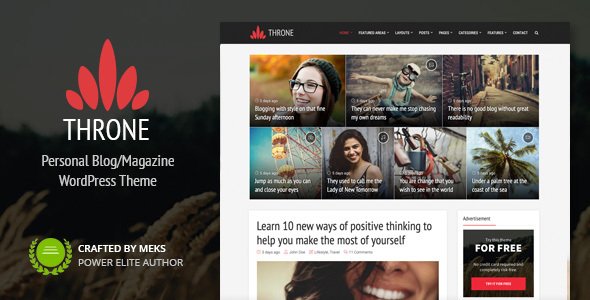
Stuck on your Throne WordPress theme? Let's fix it.
No endless back-and-forth. Just send us the details and we'll get it done.
No obligation · Replies within 1 hour · Quote within 1 day
Setup · Customization · Bug fixes · WooCommerce integration
About Throne WP Theme
Throne is a WordPress theme built by Meks, a developer studio known for clean, performance-focused themes aimed at bloggers and content publishers. Throne follows that same pattern: a minimal layout with strong typographic choices, fast load times, and a structure that keeps the reader’s attention on the content rather than the chrome around it.
The theme supports the WordPress block editor and ships with several layout options for posts, archives, and homepages. It works well for personal blogs, niche publications, and writers who want a polished look without fighting their theme to get it. Meks has a track record of keeping their themes maintained and updated, which matters for long-term reliability. Throne is sold via ThemeForest as part of the Meks portfolio.
Get matched with a Throne developer in under one day
Tell us about your Throne project. Small fixes, Throne theme customization, or a full website build, whatever you need, we've got it covered.
We'll connect you to the right Throne developers, define the scope, and get everything 100% clear.
You'll get one estimate, hire your preferred developer, and start collaborating.
Most Throne issues, whether layout quirks, plugin conflicts, or customisation requests, have been seen before by developers who work with Meks themes regularly. Through Codeable, you get matched with a vetted WordPress developer who knows what they’re doing. No agency overhead, no junior developers learning on your project. Post a project, get a free estimate, and decide from there. No obligation.
Pros
- Clean, minimal design that loads fast and keeps focus on written content
- Full Gutenberg block editor support with no layout conflicts
- Multiple homepage and archive layout options built into the theme
- Meks actively maintains the theme with regular compatibility updates
- Well-structured code that makes child theme development and customisation straightforward
Cons
- Limited built-in WooCommerce styling — not suitable as a primary ecommerce theme
- Customiser options are fairly basic; anything beyond standard settings needs custom code
- No built-in mega menu or complex navigation support
- Typography choices are somewhat fixed; switching font stacks requires CSS work
- ThemeForest licensing means renewing support costs extra after the first six months
Who is Throne for?
Personal Blog
Throne is a natural fit for personal blogs where the writing is the product. The typography is readable, the layout doesn’t distract, and setup is fast. A Throne developer can configure the sidebar, author bio, and related posts sections to match your brand without over-engineering the build.
Niche Publication
For niche publications covering a specific topic, Throne’s archive and category layouts give editors clean ways to organise content. A Throne specialist can extend the homepage to feature curated posts, add custom category headers, or integrate newsletter forms into the layout without breaking the theme’s visual consistency.
News and Editorial Site
Throne handles news-style publishing well. Its post grid options and clean header area work for editorial sites that publish frequently. A Throne expert can add breaking news tickers, custom author pages, or editorial tag systems to turn the base theme into a proper publication platform.
Portfolio with Blog
Writers and creatives who want a portfolio alongside a blog can use Throne’s flexible layout to separate those two content types. A Throne developer can create custom page templates for portfolio entries while keeping the blog section intact, giving you both without a visual clash.
Affiliate Content Site
Affiliate content sites need fast load times, clear post structure, and good readability. Throne delivers on all three. A Throne specialist can add custom call-to-action blocks, comparison table styling, or affiliate disclosure formats that fit naturally within the theme’s design language.

Customizing Throne
Throne’s Customizer panel covers the basics: fonts, colours, header layout, sidebar position, and post meta display. For most bloggers, that’s enough. But if you need something specific, like a custom author bio layout, a modified archive template, or a branded colour scheme that goes beyond the default palette, you’ll need a Throne expert to get it done cleanly without touching core theme files.
A Throne specialist can build a child theme, add custom post types, adjust the homepage grid, or integrate third-party plugins without breaking the layout. Whether you’re launching a new publication or refining an existing one, working with someone who knows the theme’s structure saves time and avoids messy CSS overrides.
Recommended plugins for Throne
Throne pairs well with plugins that extend what the theme handles natively. Caching plugins like WP Rocket or W3 Total Cache work without conflict, and the theme’s clean markup makes optimisation straightforward. If speed is a priority, a dedicated WordPress performance audit can identify bottlenecks beyond just the theme layer.
For content-focused sites, Throne also works well alongside Yoast SEO or Rank Math. The theme doesn’t interfere with structured data or meta output. If you want to go further with schema, breadcrumbs, or technical SEO, a WordPress SEO specialist can handle that alongside Throne customisation.
Not sure which plugins to use? This WordPress plugins directory covers the most popular options with reviews and setup guides.
Throne common issues
Throne theme sidebar not showing on single posts
Sidebar visibility in Throne is controlled by per-page and per-post settings as well as the global Customizer option. If the sidebar has disappeared on single posts, first check the individual post’s sidebar setting in the block editor sidebar panel. If that’s set correctly, check the global layout setting under Customizer > Layout. If the issue appeared after a plugin install, a widget plugin or page builder may be overriding the template. For persistent layout problems, a WordPress bug fixing specialist can trace the conflict quickly.
Throne homepage layout broken after WordPress update
Layout breaks after a WordPress update usually point to a JavaScript conflict or a change in block editor rendering. Open the browser console and check for JS errors first. If Throne is not running as a child theme, a core theme file may have been overwritten during an auto-update. Restore from backup and switch to a child theme before making further changes. If the homepage uses a custom template or shortcodes, check plugin compatibility too. A WordPress bug fixing service can identify the exact cause.
Throne theme fonts not loading correctly
Throne loads Google Fonts via the Customizer font settings. If fonts aren’t rendering correctly, check whether a caching plugin is serving a stale stylesheet. Clear all cache layers, including server-side cache and CDN if applicable. Some privacy plugins block Google Fonts requests, which would cause fallback fonts to display instead. If you’ve switched to a self-hosted font approach, confirm the font files are properly enqueued in the child theme’s functions.php rather than relying on the Customizer value.
Throne related posts section showing wrong posts
Throne’s related posts logic typically pulls posts from the same category or tags as the current post. If unrelated posts are appearing, check whether a related posts plugin is conflicting with the theme’s native output. Duplicate output from both the theme and a plugin is a common cause. If you only want to use the theme’s built-in related posts, deactivate any standalone related posts plugins. If you need more control over the algorithm, a Throne developer can modify the query logic in a child theme template.
Throne FAQ
Yes. Throne is designed specifically for content-focused sites. The layout prioritises readability, the typography is clean, and the archive options give bloggers enough flexibility to organise content well. It’s a better fit for text-heavy blogs than for image galleries or ecommerce. For anything beyond standard setup, a Throne specialist can configure it to match your exact content structure.
Throne supports the WordPress block editor. You can use core blocks without layout conflicts. Full Site Editing is not part of Throne’s design, so you’re still working with a classic theme structure and Customizer settings rather than block-based templates. This is fine for most bloggers and publishers who want a stable, predictable layout rather than a fully editable template system.
Throne works for smaller news and editorial sites. It has post grid layouts, category organisation, and clean archive pages that suit frequent publishing. It’s not a dedicated news theme with ticker bars or breaking news modules out of the box. A Throne developer can add those features, but if you need a heavily feature-loaded news site, a theme built specifically for that use case might need less customisation work overall.
Create a new folder in your wp-content/themes directory, add a style.css file with a Template: throne header line pointing to the parent theme, and enqueue both the parent and child stylesheets in a functions.php file. Activate the child theme from the WordPress dashboard. All customisations should go into the child theme to survive parent theme updates.
Throne has no dedicated WooCommerce template files, which means WooCommerce will fall back to its own default templates. Basic shop pages will function, but the styling won’t integrate cleanly with Throne’s design. For a blog with a small shop attached, some CSS fixes can make it presentable. For a site where ecommerce is a core function, a different theme or custom WooCommerce templates built by a Throne developer would be a better approach.
Hire a Throne Developer for Custom Work
If you need Throne customised, fixed, or extended, the fastest route is working with a developer who already knows the theme. Through our free estimate process, you describe what you need and get matched with a Throne specialist via Codeable within 24 hours. The estimate costs nothing and there’s no pressure to proceed. Whether it’s a layout change, a bug fix, or a full build on top of Throne, you’ll know exactly what it involves before committing.
You'll need a free Codeable account so developers can ask questions and send their quotes.