TinySalt WordPress Theme
by LoftOcean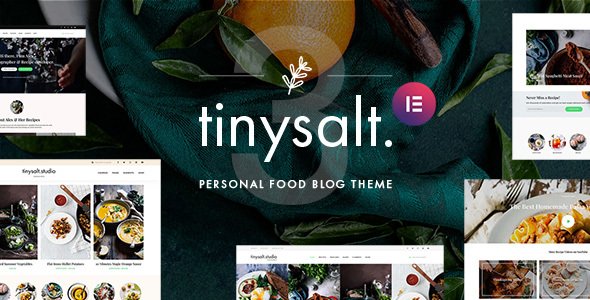
Stuck on your TinySalt WordPress theme? Let's fix it.
No endless back-and-forth. Just send us the details and we'll get it done.
No obligation · Replies within 1 hour · Quote within 1 day
Setup · Customization · Bug fixes · WooCommerce integration
About TinySalt WP Theme
TinySalt is a WordPress theme by LoftOcean built for food bloggers, recipe creators, and culinary brands. It ships with a clean, editorial layout that puts recipes and food photography front and center. The design is minimal but purposeful, with strong typography, grid-based content areas, and dedicated recipe card styling. TinySalt supports Elementor and works with popular recipe plugins like WP Recipe Maker. It is translation-ready, mobile-responsive, and built on a lightweight codebase. LoftOcean has a consistent track record of well-coded themes with active support. TinySalt fits anyone who wants a polished food site without starting from scratch. That said, getting the most out of it often requires some configuration, especially when combining it with third-party plugins or custom post types.
Get matched with a TinySalt developer in under one day
Tell us about your TinySalt project. Small fixes, TinySalt theme customization, or a full website build, whatever you need, we've got it covered.
We'll connect you to the right TinySalt developers, define the scope, and get everything 100% clear.
You'll get one estimate, hire your preferred developer, and start collaborating.
LoftOcean themes are well-built, but every food site has unique requirements. A vetted TinySalt developer on Codeable can handle everything from initial setup and plugin integration to custom template work and performance tuning. Codeable screens every developer before they join, so you are not rolling the dice on quality. Projects get matched with the right specialist fast, and you get a free estimate before committing to anything. If your TinySalt site needs serious work, that is the right place to start.
Pros
- Clean editorial design tailored specifically for food and recipe content
- Compatible with Elementor and major recipe plugins like WP Recipe Maker
- Lightweight codebase from LoftOcean keeps base page load times reasonable
- Translation-ready with RTL support for international food blogs
- Dedicated recipe card styling that integrates naturally with the overall layout
Cons
- Limited built-in customizer options compared to multipurpose themes
- Advanced layout changes require custom CSS or developer help
- No bundled page builder templates beyond basic Elementor support
- Plugin conflicts can appear when combining with ad networks or membership tools
- Documentation is sparse for edge cases and complex integrations
Who is TinySalt for?
Food Bloggers
TinySalt is built around the needs of food bloggers. Recipe card integration, strong image grids, and category archive pages make it easy to organize a large content library. A TinySalt specialist can configure the site to support ad revenue, email list growth, and social sharing without cluttering the reading experience.
Recipe Creators and YouTubers
For creators who publish on YouTube or social media alongside a blog, TinySalt handles embedded video well and keeps recipe content clean for SEO. A TinySalt developer can set up video schema markup and connect the site to newsletter tools so each new recipe post builds an audience across channels.
Culinary Schools and Cooking Classes
Culinary schools need clear class listings, instructor profiles, and booking integration. TinySalt’s structured layout adapts to this use case with some developer configuration. A TinySalt expert can add custom post types for classes, integrate a booking plugin, and create a course archive that matches the site’s visual style.
Restaurant and Cafe Brands
Restaurants and cafes can use TinySalt to showcase menus, team members, and brand story content. The theme’s editorial feel suits food brands better than generic business themes. A TinySalt developer can add reservation functionality, OpenTable embeds, or a custom menu page that stays on-brand.
Food Product and CPG Brands
Food product companies use TinySalt to publish recipes featuring their products, building content marketing alongside e-commerce. A TinySalt specialist can connect WooCommerce, set up product-linked recipe pages, and configure structured data so product recipes appear in Google’s rich results.

Customizing TinySalt
Out of the box, TinySalt offers a solid set of customizer options covering colors, fonts, header layouts, and widget areas. But most serious food sites need more than defaults. A TinySalt expert can configure recipe archive pages, set up custom category landing pages, and fine-tune the homepage layout to match a specific editorial vision. Typography choices in TinySalt are intentionally restrained, so custom font stacks often need manual CSS. Navigation menus, sticky headers, and mobile breakpoints can all be adjusted but benefit from developer input. If you are combining TinySalt with a membership plugin, ad network, or sponsored content system, a TinySalt specialist can build those integrations without breaking the theme’s native styling. Hiring a developer saves hours of trial and error.
Recommended plugins for TinySalt
TinySalt pairs well with plugins that extend content and discovery. WP Recipe Maker or Tasty Recipes add structured recipe data, which helps with rich results in search. For ad management, AdInserter or Mediavine’s scripts need careful placement to avoid layout shifts. A WordPress performance audit is worth running after installing multiple plugins, since food sites with heavy images can slow down quickly. For bloggers chasing organic traffic, a dedicated WordPress SEO setup covering schema, meta, and internal linking structures can significantly improve recipe visibility. TinySalt does not bundle a page builder beyond basic Elementor compatibility, so block editor extensions like Kadence Blocks can fill layout gaps.
Not sure which plugins to use? This WordPress plugins directory covers the most popular options with reviews and setup guides.
TinySalt common issues
TinySalt recipe cards not displaying correctly after plugin update
This usually happens when a recipe plugin updates its output markup and TinySalt’s stylesheet no longer targets the right selectors. Check for CSS conflicts in browser dev tools by inspecting the affected card elements. If the recipe plugin added new wrapper classes, you may need to update the theme’s custom CSS. For persistent conflicts, our WordPress bug fixing service can isolate the exact cause and apply a targeted fix without touching the plugin’s core files.
TinySalt homepage layout broken on mobile
Mobile layout breaks in TinySalt often trace back to a custom CSS rule overriding a responsive breakpoint, or a widget added to a sidebar that does not collapse correctly. Open Chrome DevTools on a mobile viewport and check which element is causing overflow. Removing or adjusting max-width values on custom containers usually resolves it. If the issue appeared after a theme or plugin update, our WordPress bug fixing service can identify what changed and restore the correct responsive behavior.
TinySalt slow loading with large image galleries
Food sites with large image libraries get slow fast. Start by converting images to WebP format and enabling lazy loading if it is not already active. Install a caching plugin like WP Rocket or LiteSpeed Cache and configure it for your host. Check whether any recipe plugin is loading scripts on pages where they are not needed. A full performance audit will identify the exact bottlenecks in your TinySalt setup and prioritize what to fix first.
TinySalt custom fonts not applying in Elementor
When custom fonts set in the WordPress Customizer or a fonts plugin do not apply inside Elementor, it is typically a CSS specificity conflict. Elementor loads its own font stack via inline styles, which can override theme-level font declarations. The fix is to either set the font directly inside Elementor’s global settings or use a higher-specificity CSS rule targeting Elementor’s wrapper. A TinySalt developer can add the correct override without affecting other elements on the page.
TinySalt FAQ
TinySalt is designed with food content in mind, but recipe SEO depends more on your recipe plugin than the theme. Plugins like WP Recipe Maker add the structured data (schema) that Google uses for rich results. TinySalt does not block that schema from loading, but a proper SEO setup from a TinySalt specialist will make sure everything is configured and validated correctly.
TinySalt is not a WooCommerce theme by design, but WooCommerce will run on it. The default shop templates will use WooCommerce’s own styling, which may not match TinySalt’s aesthetic without additional CSS. A TinySalt developer can style the shop, product, and cart pages to match the rest of the site if you need a consistent brand experience.
Yes. TinySalt works with the WordPress block editor (Gutenberg) without requiring Elementor. Most standard layouts can be built using core blocks. Elementor adds more layout flexibility, but it is optional. If you prefer to stay with the block editor, a TinySalt developer can extend it using block plugins like Kadence Blocks or GenerateBlocks.
Custom recipe card styling in TinySalt requires CSS targeting the output of your recipe plugin. Each plugin uses different class names, so the approach varies. You can add custom CSS via the WordPress Customizer or a child theme stylesheet. A TinySalt expert can write targeted styles that match your brand without conflicting with plugin updates.
LoftOcean maintains an active theme portfolio and releases updates for compatibility with new WordPress versions and plugin changes. TinySalt receives periodic updates, though the frequency is not as high as some larger theme shops. Checking the theme’s changelog on ThemeForest before purchasing gives a clear picture of recent update activity.
Hire a TinySalt Expert Developer
Whether you need a TinySalt developer for a full site build, a specific customization, or fixing something that has gone wrong, you can get matched with a vetted specialist through Codeable. Describe your project and receive a free estimate with no obligation to hire. Get a Free Estimate and get your TinySalt site moving in the right direction.
You'll need a free Codeable account so developers can ask questions and send their quotes.