TopFit WordPress Theme
by Mikado-Themes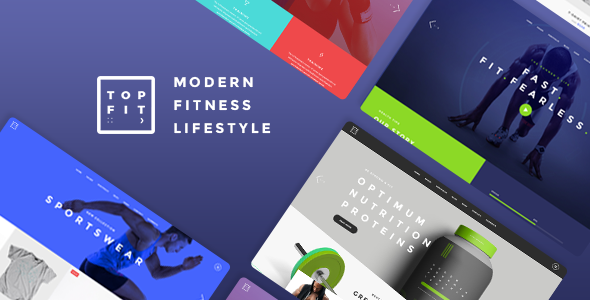
Stuck on your TopFit WordPress theme? Let's fix it.
No endless back-and-forth. Just send us the details and we'll get it done.
No obligation · Replies within 1 hour · Quote within 1 day
Setup · Customization · Bug fixes · WooCommerce integration
About TopFit WP Theme
TopFit is a WordPress theme built by Mikado-Themes, designed specifically for gyms, fitness studios, personal trainers, and sports clubs. It ships with a drag-and-drop page builder, pre-built demo pages, and a set of fitness-focused shortcodes that make building a professional gym site straightforward.
The theme includes class schedule tables, trainer profile layouts, pricing tables, and BMI calculator widgets out of the box. It integrates with WooCommerce for selling memberships or merchandise, and supports popular booking plugins for class reservations.
Mikado-Themes maintains TopFit with regular updates and provides documentation to help with setup. That said, getting the most out of the theme, especially customizing layouts beyond the demos, often requires hands-on WordPress knowledge or help from someone who knows the theme well.
Get matched with a TopFit developer in under one day
Tell us about your TopFit project. Small fixes, TopFit theme customization, or a full website build, whatever you need, we've got it covered.
We'll connect you to the right TopFit developers, define the scope, and get everything 100% clear.
You'll get one estimate, hire your preferred developer, and start collaborating.
TopFit has enough configuration options that small mistakes in the Mikado panel can break layouts or slow down your site. A developer who knows the theme avoids those pitfalls from the start. Through Codeable, you get access to vetted WordPress specialists who have worked with Mikado themes before. You post your project, receive a clear estimate within 24 hours, and only move forward if it makes sense for your budget. No guesswork, no wasted time on the wrong hire.
Pros
- Purpose-built for fitness businesses with class schedules, trainer profiles, and BMI widgets included
- Ships with multiple gym and sports demo pages that can be imported in one click
- WooCommerce integration is built in, making membership and product sales straightforward to set up
- Mikado's options panel covers typography, color, and layout controls without requiring custom CSS for most changes
- Regular updates from Mikado-Themes and detailed documentation reduce long-term maintenance risk
Cons
- The Mikado options panel has a steep learning curve and hundreds of settings that are easy to misconfigure
- Heavy reliance on Mikado's proprietary shortcodes makes switching themes later a significant content migration effort
- Page load times can suffer if demos are imported with all bundled scripts and sliders left active
- The built-in class schedule is display-only and requires a third-party booking plugin for actual reservations
- Support is limited to documentation and a ticketing system, with no live chat for urgent issues
Who is TopFit for?
Gym and Fitness Center
TopFit’s class schedule tables, membership pricing layouts, and WooCommerce integration make it a practical choice for full-service gyms. You can display weekly schedules, list trainers with profile pages, and sell memberships or day passes directly through the site without bolting on unrelated plugins.
Personal Trainer Website
Personal trainers need a clean site that communicates credibility fast. TopFit’s trainer profile layouts, testimonial sections, and before-and-after image displays are designed exactly for this. Pair it with a simple booking plugin and a contact form, and the core of a personal training business website is covered.
Yoga or Pilates Studio
Yoga and Pilates studios benefit from TopFit’s soft layout options and class listing features. The schedule tables work well for weekly or monthly class timetables. WooCommerce handles class pack or drop-in sales, and the pricing table shortcodes make membership tiers easy to present clearly to prospective students.
Martial Arts School
Martial arts schools need to show programs, belt levels, and instructor credentials clearly. TopFit’s team and program layout options support this structure. The events and schedule features can display sparring nights, belt tests, and beginner intakes, while WooCommerce handles uniform or gear sales.
Sports Club or Athletic Team
Sports clubs and athletic teams can use TopFit to present team rosters, training schedules, and sponsorship pages. The theme’s visual style suits competitive and recreational sports equally. News post layouts work well for match results and club announcements, keeping members and supporters informed without a separate platform.

Customizing TopFit
TopFit gives you a detailed options panel where you can control typography, colors, header styles, and layout widths without touching code. Most fitness businesses, however, need something more specific: custom class schedule logic, a branded homepage that does not look like the demo, or a membership flow tied to WooCommerce.
That is where a TopFit expert makes a real difference. An experienced developer knows which options to use in the Mikado panel versus when to write a child theme override, and they can build custom shortcode combinations that match your actual content structure.
Whether you need a single-page redesign or a full site build from scratch using TopFit, working with a developer familiar with the Mikado framework saves significant time and avoids the trial-and-error that comes with figuring it out alone.
Recommended plugins for TopFit
TopFit works well with several plugin categories that fitness sites commonly need. Booking plugins like Amelia or BookingPress handle class reservations cleanly. WooCommerce powers membership sales and product shops. For contact and lead capture, WPForms fits naturally into the theme’s form styling.
If your site is slow after adding these plugins, a WordPress performance audit can identify bottlenecks in scripts or image loading specific to how TopFit loads assets. If you want to rank locally for fitness searches, pairing TopFit with a proper WordPress SEO setup gives you a structured starting point.
Not sure which plugins to use? This WordPress plugins directory covers the most popular options with reviews and setup guides.
TopFit common issues
TopFit theme demo import not working
Demo import failures in TopFit usually come down to server memory limits or PHP execution timeouts. The Mikado importer pulls in images, widgets, and settings all at once, which is resource-heavy. Increase max_execution_time and memory_limit in your php.ini or wp-config.php, then retry. If the import still stalls, import the XML content file first, then apply theme settings separately from the Mikado panel.
TopFit class schedule not displaying correctly
The TopFit schedule shortcode relies on specific post types being set up correctly in the backend. If columns are missing or cells appear blank, check that all class post types have complete data, including time, instructor, and category fields. Also confirm the shortcode parameters match the category slugs you have defined. A mismatched slug is the most common cause of empty schedule cells.
TopFit page builder layout broken after update
After a Mikado or WPBakery update, row and column styles sometimes break because CSS classes are renamed or removed. Clear all caches first, including server, plugin, and browser. Then check if your custom CSS references any old Mikado class names. If the layout is genuinely broken rather than just unstyled, compare the shortcode output against the current Mikado documentation. A WordPress bug fix may be the fastest path forward.
TopFit theme slow loading speed
TopFit ships with Revolution Slider, multiple Google Fonts calls, and WPBakery assets, all of which add significant page weight. Start by disabling any sliders you are not using and limiting font variants to what the design actually needs. Use a caching plugin and serve images through a CDN. If speed is still poor after these steps, a deeper performance audit will identify which specific scripts are blocking render.
TopFit FAQ
TopFit is built around WPBakery Page Builder, not Elementor. You can technically install Elementor alongside it, but you are likely to run into style conflicts with Mikado’s CSS. Most TopFit sites are built and maintained entirely within WPBakery and the Mikado options panel. Switching to Elementor would mean rebuilding your layouts from scratch.
Yes. TopFit has native WooCommerce support and the theme styles are applied to shop, cart, and checkout pages. You can sell memberships using a plugin like WooCommerce Memberships or Paid Memberships Pro alongside TopFit without major conflicts. Some styling adjustments may be needed to match your membership pages to the rest of the site design.
TopFit works well for personal trainers. It includes trainer profile post types, testimonial layouts, before-and-after image sections, and service or pricing tables. Pair it with a contact form and a simple booking plugin, and you have everything a solo trainer needs. The demos also include a personal trainer layout you can import as a starting point.
Always use a child theme for any CSS or template changes. That way, Mikado’s theme updates apply to the parent theme without overwriting your work. Settings saved in the Mikado options panel are stored in the database, so they persist through updates. Before any major update, back up your site fully and test the update on a staging environment first.
Migrating an existing fitness site to TopFit involves moving your content into the Mikado shortcode structure and rebuilding page layouts. If your current site uses standard WordPress posts and pages, the content migration is manageable. Rebuilding the visual layouts inside WPBakery takes more time. A WordPress migration specialist can handle both the content and layout rebuild efficiently.
Hire a TopFit WordPress Developer
Need help setting up TopFit, customizing a layout, or fixing something that is not working correctly? Our developers know the Mikado framework and can handle everything from demo imports and homepage builds to WooCommerce integration and performance fixes.
Get a free estimate with no obligation. You describe the project, receive a scoped quote within 24 hours, and decide whether to proceed. 100% risk-free.
You'll need a free Codeable account so developers can ask questions and send their quotes.