Tour Package WordPress Theme
by GoodLayers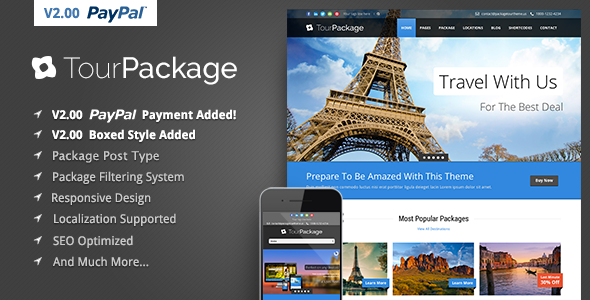
Stuck on your Tour Package WordPress theme? Let's fix it.
No endless back-and-forth. Just send us the details and we'll get it done.
No obligation · Replies within 1 hour · Quote within 1 day
Setup · Customization · Bug fixes · WooCommerce integration
About Tour Package WP Theme
Tour Package is a WordPress theme by GoodLayers built specifically for travel agencies, tour operators, and booking-focused businesses. It ships with GoodLayers’ in-house page builder, a dedicated tour listing system, itinerary builders, and a booking form with payment integration. The theme handles both the front-end presentation and back-end booking logic in one package, which keeps the stack simple for small to mid-size operators.
It supports multiple tour types, departure date management, pricing tiers, and availability calendars. The GoodLayers ecosystem also includes add-ons for reviews, wish lists, and comparison tools. Out of the box, Tour Package covers most of what a travel site needs without requiring a separate booking plugin. The design is clean and destination-focused, with full-width imagery and flexible grid layouts suited to showcasing tours visually.
Get matched with a Tour Package developer in under one day
Tell us about your Tour Package project. Small fixes, Tour Package theme customization, or a full website build, whatever you need, we've got it covered.
We'll connect you to the right Tour Package developers, define the scope, and get everything 100% clear.
You'll get one estimate, hire your preferred developer, and start collaborating.
GoodLayers builds its own framework outside of standard WordPress conventions, which means generic WordPress advice does not always apply to Tour Package. A developer who knows the theme can work with its custom post types, booking tables, and page builder shortcodes without guessing. Through Codeable, you get matched with vetted WordPress specialists who have real experience with travel themes and GoodLayers builds. No bidding wars, no junior freelancers. Just a developer who knows what they are looking at from day one.
Pros
- Built-in tour booking system handles departures, pricing tiers, and availability without a third-party plugin
- GoodLayers page builder gives layout control over tour listings, single pages, and checkout independently
- Itinerary builder supports day-by-day breakdowns with maps, images, and included or excluded items
- Supports multiple payment gateways including PayPal and Stripe out of the box
- Active GoodLayers support and a theme ecosystem with add-ons for wishlists, reviews, and tour comparison
Cons
- GoodLayers' proprietary framework makes it harder to find developers familiar with the codebase compared to Elementor or Divi builds
- Switching away from Tour Package later is difficult because tour data is stored in custom tables tied to the theme
- The built-in page builder is less flexible than dedicated builders for complex landing pages outside the tour context
- Default performance is heavy with multiple scripts loading on every page, requiring optimization work for fast load times
- Documentation is adequate but thin on edge cases, so custom booking logic or non-standard workflows often require developer help
Who is Tour Package for?
Adventure Travel Agencies
Adventure travel agencies need departure scheduling, group size limits, and difficulty ratings displayed clearly alongside booking. Tour Package handles all three natively. Agencies selling multi-activity packages can build itineraries day by day, attach gear lists, and set per-person pricing with deposit options, covering most of what an adventure operator needs without custom development.
Multi-Day Hiking and Trekking Operators
Trekking operators benefit from Tour Package’s map integration and day-by-day itinerary builder. Each stage of a trek can carry its own elevation data, accommodation notes, and images. Availability calendars manage limited group departures, and the booking form collects fitness or experience level fields with minimal setup. A Tour Package specialist can extend the intake form further for permit-required routes.
City Tour and Day Trip Providers
City tour operators running multiple short tours daily need a fast, clear listing page and a booking system that handles same-day availability. Tour Package’s grid and list archive layouts work well for high-volume catalogs. Pricing tiers cover adult, child, and group rates. A Tour Package developer can configure recurring daily departures so availability updates automatically without manual input.
Destination Wedding and Honeymoon Packages
Wedding and honeymoon package providers need polished presentation alongside booking functionality. Tour Package’s full-width hero sections and flexible single tour templates support that visual tone. Package inclusions, accommodation details, and custom add-ons like room upgrades or transfers can be structured within the itinerary and pricing fields. Payment deposit handling is available without additional plugins.
Eco-Tourism and Wildlife Safari Companies
Eco-tourism and safari operators often deal with strict group limits, seasonal availability, and premium pricing. Tour Package’s availability calendar and pricing tier system handle these constraints directly. Conservation messaging and wildlife information sections fit naturally into the itinerary builder. A Tour Package expert can add custom fields for permit requirements or park fee disclosures within the booking flow.

Customizing Tour Package
Tour Package gives you a visual customizer built on GoodLayers’ own framework, covering typography, color schemes, header layouts, and footer configurations. Tour listing pages, single tour templates, and the checkout flow each have their own layout controls, so you can adjust them independently without touching code.
Deeper customization, like custom booking fields, modified pricing logic, or non-standard itinerary layouts, typically needs PHP and a solid understanding of the GoodLayers template hierarchy. That’s where a Tour Package expert saves time. A specialist who knows the theme’s hook system and page builder structure can extend it without breaking update compatibility. Whether you need a custom search filter, a tailored tour archive page, or a specific payment gateway integration, working with a Tour Package developer keeps the work clean and maintainable.
Recommended plugins for Tour Package
Tour Package pairs well with caching plugins like WP Rocket or LiteSpeed Cache, especially once your tour library grows and listing pages start loading slowly. If your site relies on search traffic to fill bookings, pairing the theme with Rank Math or Yoast gives you structured data for tours, which helps search engines display rich results. You can find specific guidance on that in the WordPress SEO optimisation section.
For sites with heavy image galleries and multiple departure calendars, optimizing asset delivery matters. The WordPress performance service covers image compression, database cleanup, and script deferral specifically for themes like Tour Package that carry a lot of front-end weight.
Not sure which plugins to use? This WordPress plugins directory covers the most popular options with reviews and setup guides.
Tour Package common issues
Tour Package booking form not sending confirmation emails
Confirmation email failures in Tour Package usually trace back to the server’s PHP mail function being blocked or misconfigured. Install WP Mail SMTP and connect it to a transactional email provider like SendGrid or Mailgun. Also check that the booking notification email address in the Tour Package settings panel is correctly set. If emails send from SMTP but still do not arrive, check spam headers and verify your domain has SPF and DKIM records configured.
Tour Package availability calendar not updating after booking
If the availability calendar does not reflect confirmed bookings, the most common cause is a caching layer serving stale data. Clear all cache layers including page cache, object cache, and any CDN cache after a booking is confirmed. If you use WP Rocket or LiteSpeed Cache, exclude the booking and tour availability endpoints from caching rules. Persistent issues may point to a database write failure during checkout, which needs direct inspection of the Tour Package booking tables.
Tour Package page builder layouts broken after theme update
Layout breakage after a Tour Package update usually means a CSS or JavaScript conflict introduced by the update. First, clear all caches. Then deactivate all plugins and check if the layout restores. If it does, reactivate plugins one at a time to find the conflict. If you are using a child theme, verify the child theme’s style.css is enqueuing the parent theme correctly. For persistent or complex layout breaks, a WordPress bug fixing service can diagnose the conflict efficiently.
Tour Package PayPal payment not processing correctly
PayPal payment failures in Tour Package often come from API credential mismatches between sandbox and live modes, or from an IPN listener URL that is blocked or incorrectly set. Double-check that live API keys are entered in the Tour Package payment settings, not sandbox keys. Verify your site URL in PayPal’s IPN settings matches exactly, including https. Also confirm that your hosting environment allows outbound connections to PayPal’s API endpoints on port 443.
Tour Package tour listing page showing wrong price
Incorrect prices on Tour Package listing pages are usually a display cache issue or a conflict between the base price and a pricing tier override. Go to the individual tour’s pricing settings and confirm the base price and any seasonal or group tier prices are saved correctly. Clear all caches afterward. If the wrong price appears only in certain contexts, like currency switcher plugins or after a discount rule is applied, disable those plugins temporarily to isolate the conflict.
Tour Package search filter returning no results
Tour Package’s search filter returning no results typically means the filter parameters are not matching the tour post meta keys correctly. Check that the destination, category, or date fields in the search widget are mapped to the same taxonomy or meta keys that your tours actually use. If you recently imported tours or changed taxonomy slugs, those mappings may have broken. A WordPress bug fixing specialist familiar with GoodLayers’ search structure can remap these quickly.
Tour Package itinerary not displaying on single tour page
If the itinerary section is not showing on a single tour page, the most likely cause is that the itinerary data was not saved correctly, or the page template being used does not include the itinerary module. Open the tour in the back end and confirm itinerary days are populated and saved. Then check that the single tour template assigned to that post includes the itinerary section in the page builder layout. If the section is there but blank, check for a JavaScript console error blocking the render.
Tour Package images not loading on mobile
Images failing to load on mobile in Tour Package usually point to either an image size not being generated correctly or a lazy load script conflicting with the mobile viewport. Check that WordPress has generated all required image sizes by running a regenerate thumbnails plugin. If images appear in desktop but not mobile, inspect the responsive image srcset in the browser’s mobile emulator. Also check if any CDN or lazy load plugin is stripping the src attribute on smaller viewports.
Tour Package child theme changes not applying
Child theme changes not applying in Tour Package often means the child theme is not properly enqueuing the parent theme stylesheet, or the child theme is not actually active. Confirm in Appearance > Themes that the child theme is the active one. Open the child theme’s functions.php and verify the wp_enqueue_scripts hook is loading the parent stylesheet using get_template_directory_uri() not get_stylesheet_directory_uri(). CSS specificity conflicts can also override child theme styles, so use browser dev tools to check which stylesheet is winning.
Tour Package booking count not decreasing after confirmed reservation
Booking seat counts not decrementing after a confirmed reservation usually means the booking completion hook is not firing correctly, often because the payment gateway is not returning a confirmed status to Tour Package. Check the payment gateway logs for the transaction status. If payment is marked complete in PayPal or Stripe but Tour Package still shows full availability, there may be a webhook or IPN delivery failure. Confirm the gateway callback URL is accessible and not blocked by a firewall or security plugin. See also the WordPress bug fixing service for persistent booking logic issues.
Tour Package FAQ
Yes, for small to mid-size operators it is a practical choice. It handles tour listings, departure scheduling, availability management, and payment processing without requiring additional booking plugins. Large agencies with complex inventory or enterprise-level booking needs may hit its limits, but for most independent operators and boutique agencies, Tour Package covers the core workflow well.
Yes. Tour Package includes built-in support for PayPal and Stripe. You can also configure it to accept bank transfer or manual payment. Deposits and full payment options are both configurable at the tour level. For additional gateways not included by default, a Tour Package developer can integrate them through the theme’s payment extension hooks.
Tour Package is built on GoodLayers’ own page builder framework, not Elementor. You can install Elementor alongside it, but the two builders do not share layouts and using both creates performance overhead. For standard tour listing and booking pages, the GoodLayers builder handles everything. Using Elementor makes more sense for standalone landing pages outside the tour system.
Tour Package’s booking form has default fields but adding custom ones requires code. You need to hook into the form using GoodLayers’ filter system, register the field, handle the data on save, and display it in the booking admin view. This is not exposed in the visual settings panel. A Tour Package specialist can add custom fields cleanly without modifying core theme files.
Tour Package supports a base currency set in its payment settings. For multi-currency display, you need a plugin like CURCY or WooCommerce Currency Switcher. The currency switcher handles front-end display conversion, but actual payment processing still runs in your base currency unless your gateway supports dynamic currency conversion natively.
Tour Package has documented WPML compatibility. Tour post types, itineraries, and booking labels can be translated through WPML’s string translation and post translation tools. Some deeper booking logic strings may need manual registration in WPML’s configuration. If you are setting up a multilingual travel site with Tour Package, testing the full booking flow in each language before going live is strongly recommended.
Tour Package loads several scripts and styles on every page by default. Start by enabling a caching plugin like WP Rocket and configure it to defer non-critical scripts. Use an image CDN or compression plugin for tour gallery images. Disable GoodLayers features you are not using, like the comparison or wishlist tools, since they load assets even when inactive. See the WordPress performance service for a full audit approach.
Yes, but Tour Package stores booking data in custom database tables alongside standard WordPress tables, so a standard migration must include a full database export, not just the WordPress core tables. Use a plugin like Duplicator or All-in-One WP Migration for a complete site copy. After migration, update the site URL in settings and test the booking flow end to end. See the WordPress migration service for professional help.
Tour Package does not expose its custom booking endpoints through the WordPress REST API by default. The theme was designed for traditional server-rendered WordPress, not headless setups. Using it with a decoupled front end would require custom API development to surface tour data and booking functionality. That is a significant build, and most operators are better served using it in a standard WordPress setup.
GoodLayers uses a proprietary framework, so not every WordPress developer is familiar with it. Codeable is the most reliable way to find a vetted Tour Package developer. You post your project, get matched with a specialist who has relevant theme experience, and receive an estimate before committing. No bidding, no guessing. Get a Free Estimate to start.
Hire a Tour Package Expert Developer
Tour Package has enough moving parts, booking logic, itinerary builders, availability calendars, payment gateways, that small misconfigurations cause real problems for live bookings. If you need a Tour Package developer to fix a bug, add a feature, or rebuild a section properly, start with a free estimate. No commitment required. Get a Free Estimate and describe what you need. A matched developer will review it and come back with a clear scope and price.
You'll need a free Codeable account so developers can ask questions and send their quotes.