TrackStore WordPress Theme
by Elated-Themes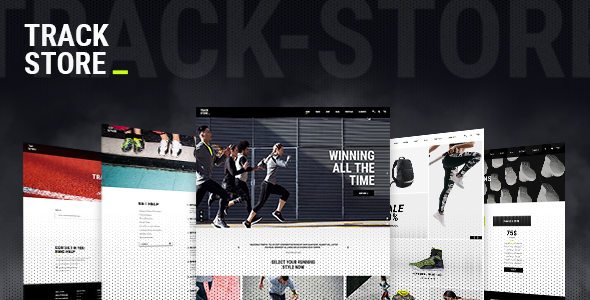
Stuck on your TrackStore WordPress theme? Let's fix it.
No endless back-and-forth. Just send us the details and we'll get it done.
No obligation · Replies within 1 hour · Quote within 1 day
Setup · Customization · Bug fixes · WooCommerce integration
About TrackStore WP Theme
TrackStore is a WordPress theme built by Elated-Themes, designed specifically for music stores, record shops, and audio equipment retailers. It ships with WooCommerce support, making it straightforward to sell physical records, digital downloads, instruments, and accessories from a single storefront.
The theme includes a clean, music-oriented design with homepage sections for featured products, new arrivals, and promotional banners. Typography choices and color schemes lean into the aesthetic you’d expect from a record store or music brand. Built-in widgets, custom post types for artists or releases, and a structured product layout give it enough out-of-the-box functionality to launch a working store without heavy development work. It’s a focused theme — good at what it’s built for.
Get matched with a TrackStore developer in under one day
Tell us about your TrackStore project. Small fixes, TrackStore theme customization, or a full website build, whatever you need, we've got it covered.
We'll connect you to the right TrackStore developers, define the scope, and get everything 100% clear.
You'll get one estimate, hire your preferred developer, and start collaborating.
TrackStore is functional out of the box, but most store owners need changes that go beyond what the Customizer allows. A developer who knows the theme can modify templates cleanly, extend WooCommerce functionality, and avoid the common mistakes that come from editing live sites without a proper setup.
Through Codeable, you get matched with vetted WordPress developers who have worked on similar projects. No wasted time on freelancer roulette. Post your project, get an estimate, and decide if you want to move forward — no obligation involved.
Pros
- Purpose-built for music and record stores with relevant design elements out of the box
- Full WooCommerce compatibility covering physical products, digital downloads, and variable products
- Clean, structured product layouts that work well for displaying albums, instruments, and accessories
- Developed by Elated-Themes, a long-standing theme company with a track record of updates and support
- Includes demo content that makes initial setup and layout planning significantly faster
Cons
- Customizer options are limited — deeper visual changes require child theme or template edits
- The design aesthetic is fixed and may feel dated compared to fully custom builds
- No built-in audio preview functionality — requires a third-party plugin for track playback on product pages
- Documentation is present but light on advanced use cases and WooCommerce customization
- Heavy demo content and bundled plugins can slow page load times if not properly configured
Who is TrackStore for?
Independent Record Store
TrackStore suits independent record shops selling vinyl, CDs, and cassettes. Product category pages can be organized by genre, format, or era. The WooCommerce integration handles stock, pricing, and shipping without needing extra configuration. A developer can extend it to include custom fields for pressing details, condition grading, or track listings.
Music Instrument Retailer
Guitar shops, drum retailers, and instrument dealers benefit from TrackStore’s product-first layout. Variable products handle different sizes, colors, and configurations well. With some customization, you can add comparison tables, specification tabs, or brand-filtered category pages that match the browsing habits of musicians shopping online.
Digital Music Downloads Shop
Selling MP3s, WAV files, or sample packs works cleanly with WooCommerce’s digital download features. TrackStore’s design provides a music-native context that generic WooCommerce themes don’t. Pair it with an audio preview plugin and customers can listen before buying, which directly improves conversion for digital music products.
Band or Artist Merchandise Store
Bands and solo artists selling merch — shirts, posters, signed items, and physical albums — get a credible storefront with TrackStore. The theme’s visual identity fits music branding better than a generic shop theme. A developer can add artist bio sections, tour date integrations, or a custom homepage that blends content with the store.
Audio Equipment and DJ Gear Shop
DJ equipment, PA systems, mixers, and headphones all fit within TrackStore’s product structure. Category depth, filter plugins, and specification-heavy product pages are all achievable with some development work. The theme gives you a starting point that looks appropriate for the niche without requiring a full custom design from scratch.

Customizing TrackStore
TrackStore works with the WordPress Customizer for basic changes — colors, fonts, header layout, and logo. But if you want to go beyond the defaults, you’ll hit limits quickly. Custom homepage sections, unique product page layouts, or brand-specific typography adjustments typically require direct theme file edits or child theme work.
A TrackStore expert can handle those changes properly, without breaking updates or creating technical debt. Common customization requests include rearranging homepage blocks, adding custom product fields for tracklists or audio previews, modifying the cart and checkout flow, and integrating third-party plugins cleanly. If you have a specific look in mind that doesn’t match the demo, it’s worth getting a developer involved early rather than patching things together yourself.
Recommended plugins for TrackStore
TrackStore pairs well with several plugin categories. WooCommerce extensions for digital downloads, subscription boxes, or bundle pricing fit naturally with a music retail setup. Adding an audio player plugin lets customers preview tracks directly on product pages.
For store growth, connecting to email marketing tools, wishlist plugins, or loyalty point systems are common additions. Site speed matters especially with media-heavy stores — image optimization, caching, and a CDN are worth setting up early. You can also look at WordPress performance improvements and SEO optimization to help your store rank and load faster.
Not sure which plugins to use? This WordPress plugins directory covers the most popular options with reviews and setup guides.
TrackStore common issues
TrackStore homepage slider not showing after update
Slider issues after an update are usually caused by a conflict between the theme version and the bundled slider plugin, often Revolution Slider or a similar library. First, check whether the slider plugin itself needs updating in the Plugins dashboard. If the issue persists, clear your caching plugin and browser cache. If the slider shortcode is on the page but renders blank, re-save the slider settings. Persistent issues may require professional debugging to identify the root cause.
TrackStore WooCommerce product images not displaying correctly
Incorrect product image sizing in TrackStore typically comes from mismatched WooCommerce image dimensions and the theme’s expected sizes. Go to WooCommerce > Settings > Products > Display and check your image dimensions. After changing them, you’ll need to regenerate thumbnails using a plugin like Regenerate Thumbnails. If images appear stretched or cropped wrongly on a specific page template, the issue may be in the theme’s CSS, which a developer can fix quickly.
TrackStore child theme changes not applying properly
If child theme changes aren’t applying, the most common cause is that the child theme isn’t actually active — check Appearance > Themes to confirm. The second common cause is enqueuing styles incorrectly in the child theme’s functions.php. Make sure you’re using wp_enqueue_style with the parent theme as a dependency, not just a direct @import in style.css. Template file overrides also require matching the exact file path from the parent theme.
TrackStore site slow loading with demo content installed
TrackStore demo content loads multiple large images, embedded fonts, and slider assets that hurt performance by default. Start by compressing all images with a tool like ShortPixel. Disable any bundled plugins you’re not using. Set up a caching plugin such as WP Rocket or W3 Total Cache. If you imported demo content purely for reference, consider removing unused pages and media. For a full performance audit and fix, see our WordPress performance service.
TrackStore FAQ
Yes. TrackStore is designed with music retail in mind, and vinyl fits naturally within its product structure. You can organize categories by genre, format, or label, and WooCommerce handles stock, variable editions, and pricing. Custom fields for tracklists or pressing details require a plugin like ACF or developer customization, but the foundation is well-suited for a vinyl shop.
Elated-Themes generally keeps their themes updated alongside major WooCommerce releases, but compatibility isn’t always immediate after a WooCommerce major version update. Always check the theme’s changelog and test updates on a staging site before applying them to a live store. If you’re running an older version of TrackStore, updating the theme first is recommended before updating WooCommerce.
Technically yes, but it’s not ideal. TrackStore’s design language — typography, iconography, and layout choices — is built around music retail. Using it for an unrelated store would require significant restyling to avoid looking out of place. If your store isn’t in the music or audio space, a more general WooCommerce theme would be a better starting point.
TrackStore doesn’t include a built-in audio player for product pages. The most common approach is installing a plugin like WooCommerce Product Audio or a dedicated WordPress audio player that hooks into product page templates. A developer can place the player in the right location within the product layout and style it to match the theme without breaking the existing design.
TrackStore is not built as an Elementor-native theme. You can install Elementor alongside it, but conflicts can occur on template-controlled pages like the homepage or product archive. Using Elementor to build new pages generally works fine. For existing theme-controlled layouts, a developer would need to assess compatibility before you commit to building with a page builder on top of this theme.
Hire a TrackStore Developer
Need changes to your TrackStore site that go beyond basic settings? Whether it’s a custom homepage layout, WooCommerce modifications, audio player integration, or a full store build from scratch, a specialist can get it done properly. Get a free estimate through Codeable — describe your project, receive a quote within 24 hours, and only proceed if it makes sense for you. No pressure, no obligation.
You'll need a free Codeable account so developers can ask questions and send their quotes.