Transfers WordPress Theme
by themeenergy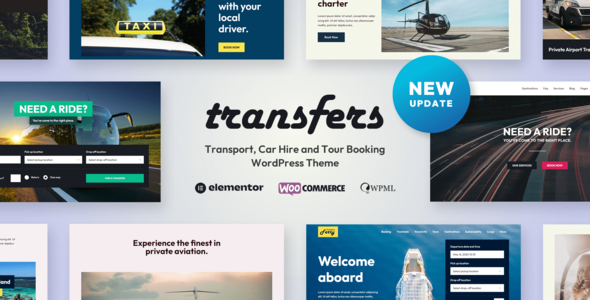
Stuck on your Transfers WordPress theme? Let's fix it.
No endless back-and-forth. Just send us the details and we'll get it done.
No obligation · Replies within 1 hour · Quote within 1 day
Setup · Customization · Bug fixes · WooCommerce integration
About Transfers WP Theme
Transfers is a WordPress theme by ThemeEnergy built specifically for transfer and taxi booking businesses. It ships with a front-end booking form, vehicle selection, route pricing, and a clean layout designed to convert visitors into paying customers.
The theme integrates with the Transfers Booking plugin, also by ThemeEnergy, which handles reservations, driver assignments, pricing rules, and email notifications. Setup is straightforward if you follow the documentation, but real-world configuration for multi-vehicle fleets, custom routes, or airport transfer pricing can get involved fast.
Built on a solid Bootstrap base, Transfers is mobile-responsive and includes WooCommerce compatibility for payment processing. It suits small operators and growing fleets alike, though scaling beyond the defaults often requires custom development work.
Get matched with a Transfers developer in under one day
Tell us about your Transfers project. Small fixes, Transfers theme customization, or a full website build, whatever you need, we've got it covered.
We'll connect you to the right Transfers developers, define the scope, and get everything 100% clear.
You'll get one estimate, hire your preferred developer, and start collaborating.
ThemeEnergy’s documentation covers the basics, but most businesses hit a wall when their requirements go beyond the standard setup. A vetted Transfers developer on Codeable has worked with the theme’s booking system, plugin hooks, and pricing logic before. You get a specific fix or build, not trial and error. Every developer on Codeable is pre-screened, so you are not gambling on an unknown freelancer to handle your live booking system.
Pros
- Purpose-built booking system designed specifically for transfer and taxi businesses
- Includes front-end vehicle selection, route pricing, and availability management
- WooCommerce integration handles payments without a custom gateway build
- Responsive layout performs well on mobile where many travel bookings happen
- Active plugin and theme updates from ThemeEnergy with ongoing support
Cons
- Complex multi-route or dynamic distance pricing requires custom development
- Plugin and theme must be used together, limiting flexibility with other booking systems
- Default email notifications are basic and need customization for professional branding
- No built-in driver app or real-time tracking, which larger fleets often need
- Documentation gaps mean some configuration steps require developer knowledge to solve
Who is Transfers for?
Airport Transfer Companies
Airport transfer businesses need route-based pricing from fixed pickup zones to terminals. Transfers handles this well with its point-to-point fare structure. A Transfers specialist can configure zone maps, flight tracking fields, and luggage add-ons to give passengers a complete booking experience without calling to confirm details.
Private Taxi Operators
Independent taxi operators benefit from Transfers’ simple booking form and WooCommerce payment flow. You can list vehicle types, set hourly or flat rates, and take online deposits. A Transfers developer can add postcode-based availability restrictions so your booking form only accepts rides within your operating area.
Shuttle and Minibus Services
Shuttle companies running fixed routes between cities or venues can use Transfers to publish schedules, seat counts, and per-seat pricing. Configuration for group sizes and multiple departure times requires plugin customization, but a Transfers expert can set this up cleanly without breaking the core booking system.
Corporate Travel Providers
Corporate travel providers need invoice-friendly checkout, account-based booking, and branded confirmation emails. Transfers can support this with WooCommerce extensions and custom development. A Transfers specialist can build a client login area for recurring bookings and reporting, which makes the platform viable for business accounts.
Tour and Excursion Operators
Tour operators offering half-day or full-day excursions can use Transfers to package vehicle hire with route descriptions and per-person pricing. The theme’s visual layout works well for showcasing destinations. Custom add-on fields for group size, departure point, and tour extras can be added by a Transfers developer.

Customizing Transfers
Out of the box, Transfers gives you theme options for colors, fonts, homepage sections, and basic layout tweaks. The booking form is configurable, but anything beyond the standard fields, like custom pickup zones, dynamic pricing tiers, or multi-stop routes, needs code-level changes.
A Transfers expert can rework the booking flow to match your actual service area, add conditional logic for pricing based on vehicle class or distance, and integrate third-party APIs for real-time quotes. Child theme development is the right approach here to keep your customizations intact through updates.
If you need the booking form embedded in specific pages, want to restrict time slots, or need a custom confirmation email sequence, a Transfers specialist can build that without touching core plugin files.
Recommended plugins for Transfers
Transfers works with WooCommerce for payment handling, which opens the door to payment gateway plugins like Stripe or PayPal. You can add WPML for multilingual booking sites serving international travelers.
For site speed, caching and image optimization matter on booking pages where conversion rates are sensitive to load time. A WordPress performance specialist can optimize your Transfers site significantly. If you run organic traffic from airport or city transfer searches, structured WordPress SEO work on your route and vehicle pages can drive consistent bookings without ad spend.
Not sure which plugins to use? This WordPress plugins directory covers the most popular options with reviews and setup guides.
Transfers common issues
Transfers booking form not showing on the homepage
This usually happens when the booking page is not correctly assigned in the Transfers plugin settings, or a page builder conflict is stripping the shortcode output. Check that the dedicated booking page is published and set under the plugin’s general settings. If a page builder like Elementor or WPBakery is active, the shortcode may need to be placed in a plain text widget rather than a visual element. If the issue persists after checking settings, our WordPress bug fixing service can diagnose and resolve it quickly.
WooCommerce checkout not working after Transfers plugin update
Plugin updates to Transfers or WooCommerce can break checkout if hooks or template files conflict. First, check for WooCommerce template overrides in your theme’s woocommerce folder that are outdated. Deactivate other plugins temporarily to isolate the conflict. If a recent Transfers plugin update changed how order data is passed to WooCommerce, a patch to the relevant function is needed. Our WordPress bug fixing service handles these conflicts without disrupting live bookings.
Transfers theme vehicle prices not calculating correctly
Incorrect price calculations in Transfers are usually caused by misconfigured distance pricing rules, missing vehicle type assignments, or a currency/decimal format mismatch in WooCommerce settings. Open the plugin’s pricing matrix and verify that each vehicle class has a base fare and per-kilometer rate assigned. Also confirm that your WooCommerce currency decimal settings match what the plugin expects. If the math is still off after checking these, a Transfers developer can trace the calculation logic and fix the source of the error.
Transfers booking confirmation emails not being sent
Missing confirmation emails from Transfers are typically a mail delivery issue rather than a plugin bug. WordPress relies on PHP mail by default, which many hosts block or throttle. Install an SMTP plugin like WP Mail SMTP and connect it to a transactional email service. Also check the Transfers plugin’s email template settings to confirm the customer and admin notification templates are enabled. If emails are sending but landing in spam, SPF and DKIM DNS records for your domain need to be configured at the hosting level.
Transfers FAQ
ThemeEnergy updates Transfers to maintain compatibility with current WordPress releases. That said, major WordPress or WooCommerce updates can occasionally break booking functionality until a patch is released. Keeping the theme, plugin, and WordPress core in sync is important. If you hit a compatibility issue after an update, a Transfers developer can apply a targeted fix without waiting for the next official release.
The Transfers theme is built around the ThemeEnergy booking plugin. Without it, you lose the booking form, vehicle management, pricing rules, and reservation handling. The theme’s layout and design elements still work independently, but there is no practical booking functionality. You could integrate a third-party booking plugin, but that requires significant custom development to match the theme’s layout and data structure.
Transfers is not built around Elementor or WPBakery. It uses its own layout system and shortcodes. You can use these page builders for standard content pages, but the booking form and core plugin pages are best managed through the theme’s native options. Forcing page builder control over booking pages can break functionality and usually requires a Transfers specialist to resolve correctly.
Distance-based pricing in Transfers is configured through the plugin’s pricing matrix, where you define base fares and per-distance rates per vehicle type. You also need to set up pickup and dropoff locations or zones. The Google Maps API is required for distance calculation. Configuration errors here are common, and a Transfers expert can set up accurate pricing rules for your specific service area without trial and error.
Yes, the Transfers plugin supports multiple vehicle types with individual pricing, images, and passenger capacity. Driver management is also included, allowing you to assign drivers to bookings. For larger fleets needing automated driver assignment, driver login portals, or real-time availability syncing, custom development beyond the default plugin features is required. A Transfers developer can build these extensions on top of the existing system.
Hire a Transfers Developer for Your Booking Site
Whether you need a Transfers expert to configure your fleet pricing, fix a broken booking form, or build custom route logic from scratch, the right developer makes the difference between a site that works and one that costs you reservations. Get a Free Estimate and describe your project. You will hear back within 24 hours with a clear scope and no obligation to proceed.
You'll need a free Codeable account so developers can ask questions and send their quotes.