Transport WordPress Theme
by ThemeMove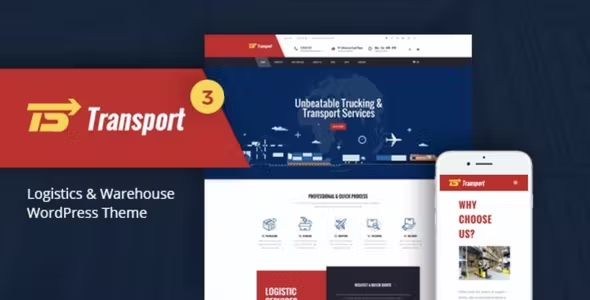
Stuck on your Transport WordPress theme? Let's fix it.
No endless back-and-forth. Just send us the details and we'll get it done.
No obligation · Replies within 1 hour · Quote within 1 day
Setup · Customization · Bug fixes · WooCommerce integration
About Transport WP Theme
Transport is a WordPress theme built by ThemeMove, designed specifically for logistics, trucking, freight, and shipping companies. It ships with a clean layout, multiple homepage variations, and pre-built inner pages that cover the core needs of a transport business website.
The theme is built on WPBakery Page Builder and includes custom widgets for services, team members, pricing tables, and testimonials. It supports WooCommerce, making it usable for companies that sell transport-related products or booking services directly online.
Transport includes a quote request form, route listings, and fleet showcase sections out of the box. These elements save significant build time for logistics sites. The theme is translation-ready and supports RTL layouts, which matters if your audience spans multiple regions or languages.
Get matched with a Transport developer in under one day
Tell us about your Transport project. Small fixes, Transport theme customization, or a full website build, whatever you need, we've got it covered.
We'll connect you to the right Transport developers, define the scope, and get everything 100% clear.
You'll get one estimate, hire your preferred developer, and start collaborating.
ThemeMove builds solid starter themes, but Transport is not a plug-and-play solution for a professional logistics business. The demo looks polished, but real-world sites need proper configuration, custom integrations, and performance work before they’re client-ready.
Working through Codeable, you get access to vetted WordPress developers who have worked with transport and logistics themes specifically. No guesswork on freelancer quality. Post your project, get a free estimate, and only move forward if it makes sense for your budget and timeline.
Pros
- Ships with logistics-specific demo content including fleet pages, service listings, and route sections
- WooCommerce compatibility allows freight deposits or product sales directly from the site
- Multiple homepage layouts included, reducing initial design decision time
- RTL and translation-ready, useful for international transport and logistics companies
- Quote request forms and call-to-action sections are built into the layout without extra plugins
Cons
- WPBakery Page Builder makes the codebase heavier and harder to maintain long-term
- Demo import does not always work cleanly, requiring manual page reconstruction
- Page speed scores tend to be poor without additional optimization work
- Limited block editor support since the theme was built around WPBakery
- Theme update frequency from ThemeMove has slowed, which raises long-term compatibility concerns
Who is Transport for?
Trucking and Freight Companies
Transport’s pre-built fleet showcase and service page templates are a direct fit for trucking businesses. You can list vehicle types, load capacities, and route coverage areas without building from scratch. The quote request section works well as a lead capture tool for freight inquiries.
Logistics and Supply Chain Businesses
Logistics companies benefit from Transport’s structured service and pricing layout. You can clearly present warehousing, distribution, and freight services in a way that helps B2B clients understand your offer quickly. Integration with a CRM via Gravity Forms improves lead handling significantly.
Moving and Relocation Services
Moving companies need trust signals, clear pricing, and easy contact options. Transport covers all three with its testimonial sections, pricing tables, and quote forms. The team section also works well for showing staff credibility, which matters in residential moving services.
Courier and Last-Mile Delivery
Courier and delivery businesses can use Transport to present service zones, delivery speeds, and pricing tiers. The WooCommerce integration is useful here if you want clients to purchase delivery credits or prepaid shipping labels directly through the site.
Fleet Management and Vehicle Hire
Fleet hire companies can use the vehicle showcase sections to list available assets with specs and availability. With some custom development work, the theme can be extended to support a simple booking or reservation system for vehicle hire inquiries.

Customizing Transport
Transport gives you a reasonable starting point, but most serious logistics sites will need customization beyond the bundled demo content. A Transport expert can rework the homepage layout to match your fleet, rebrand the color scheme to your company identity, and configure the quote request workflow to connect with your CRM or email system.
Custom post types for vehicles or routes, integration with booking plugins, and performance tuning are common requests. WPBakery customization can get complex fast, especially when you want layouts that differ significantly from the demo. A developer familiar with Transport and ThemeMove’s code structure can make those changes cleanly without breaking future updates.
Child theme setup is strongly recommended before any customization work begins to protect your changes through theme updates.
Recommended plugins for Transport
Transport pairs well with several plugins that extend its core functionality. Gravity Forms or WPForms handle quote and contact requests reliably. WooCommerce adds online payment capability for bookings or freight deposits. WPML or Polylang handle multilingual needs for international logistics companies.
For SEO, the theme works with Yoast or Rank Math without conflicts. If you need WordPress SEO work done properly, that’s worth handling separately from the theme setup. For site speed, Transport can be slow out of the box, so pairing it with proper caching and image optimization is important. A dedicated WordPress performance service can address that systematically.
Not sure which plugins to use? This WordPress plugins directory covers the most popular options with reviews and setup guides.
Transport common issues
Transport theme demo import not working
Demo import failures in Transport are usually caused by server memory limits or a PHP timeout during the import process. Start by increasing max_execution_time and memory_limit in your PHP settings. If the import still fails partially, you can import XML content and Revolution Slider files separately. ThemeMove provides these as separate download files on ThemeForest. If reconstruction is needed, a developer can rebuild the key pages manually using the demo as reference.
Transport WordPress theme slow loading speed
Transport loads WPBakery assets, Revolution Slider scripts, and multiple Google Fonts by default, which adds significant weight. Start by disabling Revolution Slider on pages that don’t use it. Use a caching plugin like WP Rocket and enable CSS and JS minification. Serve images in WebP format and lazy-load anything below the fold. If scores are still poor after those steps, a WordPress performance specialist can audit and resolve deeper issues.
WPBakery layout breaking in Transport theme
WPBakery layout breaks in Transport are often caused by plugin conflicts, a missing shortcode registration, or a CSS conflict introduced by another plugin. Start by disabling recently added plugins and testing in a staging environment. Check the browser console for JavaScript errors, which usually point to the conflicting script. If the layout was working and broke after an update, a child theme may not have been in place. See our WordPress bug fixing service if the issue persists.
Transport theme contact form not sending emails
Contact form delivery failures in Transport usually come down to the hosting server’s mail function being blocked or poorly configured. Install the WP Mail SMTP plugin and connect it to a transactional email service like Mailgun, SendGrid, or Amazon SES. Avoid relying on PHP mail. Once SMTP is configured, send a test message from the plugin’s settings. Also check spam folders and confirm the form’s recipient email address is correct in the form settings.
Transport FAQ
Transport is a reasonable starting point for logistics companies. It includes pre-built sections for fleet, services, pricing, and quote requests that match what a transport business needs. However, for a professional result, expect to invest in customization work. The demo content is generic and will need to be replaced with real brand assets and content to stand out from other Transport-based sites.
Transport was built around WPBakery and has limited native Gutenberg support. Basic blocks work, but the theme’s custom layouts and shortcodes are tied to WPBakery. If you want a full block editor workflow, Transport is not the right fit. You would either need to continue using WPBakery or rebuild the layouts using a block-based approach with developer help.
Transport does not include a booking system by default. The most common approach is integrating a plugin like Bookly, WooCommerce Bookings, or Amelia. These can be styled to match the theme with some CSS work. For freight or logistics-specific booking logic, custom development is usually required to handle routing, capacity, and pricing variables correctly.
ThemeMove’s update activity on Transport has slowed compared to earlier years. The theme still works on current WordPress versions, but updates are less frequent than actively developed themes. This is worth considering for long-term maintenance. Keeping WordPress core, plugins, and the theme in sync requires monitoring. A WordPress maintenance plan can handle this on an ongoing basis.
Yes, migrating an existing site to the Transport theme is possible. The process involves setting up Transport on a staging environment, rebuilding your pages using WPBakery, and moving over your content and media. It is not a one-click process. The complexity depends on your current theme and how much content you have. WordPress migration services can handle this cleanly without disrupting your live site.
Hire a Transport WordPress Developer
Whether you need a full Transport theme setup, specific customizations, or fixes to an existing build, working with a specialist saves time and avoids costly mistakes. Our developers know ThemeMove themes and logistics site requirements well.
Get a free estimate with no obligation to hire. You’ll receive a clear scope and price before any work begins. The process is straightforward and the risk is zero.
You'll need a free Codeable account so developers can ask questions and send their quotes.