Transport WordPress Theme
by Anps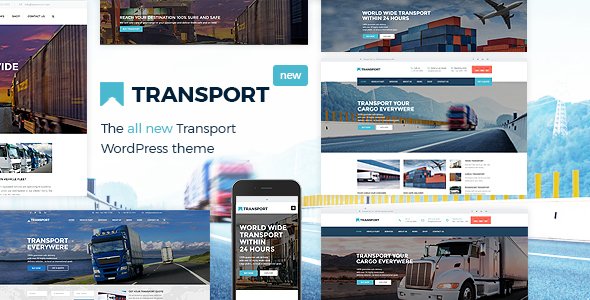
Stuck on your Transport WordPress theme? Let's fix it.
No endless back-and-forth. Just send us the details and we'll get it done.
No obligation · Replies within 1 hour · Quote within 1 day
Setup · Customization · Bug fixes · WooCommerce integration
About Transport WP Theme
Transport is a WordPress theme by Anps designed specifically for logistics, freight, and transportation businesses. It ships with a clean layout, multiple homepage demos, and a visual page builder that makes it straightforward to present services, pricing tables, and fleet details without writing code.
The theme supports WooCommerce for online bookings or product sales, includes custom widgets for service areas and contact forms, and is built on a responsive grid that holds up across mobile, tablet, and desktop. Icon packs, Google Maps integration, and a dedicated team section give transport companies the building blocks they need to present a credible online presence without starting from scratch.
Get matched with a Transport developer in under one day
Tell us about your Transport project. Small fixes, Transport theme customization, or a full website build, whatever you need, we've got it covered.
We'll connect you to the right Transport developers, define the scope, and get everything 100% clear.
You'll get one estimate, hire your preferred developer, and start collaborating.
FoxyConcept works with vetted Transport theme developers through Codeable, a platform that screens every developer before they take on client work. You post a project, describe what you need, and get matched with a specialist within 24 hours. There are no hourly guessing games and no obligation to hire after the estimate. If you need a Transport developer who knows the theme inside out, this is the most direct way to find one.
Pros
- Multiple pre-built homepage demos tailored to logistics and transport niches, reducing setup time
- WooCommerce compatibility allows online bookings, service packages, or product sales out of the box
- Built-in Google Maps integration makes displaying service areas and depot locations straightforward
- Includes dedicated sections for team members, testimonials, and service listings relevant to transport businesses
- Compatible with popular page builders, making layout changes accessible without touching theme files
Cons
- Default booking forms are basic and will need a third-party plugin or custom development for real freight quote functionality
- Theme updates from Anps can be infrequent, which creates compatibility risks with newer versions of WordPress and WooCommerce
- Demo content import can be unreliable, sometimes requiring manual cleanup or developer assistance to replicate the preview
- Limited documentation makes troubleshooting non-obvious issues time-consuming for non-developers
- Some design elements feel dated compared to current web standards and may need custom CSS to modernise
Who is Transport for?
Freight and Logistics Companies
Transport works well for freight and logistics companies that need to present service lanes, capacity options, and contact routes clearly. A Transport developer can extend the theme with custom freight enquiry forms, integration with logistics CRMs, and structured service pages targeting specific cargo types or trade corridors.
Removals and Relocation Services
Removals companies benefit from Transport’s service listing and pricing table sections. A Transport specialist can add booking calendars, moving checklists as downloadable resources, and location-based service area pages that help the business rank locally and convert visitors who are actively planning a move.
Courier and Parcel Delivery Businesses
Courier businesses need fast-loading, mobile-first pages with clear CTAs. Transport’s responsive layout provides a solid base. A Transport expert can bolt on real-time tracking widgets, API connections to dispatch software, and streamlined quote request flows that reduce friction for customers looking to book a same-day delivery.
Vehicle Fleet Management Services
Fleet management services can use Transport to showcase vehicle categories, maintenance packages, and operator credentials. A skilled Transport developer can add custom vehicle post types, filterable fleet galleries, and client portal integrations that give fleet managers a useful tool beyond a simple brochure site.
Trucking and Haulage Operators
Haulage operators need credibility fast. Transport’s testimonial sections, team profiles, and service pages support that. A Transport theme developer can configure structured data for local SEO, add load board enquiry forms, and tailor the homepage layout to highlight the routes, payload specs, and compliance certifications that matter most to prospective clients.

Customizing Transport
Out of the box, Transport covers the basics. Where businesses run into limits is when they need custom booking flows, dynamic route calculators, freight quote forms, or integrations with dispatch and CRM systems. That’s where a Transport expert makes a real difference.
A skilled Transport theme developer can extend the theme’s page builder sections, add custom post types for vehicles or services, wire up third-party APIs, and rebuild templated sections to match brand guidelines precisely. Visual tweaks like custom headers, sticky navigation, and tailored typography are straightforward for an experienced developer, but time-consuming and error-prone without one. If your site needs to do more than the demo shows, hiring a Transport specialist is the practical route.
Recommended plugins for Transport
Transport pairs well with a handful of well-supported plugins. Gravity Forms or WPForms handle quote requests and contact submissions reliably. For SEO, an experienced developer can configure Yoast or Rank Math alongside Transport to improve structured data and page-level optimisation. Check our WordPress SEO service for details.
On the performance side, combining Transport with a caching layer, image optimisation, and a CDN can cut load times significantly, especially on fleet or service pages with heavy imagery. See our WordPress performance service if your Transport site is running slow.
Not sure which plugins to use? This WordPress plugins directory covers the most popular options with reviews and setup guides.
Transport common issues
Transport theme homepage slider not showing after update
Slider issues after an update usually come from a plugin conflict or a missing Revolution Slider or Layer Slider license that stopped auto-updating. First, check that your slider plugin is current. If the slider shortcode is present but rendering blank, deactivate plugins one by one to isolate the conflict. If that doesn’t resolve it, a WordPress bug fixing specialist can trace the issue through error logs and theme template files quickly.
Transport theme page builder sections missing or broken
Broken page builder sections in Transport often follow a WordPress core update or a WPBakery version mismatch. Go to the WPBakery settings and re-register your purchase key. If sections are showing raw shortcode instead of rendered content, the plugin may have been deactivated. Reinstalling or updating WPBakery to match your WordPress version usually resolves this. Persistent layout breakage is worth handing to a WordPress bug fixing service.
Transport theme contact form not sending emails
Transport’s default contact forms typically rely on wp_mail, which fails silently on many shared hosts. Install an SMTP plugin like WP Mail SMTP and connect it to a transactional email service such as Mailgun, SendGrid, or your Google Workspace account. Set up a test email after configuration. If the form submits but still doesn’t deliver, check spam folders and review server-side mail logs for bounce messages.
Transport theme slow loading on mobile
Transport’s demo layouts load large hero images and multiple scripts that hurt mobile performance. Start by running the site through PageSpeed Insights to identify the biggest offenders. Compress images with a plugin like ShortPixel, enable lazy loading, and defer non-critical JavaScript. If the theme is loading scripts that aren’t being used on every page, a developer can conditionally dequeue them. See our WordPress performance service for a full audit.
Transport FAQ
Anps releases updates periodically, but the Transport theme is not on an aggressive update schedule. It remains functional on current versions of WordPress, though some third-party bundled plugins may lag behind. If you’re running a live business site on Transport, it’s worth having a developer review compatibility before major WordPress updates and keeping a maintenance plan in place.
Transport doesn’t include a native booking system, but it integrates with WooCommerce and form plugins that can handle reservations. For more advanced workflows like route-based pricing, time-slot bookings, or automated confirmations, a Transport developer would need to integrate a dedicated booking plugin such as Amelia or WooCommerce Bookings and configure it to match the site’s requirements.
Transport is built around WPBakery Page Builder, which is bundled with the theme. Most layout customisation happens inside WPBakery’s frontend or backend editor. Some sections are hardcoded into theme templates, so more structural changes require editing PHP files directly, which is best handled by an experienced Transport theme developer.
Transport includes a one-click demo importer accessible from the theme options panel. Go to Appearance, then the Transport settings, and find the demo import section. The process imports pages, widgets, and settings. It works best on a fresh WordPress install. On existing sites, it can overwrite menus and widget areas, so back up your site before running it.
Yes, provided customisations are made through a child theme rather than editing the parent theme files directly. A Transport specialist will set up a child theme to hold all custom CSS, template overrides, and PHP modifications. This keeps changes intact when the parent theme updates. It’s standard practice and something any competent Transport developer will do from the start of a project.
Hire a Transport Theme Developer or Expert
Whether you need a full custom build on Transport, a specific feature added, or a broken layout fixed, a dedicated Transport developer can scope the work and deliver it cleanly. Projects are posted through Codeable, where all developers are vetted and estimates are free. Get a Free Estimate and describe your project. No commitment required until you’re happy with the plan.
You'll need a free Codeable account so developers can ask questions and send their quotes.