TwoFold WordPress Theme
by fuelthemes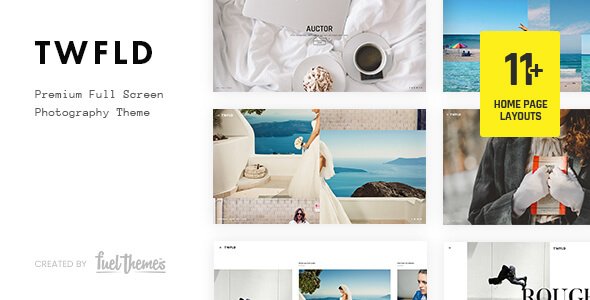
Stuck on your TwoFold WordPress theme? Let's fix it.
No endless back-and-forth. Just send us the details and we'll get it done.
No obligation · Replies within 1 hour · Quote within 1 day
Setup · Customization · Bug fixes · WooCommerce integration
About TwoFold WP Theme
TwoFold is a WordPress theme by fuelthemes built around a split-screen layout concept. It pairs bold visual sections side by side, making it a strong choice for portfolios, agencies, and creative studios that want high visual impact without heavy page builders.
The theme ships with a clean codebase, full-screen sections, smooth scroll transitions, and support for the WordPress Customizer. It’s built to work with Elementor and standard block editor setups, giving developers flexibility in how they build out pages.
TwoFold suits projects where first impressions matter. The split layout naturally guides visitors through a visual story, and the typographic options give designers enough room to create something distinctive. It’s not a theme for every project, but for the right brief, it hits well.
Get matched with a TwoFold developer in under one day
Tell us about your TwoFold project. Small fixes, TwoFold theme customization, or a full website build, whatever you need, we've got it covered.
We'll connect you to the right TwoFold developers, define the scope, and get everything 100% clear.
You'll get one estimate, hire your preferred developer, and start collaborating.
Getting TwoFold to match a specific design brief takes more than tweaking Customizer settings. A vetted TwoFold developer through Codeable can take the theme from a starting point to a fully custom build, handling layout adjustments, plugin integration, and performance tuning. Every developer on Codeable is pre-screened, so you’re working with someone who knows WordPress properly, not a generalist. Post a project, get a scoped estimate, and decide from there with no obligation to proceed.
Pros
- Split-screen layout creates strong visual impact for creative and agency sites without custom design work
- Clean, lightweight codebase from fuelthemes means fewer performance issues compared to bloated multipurpose themes
- Full Customizer support with live preview keeps non-technical clients comfortable managing basic changes
- Works alongside Elementor for teams that prefer a visual page builder workflow
- Smooth scroll and full-screen section behavior are built in, removing the need for third-party scripts in most cases
Cons
- Split-screen layout requires careful rework on mobile, as the two-column concept doesn't translate automatically to small screens
- Limited built-in page template variety means more custom development is needed for multi-section or complex sites
- WooCommerce support is not native and requires additional styling work to look consistent with the theme design
- Niche layout style makes it a poor fit for content-heavy sites like news, directories, or multi-category blogs
- fuelthemes has a smaller support community compared to major theme shops, so troubleshooting resources are more limited
Who is TwoFold for?
Creative Agency
TwoFold works well for agencies that want a site with visual confidence. The split layout lets you put work samples and service messaging side by side without it feeling cluttered. A TwoFold developer can set up case study templates and inquiry forms to round out a proper agency build.
Photographer Portfolio
For photographers, the full-screen sections and minimal UI keep the focus on images. TwoFold handles large visuals cleanly, and a TwoFold specialist can add gallery filtering, lightbox support, and client proof pages to turn the theme into a functional photography business site.
Freelance Designer
Freelance designers benefit from TwoFold’s strong typographic options and layout flexibility. The split-screen format suits before/after work comparisons and project breakdowns. With some custom development, it works as both a portfolio and a direct lead generation tool.
Architecture Studio
Architecture and interior design studios need a theme that holds up to large, high-quality images. TwoFold’s layout structure suits project showcases well. A TwoFold expert can build out project archive pages, filterable by type or location, to support a deeper content strategy.
Personal Brand / Speaker Site
Speakers, consultants, and personal brands use TwoFold to create a strong single-page presence. The scroll-driven layout works well for guiding visitors from bio to work to contact. Custom TwoFold development can add booking integration, media kit downloads, and social proof sections.

Customizing TwoFold
Out of the box, TwoFold gives you solid controls through the WordPress Customizer, but most serious builds go further. A TwoFold expert can rework the split-screen sections to match a specific brand system, adjust the scroll behavior, and fine-tune breakpoints for mobile where the two-column concept needs careful handling.
Custom work typically includes adding WooCommerce support, building out additional page templates, integrating contact or booking forms, and setting up custom post types for portfolio or case study entries.
If the default layout options feel limiting, a TwoFold specialist can extend the theme properly through child theme development rather than direct edits, keeping updates clean and the codebase maintainable long term.
Recommended plugins for TwoFold
TwoFold pairs well with several plugin categories depending on your project goals. For sites where load speed matters, pairing the theme with a solid caching layer and image optimization setup makes a real difference. See our WordPress performance service for how that works in practice.
If organic traffic is a priority, TwoFold works with Yoast SEO and Rank Math without conflict, but schema setup and technical SEO still need attention. Our WordPress SEO service covers that end to end. Contact form plugins, GSAP-based animation libraries, and portfolio filtering tools also integrate cleanly with this theme.
Not sure which plugins to use? This WordPress plugins directory covers the most popular options with reviews and setup guides.
TwoFold common issues
TwoFold split layout broken on mobile
The split-screen layout in TwoFold stacks vertically on smaller screens, but CSS conflicts or custom edits can break this behavior and produce overlapping or misaligned sections. Check for conflicting stylesheets from page builder plugins first. If the issue appeared after a theme or plugin update, a CSS regression is likely. For persistent layout breakage, our WordPress bug fixing service can isolate and resolve the conflict without disrupting the rest of your site.
TwoFold smooth scroll not working after plugin update
TwoFold’s scroll behavior relies on JavaScript that can conflict with certain performance plugins, particularly those that aggregate or defer scripts aggressively. Check your caching and optimization plugin settings and look for deferred JS options that may be interrupting the scroll initialization. Disabling script deferral for theme-specific JS files usually resolves this. If the issue persists across plugin combinations, a WordPress bug fix is the faster route.
TwoFold theme full-screen sections showing wrong height
Full-screen section height issues in TwoFold are usually caused by the 100vh CSS value behaving unexpectedly in certain browsers, particularly mobile Safari, or when an admin bar is present. The fix typically involves adding a small JavaScript adjustment to account for dynamic viewport height. Check whether the issue appears only on mobile or across all devices, then isolate whether the admin bar or a specific plugin toolbar is adding offset to the page.
TwoFold Customizer changes not saving
If TwoFold Customizer changes aren’t saving, the most common causes are a permissions issue on the wp-options table, a PHP timeout during the save request, or a security plugin blocking the Customizer AJAX call. Open your browser’s network tab while saving and check for failed requests. Also verify your site’s file permissions and whether a WAF rule is intercepting the request. A quick database and server-level check usually pinpoints the cause.
TwoFold FAQ
TwoFold is generally compatible with Elementor, but some of the theme’s built-in layout features, particularly the split-screen sections and scroll behavior, work independently of the page builder. Mixing Elementor templates with TwoFold’s native sections can produce styling conflicts. A TwoFold developer can set up a clean integration where Elementor handles page-level content without overriding the theme’s core layout logic.
TwoFold does not include native WooCommerce templates, so out-of-the-box shop and product pages will use WooCommerce’s default styling rather than the theme’s design. A TwoFold specialist can build custom WooCommerce templates that match the theme’s visual style, including the split-screen aesthetic for product pages if the brief calls for it.
Creating a child theme for TwoFold follows the standard WordPress process. Create a new folder in wp-content/themes, add a style.css file with the correct Template header pointing to TwoFold, and add a functions.php that enqueues the parent theme stylesheet. Any customizations go in the child theme, keeping the parent intact when fuelthemes releases updates.
Update frequency for TwoFold depends on fuelthemes’ release schedule. Check the theme’s changelog on ThemeForest or the fuelthemes site for the most recent version date. If the theme hasn’t been updated recently and you’re running a current version of WordPress, test core compatibility carefully before committing to a new build on it.
TwoFold is designed for visually led sites, not content-heavy layouts. Blog archive pages and category listings aren’t a strong fit for the split-screen structure. You can use it for a site with a blog section, but the blog templates will likely need custom development to look consistent with the rest of the theme. For primarily editorial sites, a different theme would be a better starting point.
Hire a TwoFold Expert Developer
Whether you need a TwoFold developer to build out a site from scratch, fix a specific layout issue, or extend the theme with custom functionality, you can get matched with a vetted specialist fast. Post your project through our free estimate page, describe what you need, and receive a scoped quote within 24 hours. No upfront cost, no obligation to hire. Work only moves forward when you’re ready.
You'll need a free Codeable account so developers can ask questions and send their quotes.