Typology WordPress Theme
by meks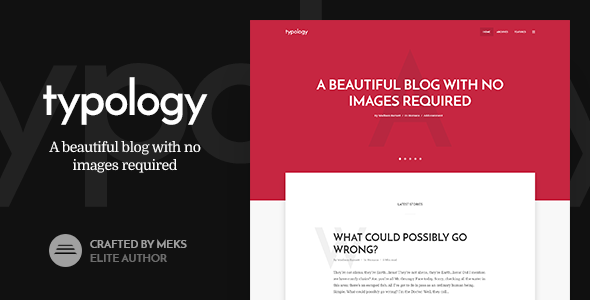
Stuck on your Typology WordPress theme? Let's fix it.
No endless back-and-forth. Just send us the details and we'll get it done.
No obligation · Replies within 1 hour · Quote within 1 day
Setup · Customization · Bug fixes · WooCommerce integration
About Typology WP Theme
Typology is a text-based WordPress theme built by Meks, designed specifically for blogs and online magazines that put writing first. It strips away visual noise and keeps the focus on content, typography, and readability. The theme ships with a clean minimal layout, multiple post formats, and a built-in mega menu. It integrates tightly with Meks plugins, giving you social feeds, smart widgets, and ad management out of the box. Typology supports the WordPress Customizer for live previewing changes, and it plays nicely with WooCommerce if you need a shop. The codebase is well-structured and translation-ready, making it a solid pick for multilingual publishing sites. Performance is reasonable on a clean install, though plugin-heavy setups will need tuning.
Get matched with a Typology developer in under one day
Tell us about your Typology project. Small fixes, Typology theme customization, or a full website build, whatever you need, we've got it covered.
We'll connect you to the right Typology developers, define the scope, and get everything 100% clear.
You'll get one estimate, hire your preferred developer, and start collaborating.
Typology looks straightforward until you need something it does not do by default. Meks built it with specific publishing workflows in mind, and working outside those patterns takes real theme knowledge. Rather than spending days in the code, you can post a project on Codeable and get matched with a vetted Typology developer within 24 hours. Estimates are free, there is no obligation to hire, and every developer on the platform has passed a technical vetting process. It is a faster path to a working result.
Pros
- Typography-first design that makes long-form content genuinely readable
- Tight integration with Meks plugins for social feeds, ads, and widgets
- Multiple post formats including audio, video, gallery, and quote
- Built-in mega menu supports large content taxonomies without extra plugins
- WooCommerce compatible for publishers who also sell products or memberships
Cons
- Heavily tied to Meks plugins, making it harder to swap components independently
- Limited block editor (Gutenberg) support compared to newer themes
- Homepage customisation options are restrictive without custom development
- No built-in demo importer for all available demos, setup can be manual
- Updates have slowed in recent years, raising long-term maintenance questions
Who is Typology for?
Personal Writing Blogs
Typology suits writers who want their words to carry the page. The minimal layout, generous line spacing, and strong typeface choices make personal blogs feel intentional rather than templated. A Typology specialist can configure the reading experience, related posts, and author bios to match your personal brand without cluttering the content.
Online News Magazines
The mega menu and category-driven layout make Typology a workable base for news-style magazines. Multiple sidebar options and ad widget areas support monetisation. A Typology developer can set up custom category templates and archive pages to handle high-volume publishing without the layout breaking under content weight.
Niche Editorial Sites
Food, travel, finance, and lifestyle sites benefit from Typology’s clean post grid and strong featured image handling. The theme lets the subject matter speak rather than competing with the design. Custom taxonomy pages and filtered archives are areas where a Typology expert adds real value.
Podcast and Audio Blogs
Typology’s audio post format is one of its stronger built-in features. Podcasters and music bloggers can embed players directly in posts with a consistent layout. A Typology developer can extend this with custom playlist functionality or subscription prompts tied to WooCommerce memberships.
Affiliate and Review Sites
Affiliate and review sites need clean comparison layouts and strong call-to-action placement. Typology’s structured post design supports this, especially with custom shortcodes and review blocks added by a developer. SEO-focused builds benefit from proper schema markup, which a Typology specialist can implement correctly.

Customizing Typology
Typology ships with a good set of Customizer options: typography controls, color schemes, header layouts, and sidebar positions. Most changes are handled without touching code. But if you want to go further, say custom post templates, restructured category pages, or a homepage that behaves differently from the defaults, you will need PHP and CSS knowledge. A Typology expert can help you extend the theme properly using child themes rather than editing core files, which protects your changes on updates. Meks provides decent documentation, but gaps appear when you try to modify plugin-dependent features like the Meks Smart Social Widget or the audio player post format. That is where custom development saves time and avoids breaking things.
Recommended plugins for Typology
Typology pairs well with caching plugins like WP Rocket or LiteSpeed Cache to handle image-heavy editorial layouts. If your site publishes frequently, optimising Core Web Vitals matters for both readers and rankings. Our WordPress performance service covers that end to end. On the SEO side, Typology works cleanly with Yoast and Rank Math, but schema markup for articles and authors often needs manual configuration. Our WordPress SEO service can handle structured data, breadcrumb setup, and technical SEO audits to make sure your content actually ranks.
Not sure which plugins to use? This WordPress plugins directory covers the most popular options with reviews and setup guides.
Typology common issues
Typology theme not showing featured image on single post
This is usually caused by a missing post thumbnail or a template override that bypasses the featured image check. Open the single post template in your child theme and confirm the_post_thumbnail() is being called. If you are using a page builder or custom fields plugin that conflicts with post meta, that can also suppress the image. Check your Customizer settings under the post layout section as well, since Typology allows toggling featured images per layout. If the issue persists, a WordPress bug fixing service can trace the exact template conflict.
Typology mega menu not working on mobile
Typology’s mega menu relies on specific JavaScript that can conflict with aggressive caching or minification plugins. Start by disabling JS minification in your caching plugin and testing again. On mobile, the issue is often a z-index or overflow problem in the responsive CSS. Inspect the menu in browser dev tools and look for hidden overflow on parent containers. If a recent plugin or theme update introduced the problem, rolling back and comparing changelogs will pinpoint the cause.
Typology theme slow loading after adding Meks plugins
Meks plugins add HTTP requests and database queries, which compound quickly on shared hosting. Use Query Monitor to identify slow queries tied to the Meks Smart Social Widget or ad plugin. Enabling object caching and configuring your CDN to cache widget output reduces the load significantly. Also check whether all active Meks plugins are actually needed. Deactivating unused ones is often the fastest fix. For deeper performance work, review our WordPress performance service.
Typology related posts not displaying correctly
Typology’s related posts pull from the same category by default. If categories are inconsistently assigned or posts lack a matching category, the section falls back to recent posts or shows nothing. Check the Typology settings panel for the related posts source configuration. If you are using a third-party related posts plugin alongside the theme’s built-in function, there may be a duplicate output conflict. Disable one and test.
Typology theme breaking after WordPress update
Typology and Meks plugins occasionally have compatibility gaps after major WordPress releases. Start by updating to the latest theme and plugin versions. If you are not using a child theme, check whether core template files were overwritten. Enabling WordPress debug mode will surface PHP deprecation notices that point to the exact breaking line. If the site is down or broken in a live environment, a WordPress bug fixing specialist can restore it safely.
Typology audio post format player not loading
The audio post format in Typology uses a JavaScript-based player that depends on specific enqueueing in the theme’s functions. If the player is not loading, check the browser console for script errors. A common cause is a security plugin blocking external audio sources or a caching plugin serving a stale page without the player script. Also confirm you are using the correct post format setting in the post editor, since defaulting to standard format disables the player template entirely.
Typology homepage layout not matching demo
Typology demos are set up with specific widget configurations and Customizer settings that are not always imported automatically. After importing demo content, manually replicate the widget areas from the demo screenshot. The front page layout typically depends on a static page set in Settings > Reading and specific widgets placed in the homepage widget areas. Meks provides a setup guide for each demo that walks through the exact widget and Customizer settings required.
Typology theme logo not displaying in header
Logo display issues in Typology are almost always a Customizer misconfiguration. Go to Appearance > Customize > Site Identity and confirm the logo image is uploaded and saved. If the logo appears broken, the file path may have changed after a migration or media library reorganisation. Re-upload the logo directly. For Retina display issues, upload a version twice the display size and Typology will scale it correctly. Clear your cache after saving.
Typology sidebar not showing on category pages
Typology allows per-template sidebar configuration. Category pages default to a specific layout that may have the sidebar disabled in the theme settings. Go to Appearance > Customize and look for the category or archive layout option. Also check whether the relevant sidebar widget area is populated, since an empty sidebar is hidden automatically. If you have custom category templates in a child theme, verify the sidebar call is present and using the correct sidebar ID.
Typology social icons not working with Meks Smart Social Widget
The Meks Smart Social Widget requires API keys for platforms like Twitter and Instagram to pull live data. If icons appear but counts are missing, the API credentials are either expired or not entered correctly in the plugin settings. For Instagram specifically, the API setup changed significantly after 2020 and older configurations no longer work. Re-authenticate through the Meks plugin settings page. If the widget is not appearing at all, check for a JavaScript conflict using browser dev tools. A WordPress bug fix can resolve persistent widget conflicts.
Typology FAQ
Meks continues to maintain Typology, but update frequency has slowed compared to earlier years. The theme remains compatible with current WordPress versions, but it does not receive feature updates at the pace of newer themes. Check the changelog on ThemeForest before purchasing if long-term active development is a priority for your project.
Typology has basic Gutenberg compatibility, meaning blocks display correctly in single posts. However, the theme was designed around the Classic Editor workflow and does not use Full Site Editing or block-based templates. For sites committed to a Gutenberg-first workflow, the editing experience will feel limited compared to block themes built specifically for FSE.
Yes, the core theme functions independently of Meks plugins. Features like the mega menu, post formats, and Customizer options work without them. The Meks plugins add social widgets, ad management, and audio player enhancements. They are recommended but not required. Removing them simplifies the stack if those features are not needed.
Typology produces clean HTML output and loads reasonably fast on a well-configured server, both of which help SEO. It works with Yoast SEO and Rank Math without conflicts. Article schema and author markup may need manual configuration. Pairing the theme with an SEO plugin and proper technical setup gives a solid foundation for content-driven rankings.
Yes, Typology includes WooCommerce compatibility. Standard shop, product, cart, and checkout pages inherit the theme’s styling. The design is minimal enough that products display cleanly. For heavily customised shop layouts, a Typology developer may need to add custom CSS or template overrides to match a specific design requirement.
Create a new folder in wp-content/themes/ named something like typology-child. Add a style.css file with the correct template header pointing to the parent theme slug, then add a functions.php that enqueues both parent and child stylesheets. Activate the child theme from the Appearance menu. Any template files or CSS you add there will override the parent without being erased on updates.
Yes. A Typology developer can restructure the homepage using custom templates, widget areas, and conditional logic in a child theme. The default homepage options cover common layouts, but a developer gives you full control over section order, post queries, featured content blocks, and any unique layout requirements your editorial strategy needs.
Typology is translation-ready and compatible with WPML and Polylang. The theme string translations are accessible through WPML’s String Translation module. Meks plugins also support translation. For multilingual sites, a Typology specialist can configure language switchers, hreflang tags, and ensure the layout holds correctly across all language versions.
Typology is Meks’ most typography and text-focused theme. Other Meks themes like Jevelin and Ripple lean more toward visual and portfolio layouts. Typology is specifically designed for text-heavy publishing. The Meks plugin ecosystem is shared across themes, but the template structure and design priorities differ significantly between them.
Start with a caching plugin, image compression, and a CDN. Deactivate any Meks plugins you are not actively using. Check for render-blocking scripts through PageSpeed Insights and defer non-critical JavaScript. On managed hosting with server-level caching, Typology loads well. For a full audit and implementation, our WordPress performance service covers every layer of the stack.
Hire a Typology Expert Developer
Whether you need layout customisation, performance work, plugin conflicts resolved, or a full child theme built from scratch, a Typology developer can get it done properly. Work is scoped before anything starts, so you know exactly what you are paying for. Get a Free Estimate and describe your project. There is no commitment until you decide to move forward.
You'll need a free Codeable account so developers can ask questions and send their quotes.