Ukiyo WordPress Theme
by Select-Themes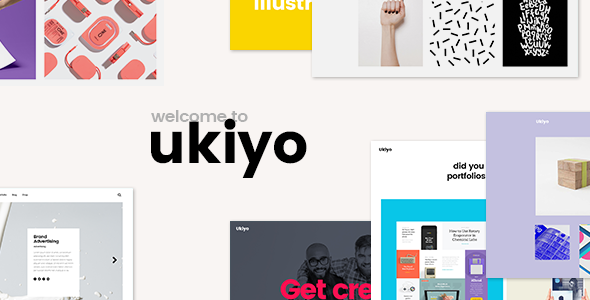
Stuck on your Ukiyo WordPress theme? Let's fix it.
No endless back-and-forth. Just send us the details and we'll get it done.
No obligation · Replies within 1 hour · Quote within 1 day
Setup · Customization · Bug fixes · WooCommerce integration
About Ukiyo WP Theme
Ukiyo is a minimal WordPress theme built by Select-Themes, designed primarily for photography, portfolio, and lifestyle websites. It centres on full-screen imagery and clean typography, letting visual content take the lead without interface clutter getting in the way.
The theme ships with a fullscreen hero slider, smooth scroll effects, and a flexible grid layout for showcasing work. It supports WooCommerce for light shop setups and works with the standard WordPress customizer. Page builders are not required, which keeps load times reasonable out of the box.
Ukiyo suits creators who want a refined, image-forward site without spending days configuring it. The setup is straightforward, documentation from Select-Themes is solid, and the theme has been maintained consistently since launch.
Get matched with a Ukiyo developer in under one day
Tell us about your Ukiyo project. Small fixes, Ukiyo theme customization, or a full website build, whatever you need, we've got it covered.
We'll connect you to the right Ukiyo developers, define the scope, and get everything 100% clear.
You'll get one estimate, hire your preferred developer, and start collaborating.
Ukiyo looks simple, but building something polished on top of it takes real WordPress knowledge. Customizing its slider logic, extending its portfolio templates, or integrating it cleanly with WooCommerce requires hands-on PHP and CSS work.
Through Codeable, you get matched with vetted WordPress developers who have worked with themes like Ukiyo before. No guesswork, no junior freelancers. Post your project, get an estimate within 24 hours, and only move forward when you’re confident.
Pros
- Full-screen image presentation works exceptionally well for photography and visual portfolios
- Clean, minimal codebase means faster load times compared to feature-heavy multipurpose themes
- No page builder dependency keeps the theme lightweight and easier to maintain long-term
- WooCommerce compatible out of the box for photographers selling prints or digital products
- Select-Themes provides consistent updates and responsive support documentation
Cons
- Limited layout variety without custom development, most pages follow the same structural pattern
- No built-in mega menu or complex navigation options, which limits larger content-heavy sites
- The fullscreen slider can slow page performance if large images are not properly optimized
- Fewer third-party demo templates compared to mainstream themes like Astra or Divi
- Gutenberg block styling is basic and may require additional CSS to match the theme's overall design
Who is Ukiyo for?
Photography Portfolio
Ukiyo’s fullscreen slider and grid layouts are built for showcasing photography work. Galleries load cleanly, images stay front and centre, and the minimal interface keeps visitors focused on the work itself. It handles both commercial and fine art photography portfolios without needing major structural changes.
Creative Agency
Small creative agencies use Ukiyo to present case studies and client work without the visual noise of heavier multipurpose themes. The clean typography and whitespace give the site a confident, professional feel. Custom service pages and a filterable work grid can be added by a developer without fighting the theme.
Lifestyle Blog
Ukiyo’s image-forward layout suits lifestyle bloggers who want their photography and content to coexist without a cluttered sidebar. Post layouts are readable, and the homepage hero draws visitors in immediately. It works well for travel, food, and interiors niches where strong visuals drive engagement.
Online Print Shop
Combined with WooCommerce, Ukiyo makes a clean base for photographers selling prints or digital downloads. Product pages stay visually consistent with the rest of the site, and the minimal cart and checkout flow does not distract from the brand. A developer can tighten the WooCommerce styling to match the theme precisely.
Wedding & Events Vendor
Wedding photographers, florists, and event planners benefit from Ukiyo’s romantic, uncluttered aesthetic. The theme handles gallery-heavy pages well, and inquiry forms can be integrated cleanly. Couples and clients browsing vendor websites respond well to the calm, image-led presentation Ukiyo delivers by default.

Customizing Ukiyo
Ukiyo gives you a decent starting point, but most serious builds go beyond what the WordPress customizer alone can deliver. A skilled Ukiyo expert can rework the layout structure, introduce custom post types, adjust the fullscreen slider behaviour, and tailor the typography system to match a specific brand.
Common customization requests include adding a filterable portfolio grid, building a custom contact or booking section, tweaking WooCommerce templates to fit the minimal aesthetic, and wiring up third-party integrations like Mailchimp or Calendly.
If you need the theme to behave differently from its defaults, custom CSS and PHP modifications are usually the right route rather than fighting plugin-based page builders against Ukiyo’s native structure. A developer who knows the theme well will move faster and avoid compatibility issues.
Recommended plugins for Ukiyo
Ukiyo pairs well with a focused set of plugins. WooCommerce adds shop functionality without heavy rework. WPForms or Gravity Forms handles contact and inquiry forms cleanly. WPML or Polylang covers multilingual needs for international portfolios.
For performance, combining Ukiyo with a caching layer and image optimization plugin makes a noticeable difference given the theme’s reliance on large images. See our WordPress performance service if load speed is a concern.
If SEO is a priority, pairing Ukiyo with Rank Math or Yoast and a proper schema setup helps. Our WordPress SEO service covers that end to end.
Not sure which plugins to use? This WordPress plugins directory covers the most popular options with reviews and setup guides.
Ukiyo common issues
Ukiyo theme slider not working after WordPress update
Slider issues after a WordPress core or plugin update are usually caused by a JavaScript conflict or a deprecated function in the theme’s slider script. Start by disabling plugins one at a time to isolate any conflict. Check the browser console for JS errors. If the theme itself needs a patch, contact Select-Themes support with your WordPress and theme version numbers. For persistent issues, our WordPress bug fixing service can diagnose and resolve this quickly.
Ukiyo theme images not displaying correctly on mobile
Ukiyo’s fullscreen image approach relies on CSS background sizing and object-fit properties. On mobile, images can crop unexpectedly if focal points are not set or if the image dimensions fall outside what the theme expects. Go to the customizer and check mobile preview settings. For slider images, ensure they are at least 1920px wide. If the layout is still broken, a CSS fix targeting specific breakpoints usually resolves it without touching the theme files directly.
Ukiyo theme customizer changes not saving
Customizer changes failing to save usually points to a permissions issue, a caching conflict, or a plugin interfering with the WordPress REST API. First, clear any server-side or object cache. Then temporarily disable security plugins like Wordfence or iThemes and try saving again. If the issue persists, check your server’s PHP error log for REST API errors. A hosting-level permission problem on the uploads or options table is also worth ruling out.
Ukiyo theme slow loading with large images
Large hero and gallery images are the most common reason Ukiyo sites load slowly. Run images through a compression tool like Imagify or ShortPixel before uploading. Enable lazy loading for images below the fold. Use a CDN to serve static assets faster. If you want a full audit and fix, our WordPress performance service covers image optimization, caching configuration, and Core Web Vitals improvements specific to image-heavy themes like Ukiyo.
Ukiyo FAQ
Yes, Ukiyo includes native WooCommerce support. Product pages, the cart, and checkout all inherit the theme’s minimal styling. It works best for small shops, such as print sales or digital downloads. For heavily customized WooCommerce builds with complex product types or memberships, you may need additional template work to keep the visual consistency intact.
Ukiyo works with the WordPress block editor (Gutenberg) for standard page and post content. Elementor can be used alongside it, but the theme was not built with Elementor in mind, so some fullscreen and slider sections may not integrate cleanly without custom CSS adjustments. For most portfolio or photography sites, the native customizer options are sufficient without adding a page builder.
Ukiyo does not include a built-in filterable portfolio. Adding one typically involves a custom post type, taxonomy terms, and a JavaScript filter script like Isotope or MixItUp. This requires PHP and JS work in the theme. A developer can implement this cleanly using a child theme so it survives future updates. It is one of the more common Ukiyo customization requests.
Select-Themes has maintained Ukiyo with regular updates and it remains compatible with current WordPress versions. Support is available through the ThemeForest comments section and the Select-Themes support portal. If you are running an older version of Ukiyo, updating is recommended to avoid compatibility issues with recent WordPress and PHP releases.
Yes, Ukiyo is translation-ready and compatible with WPML and Polylang. For a multilingual photography or portfolio site, WPML is the more full-featured option. You will need to translate string content through the plugin’s interface and ensure your menu and widget areas are configured per language. For complex multilingual setups, professional help avoids common configuration mistakes.
Hire an Ukiyo WordPress Developer
Whether you need a small fix or a full custom build on Ukiyo, working with an experienced developer saves time and avoids costly mistakes. Our developers know Select-Themes products and can handle everything from layout customization to plugin integration and performance tuning.
Get a free estimate with no obligation. You’ll hear back within 24 hours and only pay if you decide to move forward.
You'll need a free Codeable account so developers can ask questions and send their quotes.