Unbound WordPress Theme
by radiantthemes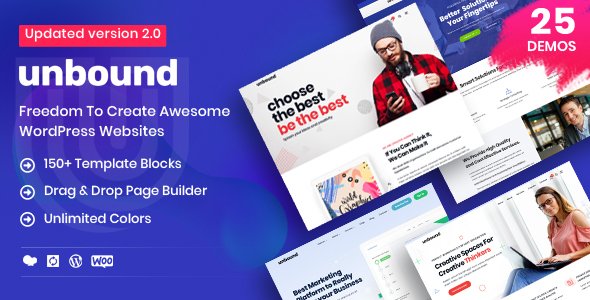
Stuck on your Unbound WordPress theme? Let's fix it.
No endless back-and-forth. Just send us the details and we'll get it done.
No obligation · Replies within 1 hour · Quote within 1 day
Setup · Customization · Bug fixes · WooCommerce integration
About Unbound WP Theme
Unbound is a multipurpose WordPress theme developed by radiantthemes. It ships with a drag-and-drop page builder, a library of pre-built demo sites, and a wide set of custom elements designed to cover most business categories without additional plugins.
The theme targets agencies, freelancers, and small business owners who want a polished site without writing code. It supports WooCommerce, has built-in portfolio layouts, and includes header and footer builders that give you direct control over page structure.
Unbound is sold through ThemeForest and comes with six months of author support. The codebase is built around Elementor or the bundled Visual Composer, depending on the version, so your editing workflow depends on which page builder you pick at setup.
Get matched with a Unbound developer in under one day
Tell us about your Unbound project. Small fixes, Unbound theme customization, or a full website build, whatever you need, we've got it covered.
We'll connect you to the right Unbound developers, define the scope, and get everything 100% clear.
You'll get one estimate, hire your preferred developer, and start collaborating.
Getting Unbound configured exactly the way you want it takes more than clicking through the options panel. A skilled developer knows where the theme’s structure bends and where it breaks. Through Codeable, you get matched with vetted WordPress specialists who have hands-on experience with multipurpose themes like Unbound. No guesswork, no generic fixes. Work gets scoped clearly, priced fairly, and delivered by someone who actually knows the codebase. That is what separates a clean build from a patched one.
Pros
- One-click demo import gets a full site structure live in minutes
- Built-in header and footer builder removes the need for a separate plugin
- WooCommerce support is included without extra configuration
- Multiple pre-built niche demos cover agency, portfolio, and business layouts
- Redux-based theme options panel is well-organized and approachable for non-developers
Cons
- Bundled Visual Composer licence is tied to the theme and cannot be used on other projects
- Default page load includes several render-blocking scripts that need manual optimization
- Support is limited to six months on a standard ThemeForest licence
- Some demo layouts rely on shortcodes that become difficult to edit after a page builder switch
- Documentation is sparse for advanced customization like custom post type templates
Who is Unbound for?
Creative Agency
Unbound’s agency demo includes team sections, service grids, and case study layouts built for client-facing presentations. The header builder lets you match your brand without coding. An agency can have a full working site imported and customized within a day, then hand it off to a developer for fine-tuning specific sections.
Freelance Portfolio
The portfolio post type comes pre-configured with filterable grids and single project pages. Freelancers can showcase work by category, add client testimonials, and connect a contact form without plugins. The layout is clean enough to work in creative industries like photography, design, and development consulting.
Small Business Services
Service-based businesses benefit from Unbound’s pre-built pricing tables, feature sections, and call-to-action blocks. You can mix and match elements from different demos. Adding a Google Maps embed, a booking form plugin, or a live chat widget is straightforward since the theme does not conflict with common service plugins.
WooCommerce Store
Unbound’s WooCommerce support includes styled product grids, cart and checkout pages, and wishlist compatibility. You get a working shop without custom CSS from the start. Pairing it with a payment gateway plugin and a product filter extension gives a small store everything it needs to handle real transactions cleanly.
Startup Landing Page
Single-page and landing page layouts in Unbound are well-suited for startups promoting a product or app. Full-width hero sections, feature highlights, and a sticky navigation bar are available in the demo library. Adding a lead capture form and an analytics script is quick, making it practical for pre-launch or campaign pages.

Customizing Unbound
Out of the box, Unbound gives you a Theme Options panel powered by Redux Framework where you can adjust typography, colors, layout widths, and header styles without touching code. Pre-built demo content imports in one click, which cuts setup time considerably.
Beyond the basics, customization gets more involved. Custom post types for portfolios and testimonials require configuration, and matching the demo exactly often means editing shortcodes or overriding CSS. An Unbound expert can handle that accurately and quickly, saving you hours of trial and error.
For teams with specific brand requirements, a developer can build child theme templates, register custom fields, and extend the existing elements without breaking future updates. That kind of targeted work is where hiring an Unbound specialist pays off.
Recommended plugins for Unbound
Unbound works with the major WordPress plugin ecosystem without major conflicts. WooCommerce integration is built in, so adding a shop is straightforward. Contact Form 7 and Gravity Forms both slot in cleanly.
For performance, pairing Unbound with a caching plugin and a CDN is recommended since the theme loads several scripts by default. A developer can audit and defer non-critical assets. If SEO matters to your project, combining Unbound with Yoast or Rank Math and a structured content strategy covers the basics well. You can also explore WordPress performance optimization and WordPress SEO services to get more out of the theme.
Not sure which plugins to use? This WordPress plugins directory covers the most popular options with reviews and setup guides.
Unbound common issues
Unbound theme demo import not working
Demo import failures in Unbound are usually caused by PHP memory limits or execution timeouts set too low on shared hosting. Set memory_limit to at least 256M and max_execution_time to 300 in your php.ini or wp-config.php. Also confirm that required plugins like the bundled Visual Composer or Elementor are active before importing. If the issue continues, try importing XML content manually through the WordPress importer tool. A developer can resolve persistent import failures quickly through your WordPress bug fixing service.
Unbound page builder elements not loading on frontend
Missing or broken page builder elements usually point to a plugin conflict or a missing required plugin. Check that all plugins bundled with Unbound are installed and activated. Clear any caching plugin output after activation. If elements still fail, deactivate plugins one by one to isolate the conflict. A JavaScript console error in your browser dev tools will often name the conflicting script. If shortcodes are rendering as plain text, the associated plugin is inactive or was deleted.
Unbound theme update broke my layout
Layout breaks after an update are common when custom CSS lives in the theme files rather than a child theme. Before any update, always back up your site. After the update, compare your custom CSS against the new stylesheet and reapply changes through the Additional CSS field in the Customizer or a child theme. If Visual Composer elements are involved, check that the bundled plugin version matches what the updated theme expects. WordPress maintenance support can handle this routinely.
Unbound theme slow loading speed
Unbound loads multiple CSS and JavaScript files that are not always deferred or minified by default. Start by auditing with Google PageSpeed Insights to identify blocking resources. Use a caching plugin like WP Rocket or LiteSpeed Cache to minify and combine assets. Disable unused Unbound elements through the theme options if that option is available. Replace large slider images with compressed WebP files. A developer can audit the full asset stack and configure loading order correctly without breaking theme functionality. See WordPress performance optimization for more.
Unbound FAQ
Unbound was originally built around Visual Composer, though some versions offer Elementor compatibility. Check the changelog on the ThemeForest listing to confirm which page builder your purchased version supports. Mixing both builders on the same site usually causes conflicts. Stick to one builder throughout the build and verify compatibility before purchasing if Elementor is a requirement.
Technically you can, but most of Unbound’s pre-built layouts and demo content are built using Visual Composer shortcodes. Without it, those sections will render as broken shortcode strings rather than styled blocks. You would need to rebuild all affected pages using Gutenberg or another builder. For a clean transition, a developer can migrate page content and rebuild layouts in your preferred editor.
After installing and activating Unbound along with its required plugins, go to Appearance and look for the theme’s import panel. Select your preferred demo and click import. The process pulls in pages, posts, media, and widget settings. Make sure your hosting environment meets the PHP memory and timeout requirements beforehand. A failed import halfway through can leave partial content that needs cleaning up manually.
Yes, Unbound includes native WooCommerce support. Shop pages, product grids, cart, and checkout are styled to match the theme. You can add WooCommerce and configure a payment gateway without custom CSS in most cases. Some niche WooCommerce extensions may need minor style adjustments, but core shop functionality works without modification.
Migrating an existing site to Unbound means rebuilding your page layouts inside the theme’s page builder rather than doing a direct content transfer. Text and images move over fine, but the visual structure needs to be rebuilt. A WordPress migration specialist can handle the content transfer and rebuild key pages in Unbound so nothing is lost in the process.
Hire an Unbound WordPress Developer
Whether you need a full site build on Unbound, a specific layout fixed, or custom functionality added, working with an experienced developer saves time and avoids broken code. FoxyConcept connects you with Unbound specialists through Codeable’s vetted network. Get a free estimate with no obligation. You describe the project, get a clear quote, and decide whether to move forward. Completely risk-free.
You'll need a free Codeable account so developers can ask questions and send their quotes.