Unfinity WordPress Theme
by Case-Themes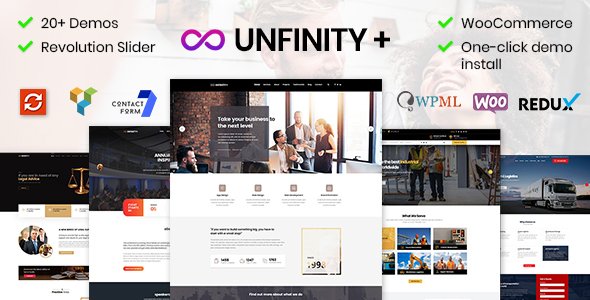
Stuck on your Unfinity WordPress theme? Let's fix it.
No endless back-and-forth. Just send us the details and we'll get it done.
No obligation · Replies within 1 hour · Quote within 1 day
Setup · Customization · Bug fixes · WooCommerce integration
About Unfinity WP Theme
Unfinity is a WordPress theme built by Case-Themes, designed around flexibility and clean visual structure. It targets creative agencies, freelancers, and portfolio-focused businesses that want a polished site without heavy page builder dependencies.
The theme ships with multiple demo layouts, a built-in options panel, and support for Elementor. Typography controls, color schemes, and header variations are all handled through the customizer, keeping things accessible for non-developers.
Case-Themes has a reputation for well-documented themes with consistent update cycles. Unfinity fits that pattern. It loads relatively light, plays well with popular plugins, and gives you a solid foundation for a professional site. That said, getting the most out of it often requires going beyond the default settings.
Get matched with a Unfinity developer in under one day
Tell us about your Unfinity project. Small fixes, Unfinity theme customization, or a full website build, whatever you need, we've got it covered.
We'll connect you to the right Unfinity developers, define the scope, and get everything 100% clear.
You'll get one estimate, hire your preferred developer, and start collaborating.
Unfinity is well-built, but no theme handles every project requirement on its own. When your customization needs go beyond the settings panel, you need a developer who has worked inside the theme’s structure before.
Through Codeable, you get access to vetted WordPress specialists who understand Case-Themes products and can build, fix, or extend Unfinity cleanly. No junior developers, no guesswork. Post your project, get an estimate within 24 hours, and move forward only if you’re confident. The process is straightforward and the quality standard is consistent.
Pros
- Clean, modular code base that follows WordPress standards and stays update-safe
- Native Elementor support with well-structured template files that don't conflict
- Multiple header and footer layout options controllable from the customizer
- Responsive out of the box with solid mobile breakpoint handling
- Regularly maintained by Case-Themes with documented changelogs and update history
Cons
- Demo import can produce layout inconsistencies depending on your server environment
- WooCommerce styling requires manual CSS adjustments for shop and checkout pages
- Limited built-in mega menu options without a third-party plugin or custom code
- Some typography options are restricted unless you install a Google Fonts plugin separately
- Theme options panel can feel cluttered when managing multiple layout configurations
Who is Unfinity for?
Creative Agency
Unfinity’s multi-section homepage layouts and clean grid systems make it a practical choice for agencies showcasing client work. You can structure service pages, case studies, and team sections without overcomplicating the build. Elementor support means your team can update content without a developer on standby.
Freelance Portfolio
Freelancers benefit from Unfinity’s portfolio post type and project filtering. The theme keeps the focus on work samples without excessive visual noise. You can set up a single-page layout or multi-page structure depending on how much content you’re working with. It presents well on desktop and mobile without extra configuration.
Small Business
For local or service-based businesses, Unfinity provides a professional baseline quickly. Contact sections, service grids, testimonial layouts, and Google Maps integration all work cleanly. The customizer lets business owners make basic updates independently, which reduces ongoing maintenance overhead for straightforward informational sites.
WooCommerce Store
Unfinity supports WooCommerce at a functional level, making it usable for small to mid-sized product catalogues. The base shop layout is clean, but custom styling is needed for a polished checkout experience. It works best for stores where design consistency matters more than heavy feature requirements.
Photography Studio
Photography and visual studios benefit from Unfinity’s full-width layout options and minimal chrome around images. Gallery support works with standard WordPress blocks and Elementor gallery widgets. The theme stays out of the way of your images, which is the main thing photographers actually need from a theme.

Customizing Unfinity
Out of the box, Unfinity covers the basics well. You get customizer controls for colors, fonts, header styles, and layout widths. Elementor support means you can build pages visually without touching code.
But real customization work starts when those defaults stop fitting your project. Custom post types, conditional headers, WooCommerce template overrides, advanced animation triggers, or child theme modifications all require hands-on development work.
An Unfinity expert understands where the theme’s hooks and filters live, how to extend it cleanly without breaking future updates, and how to adapt its templates for specific business needs. If you need more than the customizer offers, working with someone who knows Unfinity’s codebase saves time and avoids messy workarounds.
Recommended plugins for Unfinity
Unfinity pairs well with WooCommerce for shop builds, WPForms or Gravity Forms for lead capture, and WPML for multilingual setups. Elementor Pro unlocks additional widget options that complement the theme’s existing layouts.
For performance, combining Unfinity with a good caching plugin and image optimization tool makes a measurable difference. Check our WordPress performance service for a full audit approach.
If search visibility matters, pairing the theme with Yoast or Rank Math and proper schema implementation is worth the effort. We cover that through our WordPress SEO service.
Not sure which plugins to use? This WordPress plugins directory covers the most popular options with reviews and setup guides.
Unfinity common issues
Unfinity theme demo content not importing correctly
Demo import failures in Unfinity are usually caused by server memory limits or missing required plugins. Before importing, confirm that Elementor and any bundled plugins are installed and activated. Increase your PHP memory limit to at least 256MB in wp-config.php. If the import still fails, import the XML file manually through Tools > Import, then apply the customizer settings separately.
Unfinity header layout not showing on mobile
Mobile header issues in Unfinity often trace back to a CSS conflict with another plugin or a cached stylesheet. Clear your caching plugin and browser cache first. Check the customizer’s mobile header settings and confirm the hamburger menu toggle is enabled. If a third-party plugin is injecting CSS that overrides the header, use browser dev tools to identify the conflicting rule and resolve it with a child theme stylesheet. Visit our bug fixing service if it persists.
Unfinity theme breaking after WordPress update
If Unfinity breaks after a WordPress core update, the most common causes are deprecated functions or a conflict with an updated plugin. Switch to a child theme if you haven’t already, so core theme files can update without wiping your changes. Check the browser console and PHP error log for specific error messages. Rolling back WordPress temporarily using the WP Downgrade plugin can restore function while you investigate. Our WordPress maintenance service handles this proactively.
Unfinity custom fonts not loading on frontend
Custom fonts failing to load in Unfinity typically means the font files aren’t properly enqueued or a caching layer is serving an old stylesheet. If you’re using a Google Fonts plugin, confirm it’s compatible with your current Elementor version. For self-hosted fonts, verify the font files are correctly uploaded and the @font-face declarations are in your child theme’s stylesheet. Purge all caches after making changes and test in an incognito window.
Unfinity FAQ
Yes. Unfinity is built with Elementor compatibility in mind. Page templates are structured to work cleanly with Elementor’s editor, and most layouts in the demo content are built using Elementor widgets. Elementor Free covers most use cases, but some advanced widget features require Elementor Pro.
Unfinity supports WooCommerce at a functional level. Basic shop pages, product archives, and cart and checkout pages will render correctly. However, WooCommerce-specific styling often needs custom CSS to match the rest of your design. It’s a solid starting point for small stores but may require developer input for more polished results.
Create a new folder in wp-content/themes/ named something like unfinity-child. Add a style.css with the correct Template: unfinity header and a functions.php that enqueues the parent theme’s stylesheet. Activate the child theme from Appearance > Themes. All your custom CSS and PHP changes go in the child theme, keeping them safe through updates.
Switching an existing site to Unfinity is possible but involves rebuilding your page layouts to match the new theme’s structure. Content migrates fine, but design elements won’t transfer automatically. If you’re moving from another host or domain at the same time, our WordPress migration service can handle the technical side while you manage the design transition.
Unfinity produces clean HTML output and doesn’t add unnecessary bloat to page source, which is a good baseline for SEO. Pair it with Yoast SEO or Rank Math for meta control, schema markup, and sitemap generation. The theme itself won’t hurt your rankings, but SEO results depend on your content, page speed, and how you implement structured data.
Hire an Unfinity Developer
Need help building or customizing your Unfinity site? Whether it’s a layout issue, a WooCommerce integration, a child theme build, or something more complex, our WordPress developers can handle it. Work is scoped clearly, delivered on time, and backed by Codeable’s quality guarantee.
Get a free estimate with no obligation to hire. Describe your project and get matched with an Unfinity-experienced developer within 24 hours.
You'll need a free Codeable account so developers can ask questions and send their quotes.