Unik WordPress Theme
by PremiumLayers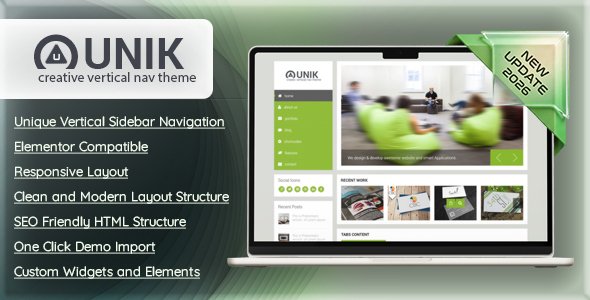
Stuck on your Unik WordPress theme? Let's fix it.
No endless back-and-forth. Just send us the details and we'll get it done.
No obligation · Replies within 1 hour · Quote within 1 day
Setup · Customization · Bug fixes · WooCommerce integration
About Unik WP Theme
Unik is a multipurpose WordPress theme by PremiumLayers built for creative agencies, portfolios, and business sites. It ships with a visual page builder, pre-built demo templates, and a layout system that handles both single-page and multi-page structures without much setup overhead.
The theme leans on clean typography, full-width sections, and smooth scroll effects to give sites a polished, studio-quality feel. It supports WooCommerce, custom post types, and a solid options panel that controls fonts, colors, and header styles globally.
Out of the box, Unik is reasonably fast and well-structured. Where it gets complicated is in customization depth — stacking multiple demo imports, custom animations, or third-party plugins can introduce conflicts that require a developer to untangle properly.
Get matched with a Unik developer in under one day
Tell us about your Unik project. Small fixes, Unik theme customization, or a full website build, whatever you need, we've got it covered.
We'll connect you to the right Unik developers, define the scope, and get everything 100% clear.
You'll get one estimate, hire your preferred developer, and start collaborating.
Finding a developer who actually knows Unik’s template structure and builder logic is harder than it sounds. Generic WordPress developers often spend hours just getting oriented before writing a single line of code.
Through Codeable, you get matched with vetted WordPress specialists who have hands-on experience with themes like Unik. Estimates are free, there’s no obligation to hire, and every project is backed by Codeable’s satisfaction guarantee. It’s the most direct route to getting Unik work done correctly.
Pros
- Pre-built demo templates cover agencies, portfolios, and business sites with minimal setup
- Built-in page builder reduces reliance on third-party builders like Elementor for standard layouts
- WooCommerce compatibility is solid for basic shop setups without extra configuration
- Global typography and color controls make brand-wide changes quick from a single panel
- Smooth scroll and animation options give portfolio sites a professional finish without custom JS
Cons
- Demo imports can conflict with each other if you import more than one template set
- Custom header designs beyond built-in presets require template overrides or developer intervention
- The options panel is large and poorly documented, making advanced settings hard to navigate without experience
- Portfolio filter customization is limited — non-standard grid layouts need custom code
- Theme updates occasionally reset or conflict with customizations made outside the child theme
Who is Unik for?
Creative Agency Websites
Unik’s agency demo templates include service grids, team sections, and case study layouts that agencies can adapt quickly. A Unik developer can reconfigure the grid structure, add custom post types for case studies, and wire up contact forms to match a specific agency workflow.
Freelance Portfolio Sites
The portfolio filter and project single-page layout make Unik a practical starting point for freelancers. With custom CSS and template edits, a Unik specialist can build a portfolio that stands apart from the default demo without rebuilding the site from scratch.
Photography Studios
Full-width hero images, gallery grids, and smooth transitions suit photography studio sites well. Unik handles large image layouts cleanly, though performance optimization is usually needed. A developer can configure lazy loading, image compression, and CDN delivery to keep load times tight.
Small Business Landing Pages
Single-page business sites are one of Unik’s stronger use cases. The scroll-section layout and anchor navigation work well for service pages, pricing tables, and contact sections. A Unik developer can configure this as a focused landing page with conversion-oriented copy blocks and form integrations.
WooCommerce Boutique Shops
Unik’s WooCommerce integration covers product archives, single product pages, and cart flow. For boutique shops selling a focused product range, the visual style works well. A developer can customize the shop grid, product page layout, and checkout styling to match the brand properly.

Customizing Unik
Most Unik users start with a demo import and quickly hit the limits of what the theme panel allows. Changing grid layouts, reordering portfolio sections, or building a header that deviates from the defaults usually means editing templates or writing custom CSS.
A Unik expert can extend the theme properly — hooking into its builder, creating reusable section patterns, and keeping everything maintainable when PremiumLayers pushes updates. That matters more than it sounds, because theme updates in Unik can sometimes overwrite custom CSS added the wrong way.
Whether you need a custom homepage layout, a bespoke portfolio filter, or WooCommerce tweaks that match your brand, working with a Unik specialist saves hours of trial and error and keeps your site stable long-term.
Recommended plugins for Unik
Unik pairs well with several plugins that extend its default capabilities. Contact Form 7 and WPForms slot in cleanly. WooCommerce works with the theme’s shop templates, though custom product page layouts need extra work.
For performance, caching layers and image optimization plugins make a measurable difference — especially on portfolio-heavy pages with large hero images. See our WordPress performance services if your Unik site is loading slowly.
On the SEO side, Yoast and Rank Math integrate without conflicts, but schema markup and structured data often need manual setup. Our WordPress SEO optimisation service covers that properly.
Not sure which plugins to use? This WordPress plugins directory covers the most popular options with reviews and setup guides.
Unik common issues
Unik theme page builder not saving changes
This usually comes down to a JavaScript conflict with another plugin, a PHP memory limit, or a caching layer that’s serving stale data. Start by disabling plugins one by one to isolate the conflict, then clear all caches. If the issue persists after that, it’s likely a server configuration problem — PHP memory under 256MB frequently causes builder saves to fail silently. For persistent issues, our WordPress bug fixing service can diagnose and resolve this properly.
Unik WordPress site slow to load on mobile
Unik loads several animation scripts and full-size images by default, which hits mobile performance hard. The fix involves deferring non-critical JavaScript, enabling lazy loading for images, and compressing hero images before upload. A caching plugin like WP Rocket helps, but configuration matters — wrong settings cause layout shifts. Check our bug fixing service if performance optimization changes have introduced visual issues.
Unik demo import not working or missing content
Failed demo imports in Unik are almost always caused by server timeout limits or memory restrictions. The import process pulls media files, posts, and settings simultaneously, which exceeds shared hosting defaults. Raise max_execution_time to at least 300 seconds and memory_limit to 256MB in php.ini. If the import completes but images are missing, re-run the media import step separately through the theme panel.
Unik header layout broken after update
Header breaks after a Unik update usually mean the update overwrote a modified template file, or a CSS change in the new version conflicts with your custom styles. Check whether you’re running a child theme — if not, any direct file edits will be gone. Re-apply your header customizations inside a child theme and use the theme options panel rather than editing core files going forward.
Unik FAQ
Unik works well for portfolio sites. It has a built-in portfolio post type, filterable grid layouts, and project single-page templates. The default options cover most standard use cases. If you want a heavily customized portfolio with non-standard grid patterns or unique single-project layouts, you’ll need a Unik developer to extend the templates beyond what the theme panel offers.
Unik has its own built-in page builder, and PremiumLayers designed it around that. Elementor can be installed alongside it, but mixing both builders on the same site creates unnecessary overhead and occasional conflicts. Most Unik specialists recommend sticking with the native builder and using Elementor only if you’re replacing the built-in one entirely for specific pages.
Go to Appearance, then the Unik theme panel, and look for the demo importer section. Select a demo, then run the full import including content, widgets, and settings. The process requires your server to meet minimum PHP memory and timeout thresholds. On shared hosting, imports sometimes fail partway through — running it in smaller steps or temporarily switching to a higher-tier hosting plan helps.
PremiumLayers does release updates for Unik, though the frequency varies. Checking the ThemeForest changelog gives you the most accurate picture of recent activity. Before applying any update, back up your site — updates occasionally introduce CSS changes that affect custom-styled sections, especially if you haven’t used a child theme.
Yes. Unik includes WooCommerce support with styled shop pages, product archives, and cart templates. It handles basic store setups without much configuration. For custom product page layouts, unique checkout designs, or non-standard shop structures, you’ll want a Unik developer to override the WooCommerce templates correctly within a child theme.
Hire a Unik Developer for Your WordPress Project
If your Unik site needs custom layouts, bug fixes, speed improvements, or a feature the theme doesn’t support out of the box, a dedicated Unik developer will get it done faster and more reliably than patching it yourself.
Post your project and get matched with a specialist within 24 hours. No commitment required. Get a free estimate and see exactly what your project involves before spending anything.
You'll need a free Codeable account so developers can ask questions and send their quotes.