Uppercase WordPress Theme
by codesupplyco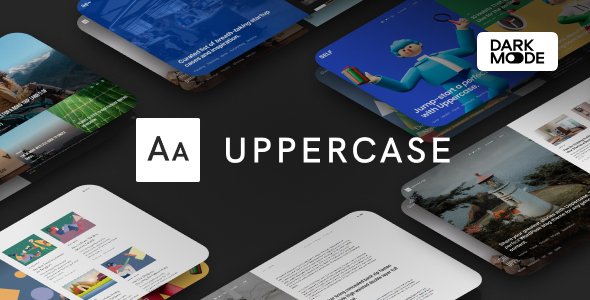
Stuck on your Uppercase WordPress theme? Let's fix it.
No endless back-and-forth. Just send us the details and we'll get it done.
No obligation · Replies within 1 hour · Quote within 1 day
Setup · Customization · Bug fixes · WooCommerce integration
About Uppercase WP Theme
Uppercase is a premium WordPress theme built by CodeSupply Co, a developer known for clean, editorial-focused designs. The theme targets modern blogs, online magazines, and content-heavy publications that need strong typography and flexible layout options.
It ships with multiple homepage layouts, a built-in post format system, and a custom widget set designed specifically for sidebars and footers. The block editor is supported, and the theme handles both classic and full-site editing workflows reasonably well.
Uppercase is particularly well-suited for writers and independent publishers who want a polished look without hiring a designer. Performance is decent out of the box, and the codebase is clean enough that a developer can extend it without fighting the theme. It runs well on most shared hosting stacks and works with common caching plugins without conflicts.
Get matched with a Uppercase developer in under one day
Tell us about your Uppercase project. Small fixes, Uppercase theme customization, or a full website build, whatever you need, we've got it covered.
We'll connect you to the right Uppercase developers, define the scope, and get everything 100% clear.
You'll get one estimate, hire your preferred developer, and start collaborating.
Uppercase is approachable for beginners, but the gap between a default setup and a truly custom site is wide. If you need specific layouts, plugin integrations, or performance improvements, a vetted developer who knows the theme is the fastest path forward.
Through Codeable, you get matched with WordPress specialists who have hands-on experience with editorial themes like Uppercase. No generalist freelancers, no bidding wars. Just developers who know what they’re doing and can get your project done right.
Pros
- Clean, editorial typography that works well for text-heavy content without custom CSS
- Multiple homepage layouts included, so you have real starting points rather than one generic template
- Customizer options are well-organized and cover the most common visual adjustments
- Lightweight codebase compared to multipurpose themes, which helps with page speed
- Child theme development is straightforward due to a predictable template and hook structure
Cons
- No official Elementor support, which limits drag-and-drop customization inside post content
- Demo import can pull in placeholder images that require manual replacement, adding setup time
- Advanced layout changes, like custom archive pages, require PHP-level work and template overrides
- WooCommerce styling is basic and needs additional CSS for a polished shop appearance
- Documentation is functional but thin on developer-specific details like available hooks and filters
Who is Uppercase for?
Independent News & Online Magazine
Uppercase handles high post volume well. Its grid-based homepage layouts let editors feature breaking news at the top while keeping category sections organized below. The built-in post format support means video, gallery, and quote posts display correctly without extra plugins. For small newsrooms that need a professional look without a large development budget, this theme covers the basics solidly.
Personal Blog & Writer Portfolio
Writers get strong typographic defaults, clean single-post templates, and readable line spacing that most multipurpose themes don’t bother with. The sidebar and footer widgets handle bio boxes, social links, and newsletter signups without custom coding. If you publish long-form content and want readers to stay focused on the text, Uppercase is designed for exactly that.
Food & Lifestyle Publication
Visual categories, recipe-style post layouts, and large featured image support make Uppercase a practical choice for food bloggers and lifestyle publishers. The theme handles image-heavy posts without significant layout breakage. Category archive pages are clean by default, and a developer can extend them with custom meta output for things like recipe details or product ratings without heavy modification.
Tech & Software Review Site
Tech review sites need structured content, clear comparison sections, and fast load times. Uppercase’s lean codebase gives you a performance advantage over heavier themes. The grid layouts work well for displaying multiple review posts in a scannable format. Pair it with a structured data plugin and a solid SEO setup, and you have a solid foundation for a review-focused site that ranks.
Niche Content Membership Site
Uppercase integrates cleanly with MemberPress and Restrict Content Pro, which makes it a workable base for paid content sites. The theme doesn’t try to handle membership logic itself, so there’s no conflict. A developer can add gated content notices, member-only post markers, and login redirects using standard WordPress hooks without modifying core theme files.

Customizing Uppercase
Uppercase exposes most visual settings through the WordPress Customizer, covering colors, fonts, header layout, sidebar positioning, and footer columns. You can switch between several pre-built demos with a single import, which gives you a solid starting point before you start adjusting.
Where things get more involved is custom post templates, modifying the magazine-style grid blocks, or integrating a non-standard plugin into the layout. That’s where working with an Uppercase expert saves real time. A developer who knows the theme’s template hierarchy and hook system can make precise changes without breaking the update path.
Custom child themes are straightforward to build on top of Uppercase, and most client requests, such as custom author pages, ad placements, or membership-gated content, can be implemented cleanly. If you want changes beyond what the Customizer offers, professional help is worth it.
Recommended plugins for Uppercase
Uppercase works well with WooCommerce if you need a simple shop alongside editorial content. WPForms, Mailchimp for WordPress, and Newsletter plugins integrate cleanly into widget areas and post footers.
For SEO, Rank Math and Yoast both work without conflicts. If you need to push performance further, pairing Uppercase with a proper caching layer and image optimization is straightforward. See our WordPress performance service and WordPress SEO optimisation service for structured help with both. Elementor is not officially supported and can cause layout issues inside content areas.
Not sure which plugins to use? This WordPress plugins directory covers the most popular options with reviews and setup guides.
Uppercase common issues
Uppercase theme header not displaying correctly after update
Header display issues after an update are usually caused by a conflict between the theme’s CSS and a caching plugin serving old stylesheets. Clear all cache layers first, including server-side and CDN cache. If the problem persists, check whether a custom child theme’s stylesheet is overriding the updated header styles. Comparing the parent theme’s header.php against your child theme version often reveals the source. Our WordPress bug fixing service can trace and resolve this quickly.
Uppercase WordPress theme sidebar overlapping content on mobile
Mobile sidebar overlap in Uppercase is typically a CSS specificity issue triggered by a plugin adding inline styles or a custom CSS rule that breaks the responsive stack. Open browser DevTools on a mobile viewport and inspect which rule is overriding the sidebar’s width or float property. A targeted media query fix in your child theme’s stylesheet resolves it without touching theme files. If the problem appeared after a plugin install, disable plugins one at a time to isolate the conflict.
Custom fonts not loading in Uppercase theme
If custom fonts aren’t loading, first check that the font is enqueued correctly in your child theme’s functions.php rather than added only via the Customizer, which can be unreliable across updates. Verify the font URL is loading over HTTPS and isn’t being blocked by a content security policy. Browser console errors will flag a blocked font request directly. Google Fonts can also be loaded locally for better privacy compliance and reliability using a plugin like OMGF.
Uppercase theme homepage layout broken after plugin install
A broken homepage layout after a plugin install usually points to a JavaScript conflict or a plugin injecting CSS that overrides Uppercase’s grid classes. Deactivate the newly installed plugin and reload the homepage to confirm it’s the source. If confirmed, check the plugin’s settings for options to disable front-end styles or scripts. In some cases, loading the plugin’s assets only on relevant pages using conditional tags in functions.php solves the conflict without removing the plugin.
Uppercase FAQ
Yes, Uppercase supports the WordPress block editor for post and page content. You can use standard blocks for text, images, and embeds without issues. Full site editing is partially supported, but the theme’s primary layout controls still live in the Customizer. For block-heavy builds, you may need minor CSS adjustments to align block styles with the theme’s typography defaults.
Uppercase is compatible with WooCommerce at a basic level. Product pages, cart, and checkout render correctly, but the default styling is minimal. If you’re running a shop alongside editorial content, expect to add custom CSS to bring the store pages in line with the rest of the theme’s design. A developer can handle this with a child theme stylesheet targeting WooCommerce’s standard CSS classes.
Demo content for Uppercase is imported through the theme’s built-in demo importer, usually found under Appearance in the WordPress dashboard. You’ll need the One Click Demo Import plugin in some versions. The process imports posts, pages, widgets, and Customizer settings. Replace placeholder images manually after import, as stock photos from the demo are not included for licensing reasons.
Uppercase does not officially support Elementor. The page builder can be activated, but it may conflict with the theme’s layout inside content areas, particularly on homepage templates and archive pages. If you need a drag-and-drop builder, consider a theme built specifically for Elementor. Forcing Elementor into Uppercase tends to create layout issues that are time-consuming to fix.
Yes, switching your existing blog to Uppercase is straightforward for content. Your posts, pages, and media carry over automatically since they’re stored in the database, not the theme. You’ll need to reconfigure widgets, menus, and Customizer settings after activation. If you’re also changing hosting or moving domains at the same time, our WordPress migration service covers the full process safely.
Hire an Uppercase WordPress Expert
Whether you need a custom child theme, layout modifications, plugin integration, or a full site build on Uppercase, we can match you with a developer who knows the theme inside and out. Work is scoped clearly, delivered through a vetted network, and backed by a straightforward process from estimate to launch.
Get a free estimate with no obligation. You’ll hear back within 24 hours.
You'll need a free Codeable account so developers can ask questions and send their quotes.