Vagabonds WordPress Theme
by axiomthemes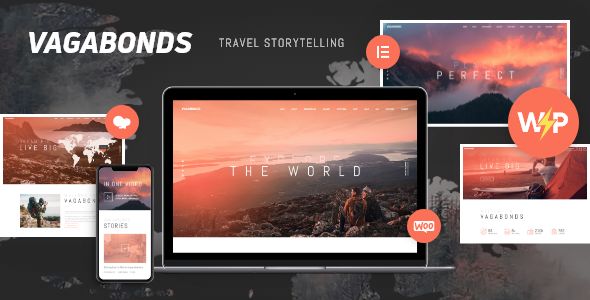
Stuck on your Vagabonds WordPress theme? Let's fix it.
No endless back-and-forth. Just send us the details and we'll get it done.
No obligation · Replies within 1 hour · Quote within 1 day
Setup · Customization · Bug fixes · WooCommerce integration
About Vagabonds WP Theme
Vagabonds is a travel-focused WordPress theme built by AxiomThemes. It targets travel bloggers, tour operators, and adventure agencies who need a visually driven site that loads fast and looks good on any device.
The theme ships with multiple demo layouts, WPBakery Page Builder support, and built-in booking-friendly sections. It handles large hero images well, supports video backgrounds, and includes a clean blog layout suited to long-form travel content.
AxiomThemes has a solid track record with niche-specific themes, and Vagabonds reflects that — the design decisions feel intentional rather than generic. If you run a travel brand and want a polished starting point without building from scratch, Vagabonds gives you that foundation.
Get matched with a Vagabonds developer in under one day
Tell us about your Vagabonds project. Small fixes, Vagabonds theme customization, or a full website build, whatever you need, we've got it covered.
We'll connect you to the right Vagabonds developers, define the scope, and get everything 100% clear.
You'll get one estimate, hire your preferred developer, and start collaborating.
Getting Vagabonds set up correctly takes more than clicking through a demo import. A developer who has worked with AxiomThemes templates knows where the customisation limits are, which plugins integrate cleanly, and how to avoid the common layout conflicts that appear after updates.
Through Codeable, you get matched with vetted WordPress specialists — including Vagabonds developers — within 24 hours. Post your project, get a free estimate, and only hire if you’re satisfied.
Pros
- Purpose-built for travel with destination, tour, and itinerary layout options included
- Multiple homepage demo layouts covering blogs, agencies, and tour operators
- Video background support in hero sections works well for cinematic travel content
- Compatible with WP Travel Engine and Tourmaster for bookings without custom coding
- Regular updates from AxiomThemes with maintained compatibility for major WordPress releases
Cons
- Relies on WPBakery Page Builder, which adds page weight and makes switching builders difficult later
- Demo import can be unreliable — images sometimes fail and layouts need manual cleanup
- Customising tour archive templates requires PHP knowledge, not just Customizer edits
- Limited native performance optimisation — heavy image use means caching and CDN setup is essential
- Support from AxiomThemes is ticket-based and can be slow for complex or code-level questions
Who is Vagabonds for?
Travel Blog
Vagabonds suits travel bloggers who publish long-form trip reports, destination guides, and gear reviews. The blog layouts handle featured images well, category pages are easy to filter, and the typography is readable on mobile. You can build a content-heavy archive without the design falling apart.
Tour Operator Website
Tour operators need trip listings, pricing tables, itinerary breakdowns, and a booking flow. Vagabonds provides the visual structure for all of this, and when paired with WP Travel Engine, you get a working booking system without building custom post types from scratch. A developer can connect payment gateways in a day.
Adventure Travel Agency
Adventure agencies selling multi-day treks, rafting trips, or group expeditions benefit from Vagabonds’ hero sections and gallery layouts. You can build separate landing pages per trip type, add testimonials, and integrate an enquiry form. The design handles outdoor and action-focused photography without looking cluttered.
Destination Guide
Sites that cover a specific region or city — with neighbourhood guides, restaurant lists, and activity roundups — fit the Vagabonds template well. The theme handles mixed content types cleanly, and with some custom taxonomy work, a developer can build a proper filterable destination directory.
Travel Photography Portfolio
Travel photographers need layouts that prioritise imagery without slow load times. Vagabonds offers fullscreen gallery sections and portfolio-style pages. With proper image optimisation and lazy loading configured, a photographer’s site on this theme can look high-end and still hit decent Core Web Vitals scores.

Customizing Vagabonds
Vagabonds ships with sensible defaults, but most travel sites need more than defaults. Customising the header layouts, typography, color schemes, and tour listing sections requires working inside WPBakery or the WordPress Customizer — both of which have a learning curve if you’re not a developer.
Beyond visual changes, a Vagabonds expert can wire up booking plugins like WP Travel Engine or Tourmaster, build custom itinerary pages, set up filtered destination archives, and optimise the template structure so performance doesn’t suffer as the site grows.
If you want the theme to match your brand precisely rather than looking like the demo, working with someone who knows Vagabonds inside out saves you hours of trial and error.
Recommended plugins for Vagabonds
Vagabonds works well with several plugins that extend its core functionality. WP Travel Engine adds a full booking and payment flow. WooCommerce handles trip or merchandise sales. WPML makes the site multilingual for international travel brands.
For performance, pairing Vagabonds with a caching layer and image optimisation plugin is essential given the heavy imagery travel sites carry. See our WordPress performance service for details.
For visibility, structured data for tours and destinations helps search rankings — something covered in our WordPress SEO service.
Not sure which plugins to use? This WordPress plugins directory covers the most popular options with reviews and setup guides.
Vagabonds common issues
Vagabonds theme demo import not working
Demo import failures in Vagabonds usually come down to server memory limits or XML timeout settings. Set max_execution_time to 300 and memory_limit to 256MB in your php.ini or wp-config.php. If images still fail to import, download the demo media manually from AxiomThemes and upload separately. If the problem persists, our bug fixing service can sort it quickly.
Vagabonds page builder layout broken after update
WPBakery layout breaks after a Vagabonds update usually mean a version conflict between the bundled WPBakery and either the theme or another plugin. First, check which WPBakery version Vagabonds bundles and whether you have a separately licensed copy running alongside it. Deactivate one and test. If shortcodes are rendering as plain text, regenerate them via WPBakery’s built-in converter tool. Persistent issues need a developer to audit the conflict.
Vagabonds theme slow loading speed
Vagabonds sites get slow because of unoptimised hero images, WPBakery’s script load, and multiple plugin requests stacking up. Start by running images through a compression tool and enabling lazy loading. Add a caching plugin like WP Rocket and consider a CDN for static assets. Minify and combine CSS and JS where possible. For a full audit and fix, see our WordPress performance service.
Vagabonds header menu not displaying correctly on mobile
Mobile menu problems in Vagabonds are often caused by a JavaScript conflict with another plugin, or custom CSS overriding the hamburger menu toggle. Open browser dev tools, check the console for JS errors on mobile viewport, and inspect the menu container for conflicting z-index or display rules. If you’ve added custom header code, temporarily revert it and test. A clean child theme setup prevents these conflicts from recurring after updates.
Vagabonds FAQ
Yes, with the right plugins. Vagabonds provides the visual structure — tour pages, itinerary layouts, booking CTAs — but you need a plugin like WP Travel Engine or Tourmaster to handle actual bookings, payments, and availability. The theme is designed with this in mind and integrates cleanly with both plugins when set up correctly.
Vagabonds is compatible with WooCommerce. You can use it to sell tours, travel merchandise, or digital products. The theme doesn’t include a dedicated WooCommerce layout, so shop and product pages use the default WooCommerce templates. A developer can style these to match the rest of your Vagabonds site without modifying core files.
Not easily. Vagabonds is built around WPBakery, and most of its demo layouts rely on WPBakery shortcodes. Switching to Elementor or the block editor mid-build means rebuilding pages from scratch. If you plan to use Gutenberg or Elementor, Vagabonds is not the right starting point — consider a theme built natively for your preferred builder.
Go to Appearance and look for the AxiomThemes panel or the one-click demo import option included with the theme. You’ll need to have the required plugins activated first — WPBakery and any bundled plugins. Set your PHP memory limit to 256MB before importing to avoid timeouts. If the import fails, check your server error logs for the specific cause.
AxiomThemes keeps Vagabonds updated and it generally stays compatible with current WordPress releases. Always check the changelog before updating your live site. If you’re running an older version of Vagabonds, test updates in a staging environment first. For ongoing compatibility management, a WordPress maintenance plan handles this automatically.
Hire a Vagabonds WordPress Developer
Whether you need a full Vagabonds setup, custom layout work, booking integration, or fixes to an existing site, our developers handle it. Work is scoped clearly, delivered on time, and backed by Codeable’s satisfaction guarantee.
Get a free estimate — no obligation, no upfront payment. Describe your project and get matched with a Vagabonds expert within 24 hours.
You'll need a free Codeable account so developers can ask questions and send their quotes.