Valenti WordPress Theme
by codetipi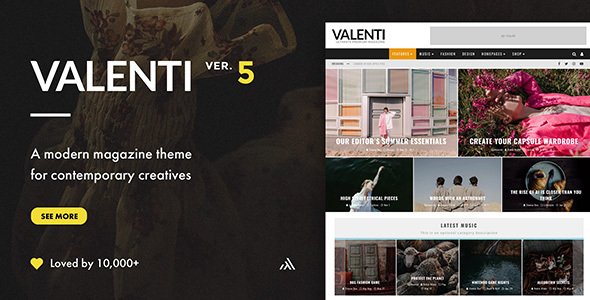
Stuck on your Valenti WordPress theme? Let's fix it.
No endless back-and-forth. Just send us the details and we'll get it done.
No obligation · Replies within 1 hour · Quote within 1 day
Setup · Customization · Bug fixes · WooCommerce integration
About Valenti WP Theme
Valenti is a WordPress magazine theme built by Codetipi, aimed at publishers, bloggers, and editorial teams who need a fast, visually structured site. It ships with a drag-and-drop front-page builder, multiple pre-built layouts, and tight integration with popular plugins like WooCommerce and bbPress.
The theme is known for its clean typography, flexible ad placement zones, and support for video content. It handles high post volumes well, making it a practical choice for news sites and niche content hubs. Updates have been consistent, and the Codetipi documentation covers most setup scenarios. That said, getting the most out of Valenti’s layout system usually takes some configuration work, especially if you’re moving from another theme or building something outside the standard editorial mold.
Get matched with a Valenti developer in under one day
Tell us about your Valenti project. Small fixes, Valenti theme customization, or a full website build, whatever you need, we've got it covered.
We'll connect you to the right Valenti developers, define the scope, and get everything 100% clear.
You'll get one estimate, hire your preferred developer, and start collaborating.
Valenti is capable, but it rewards developers who know its builder system, hook structure, and customization boundaries. If you need work done quickly and correctly, the right move is hiring a vetted Valenti developer through Codeable. Every developer on the platform has been screened, and you get a fixed estimate before any work starts. No guesswork, no hourly surprises. Whether it’s a layout fix, a full custom build, or ongoing modifications, a Valenti specialist on Codeable can handle it.
Pros
- Built-in front-page builder designed specifically for magazine and editorial layouts
- Native ad management zones with precise placement control, no extra plugin needed
- Strong performance baseline with lightweight markup compared to most magazine themes
- WooCommerce and bbPress compatibility built in, not bolted on
- Consistent update history from Codetipi with maintained documentation
Cons
- Front-page builder has a learning curve and doesn't behave like Elementor or Gutenberg
- Limited block editor support; many layout features still rely on the classic editor workflow
- Customization beyond the built-in options requires PHP and child theme knowledge
- Not well-suited for portfolio or service-based sites outside the editorial use case
- Support response times from Codetipi can be slow during busy periods
Who is Valenti for?
News and Online Magazines
Valenti was built for exactly this. Multi-category news sites benefit from its flexible front-page modules, breaking news tickers, and ad zones that fit standard IAB formats. A Valenti developer can configure category-specific layouts and automate featured post logic to keep high-traffic news sites running without manual curation overhead.
Niche Content Blogs
Single-topic blogs covering food, tech, travel, or finance work well with Valenti’s clean post templates and related content sections. The theme keeps readers on-page through structured internal linking displays and category grids. A Valenti specialist can tailor the layout to match the visual identity of a specific niche without heavy redesign work.
Video and Multimedia Publishers
Valenti handles embedded video and featured video posts natively. Publishers running YouTube channels alongside written content can use video-first post formats with automatic thumbnails. The theme’s wide layout options accommodate video grids without custom CSS hacks, making it a practical choice for multimedia editorial teams.
Community Sites with Forums
With bbPress integration built in, Valenti suits community-driven editorial sites where readers contribute through forums alongside curated content. A Valenti expert can configure forum sections to match the main editorial design, set up member roles, and integrate notification systems to keep community engagement active without visual inconsistency.
Editorial eCommerce Hybrids
Sites that combine editorial content with a WooCommerce store benefit from Valenti’s native compatibility. Product reviews, buying guides, and shop pages can live within the same theme without style conflicts. A Valenti developer can build custom product display templates that match the editorial grid layout for a consistent shopping experience.

Customizing Valenti
Valenti ships with a visual front-page builder that lets you arrange content modules without touching code. You can set up multiple homepage sections, control widget areas, and adjust colors and fonts through the WordPress Customizer. The built-in ad management system gives you precise control over placement without a separate plugin.
Beyond the defaults, a Valenti expert can unlock significantly more. Custom post templates, child theme modifications, conditional layouts for specific categories, and performance tuning all require hands-on development work. If you need a non-standard layout, unique header behavior, or deep WooCommerce integration, working with a Valenti specialist saves you the trial-and-error. The theme’s codebase is well-structured, which makes targeted customizations cleaner than many commercial themes.
Recommended plugins for Valenti
Valenti pairs well with a focused plugin stack. For ad-heavy sites, Advanced Ads integrates cleanly with Valenti’s ad zones. WooCommerce works out of the box for stores attached to editorial sites. Elementor is not the intended tool here as Valenti has its own builder logic.
Speed matters on magazine sites. A WordPress performance audit will identify render-blocking scripts, image loading issues, and caching gaps that affect your Core Web Vitals. For content-heavy sites targeting search traffic, pairing Valenti with a structured WordPress SEO strategy makes a measurable difference in how articles rank and how site architecture is crawled.
Not sure which plugins to use? This WordPress plugins directory covers the most popular options with reviews and setup guides.
Valenti common issues
Valenti homepage builder not saving changes
Homepage builder save failures in Valenti are usually caused by a PHP memory limit that’s too low or a JavaScript conflict with another plugin. Start by increasing your PHP memory limit to at least 256MB in wp-config.php. Then deactivate plugins one by one to isolate a JS conflict. Clearing your browser cache and the site’s object cache after each change helps confirm whether the fix has taken effect. If the issue persists, check the browser console for specific JS errors pointing to the conflicting script.
Valenti theme breaking after WordPress update
Core WordPress updates occasionally break theme functionality when deprecated functions are removed. After an update, check your site’s error log for PHP notices or fatal errors tied to Valenti functions. Updating to the latest Valenti version usually resolves compatibility issues. If you’re running a child theme with custom functions, those may also need updating. If your site is down or broken, a WordPress bug fixing service can diagnose and patch the issue quickly without risking further data loss.
Valenti featured image not showing on posts
Missing featured images in Valenti are often a thumbnail regeneration issue after switching themes or changing image sizes. Use the Regenerate Thumbnails plugin to rebuild all image sizes defined by the theme. Also confirm that the correct image size is set in your post meta and that your media upload directory has proper write permissions. If images are set correctly but still not appearing, inspect the post template being used, as custom templates sometimes override the default featured image display logic.
Valenti site loading slowly on mobile
Valenti can become heavy on mobile due to large unoptimized images, render-blocking scripts, and unused CSS loaded by the theme or plugins. Start by enabling lazy loading for images and using a caching plugin like WP Rocket. Compress images before uploading and use a CDN for static assets. Minify CSS and JS through your caching plugin settings. For a thorough audit covering Core Web Vitals and mobile-specific bottlenecks, a structured WordPress performance review will identify exactly what’s dragging down your scores.
Valenti ad zones not displaying correctly
Valenti’s ad zones rely on specific widget areas and shortcodes being placed correctly. If ads aren’t displaying, first confirm the widget area is active and the correct ad code is pasted without extra line breaks. Some ad networks require JavaScript to load asynchronously, which can conflict with aggressive caching or lazy load scripts. Test with caching disabled. Also check if an ad blocker in your browser is hiding the ads during testing. If using a plugin like Advanced Ads alongside Valenti’s native zones, check for duplicate zone conflicts.
Valenti child theme not applying custom CSS
If a Valenti child theme isn’t applying your custom CSS, the most common cause is stylesheet load order. The child theme’s style.css must load after the parent theme’s stylesheet. Check your child theme’s functions.php to confirm you’re enqueuing the parent stylesheet correctly using wp_enqueue_style with a dependency on the parent handle. Avoid using @import in style.css as it creates load order issues. Also confirm you activated the child theme, not the parent, in Appearance > Themes.
Valenti WooCommerce pages showing wrong layout
WooCommerce layout issues in Valenti usually happen when the theme’s WooCommerce template files are outdated after a WooCommerce update. Go to WooCommerce > Status > System Status and look for outdated template files flagged under your theme. Update those templates in your child theme folder to match the current WooCommerce versions. If you haven’t overridden templates, the issue may be a CSS conflict. Use browser dev tools to identify which styles are overriding WooCommerce’s layout and add targeted fixes in your child theme stylesheet.
Valenti social sharing buttons not working
Broken social sharing buttons in Valenti are typically caused by a JavaScript error elsewhere on the page preventing the share scripts from initializing. Open your browser console and check for JS errors. Also verify that the social sharing feature hasn’t been disabled in Valenti’s theme options. If you’re using a separate social sharing plugin alongside Valenti’s built-in functionality, they may conflict. Disable one and test. If the issue appeared after a plugin update, a WordPress bug fixing service can isolate the conflict efficiently.
Valenti search returning no results
When Valenti’s search returns no results, the problem is often related to WordPress search indexing rather than the theme itself. Start by checking if your search template is correctly referencing the query. Plugins like Relevanssi can improve search accuracy significantly. Also confirm that the posts you’re searching for aren’t set to private or draft status. If you recently moved the site, reindex search by going to Settings > Reading and toggling the search engine visibility setting, then saving.
Valenti logo not displaying in header
A missing logo in Valenti’s header is usually a Customizer setting issue. Go to Appearance > Customize > Site Identity and confirm the logo image is still attached. If you recently regenerated media or moved servers, the image URL may have changed. Re-upload the logo and save. Also check if custom CSS in your child theme or a CSS plugin is hiding the logo element with display:none or visibility:hidden. Use browser dev tools to inspect the header element and confirm whether the image tag is present but hidden.
Valenti FAQ
Codetipi has maintained Valenti with regular updates. The theme receives compatibility patches for new WordPress versions and WooCommerce releases. Before purchasing or using it on a live project, check the theme’s changelog on ThemeForest to confirm recent activity. For active news or magazine sites, using a Valenti developer to handle updates safely in a staging environment is the recommended approach.
Valenti is not designed around Elementor. It has its own front-page builder for magazine layouts. You can technically use Elementor on individual pages, but the two systems don’t integrate cleanly. If you need Elementor for specific landing pages while keeping Valenti’s editorial layout elsewhere, a Valenti specialist can configure that without breaking the theme’s core layout logic.
Technically yes, but it’s not the right fit for portfolio, agency, or service sites. Valenti’s strengths are editorial structure, ad management, and content-heavy layouts. Forcing it into a non-magazine shape requires significant customization. If your site isn’t primarily content-driven, a different theme will get you there faster with less development work.
Create a child theme folder in wp-content/themes with a style.css file containing the required header comment referencing Valenti as the parent. Add a functions.php file that enqueues the parent stylesheet using wp_enqueue_style. Activate the child theme in Appearance > Themes. All custom CSS and PHP overrides should live in the child theme to survive parent theme updates.
Yes, Valenti includes built-in WooCommerce support. Shop pages, product archives, and cart pages adopt the theme’s styling without requiring manual template work. For deeper customization like custom product layouts, review integration, or editorial-style product grids, a Valenti developer can extend the default WooCommerce templates within a child theme.
Valenti uses its own proprietary front-page builder, not Gutenberg or a third-party page builder. It’s designed specifically for arranging magazine modules like sliders, category grids, and featured post blocks. The builder works through the WordPress Customizer and a dedicated settings panel, not through a visual drag-and-drop canvas like Elementor or Divi.
Valenti has a clean markup structure and generates semantic HTML, which is a good foundation for SEO. It supports schema markup and works with plugins like Yoast SEO and Rank Math. However, theme SEO-friendliness is only one factor. For real ranking improvements on a Valenti site, structured on-page SEO work and technical auditing matter more than the theme choice alone.
Valenti is sold on ThemeForest under a Regular License, which covers one end product. If you need to use it on multiple sites, you need a separate license for each. The Extended License covers a single site where end users are charged. Check ThemeForest’s licensing terms directly before deploying across multiple domains to avoid license violations.
Yes. The most reliable way is through Codeable, where vetted Valenti developers are available for both small fixes and full custom builds. You post your project, receive a fixed estimate, and only proceed if you agree with the scope and price. There’s no obligation and no hourly billing surprises. Get a Free Estimate to get started.
Start with image optimization, a caching plugin like WP Rocket, and a CDN for static assets. Valenti loads several scripts that can be deferred or conditionally loaded. Disable any unused theme features through the options panel. On the server side, PHP 8.x and object caching make a noticeable difference. For a site-specific audit, a WordPress performance review will identify the highest-impact fixes.
Hire a Valenti Expert Developer
Need a Valenti developer who knows the theme inside out? Post your project and get matched with a vetted specialist within 24 hours. You’ll receive a clear estimate before any work begins, with no obligation to proceed. Whether it’s a small fix or a full site build, the process is straightforward. Get a Free Estimate and see what’s possible with the right developer on your project.
You'll need a free Codeable account so developers can ask questions and send their quotes.