Vayvo WordPress Theme
by ProgressionStudios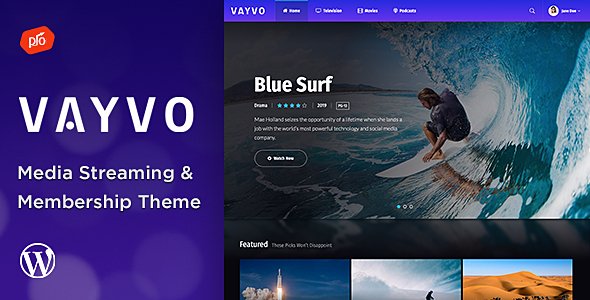
Stuck on your Vayvo WordPress theme? Let's fix it.
No endless back-and-forth. Just send us the details and we'll get it done.
No obligation · Replies within 1 hour · Quote within 1 day
Setup · Customization · Bug fixes · WooCommerce integration
About Vayvo WP Theme
Vayvo is a video and music WordPress theme built by ProgressionStudios. It targets content creators, streamers, and media publishers who want a polished front-end without building from scratch. The theme ships with a custom video player, membership controls, and monetisation options built in. It supports both self-hosted video and embeds from YouTube, Vimeo, and similar platforms.
The layout is designed around media consumption. Grid-based archives, featured sliders, and category filtering all come out of the box. It works with WooCommerce for selling memberships or downloads. ProgressionStudios maintains the theme actively and publishes documentation, but the feature density means there is a real learning curve. For anyone running a video-focused site, Vayvo is a solid starting point that does not require a page builder to get a professional result.
Get matched with a Vayvo developer in under one day
Tell us about your Vayvo project. Small fixes, Vayvo theme customization, or a full website build, whatever you need, we've got it covered.
We'll connect you to the right Vayvo developers, define the scope, and get everything 100% clear.
You'll get one estimate, hire your preferred developer, and start collaborating.
Vayvo has enough moving parts that generic WordPress advice does not always apply. Membership logic, video player customisation, and monetisation flows each have theme-specific quirks. Finding a developer who already knows the codebase is faster than paying someone to learn it on your project.
Codeable connects you with vetted WordPress specialists. Post your project, get matched with a Vayvo developer within 24 hours, and receive a free estimate before committing. No guesswork, no bidding wars.
Pros
- Built-in video player with support for self-hosted, YouTube, and Vimeo content
- Membership and access restriction features included without extra plugins
- WooCommerce compatibility for selling content, downloads, or subscriptions
- Media-focused layouts with category filtering and featured sliders out of the box
- Active development and updates from ProgressionStudios with available documentation
Cons
- Steep learning curve due to the volume of theme options and custom panels
- Theme options panel is separate from the WordPress Customizer, which breaks some standard workflows
- Heavy feature set can slow load times if the full plugin stack is used without optimisation
- Customisation beyond theme options requires developer knowledge of the specific codebase
- Community support is smaller than major multi-purpose themes, so problem-solving can take longer
Who is Vayvo for?
Video Streaming Sites
Vayvo is built for video-first sites. The custom player, grid archives, and category filtering handle a large video library cleanly. A Vayvo developer can extend this with watch history, user profiles, or recommendation logic to get closer to a full streaming experience.
Online Music Platforms
The theme handles audio as well as video, making it a reasonable fit for music blogs, artist sites, or small streaming platforms. Track listings, album pages, and embeds from SoundCloud or Spotify all work within the existing layout system.
Paid Membership Portals
Vayvo’s built-in access controls and WooCommerce integration make it practical for membership sites. A Vayvo specialist can configure tiered access, restrict specific content categories, and set up recurring billing with minimal plugin overlap.
Podcast and Audio Content Sites
Podcast publishers get clean episode archives, embedded players, and category organisation without custom development. Connecting a podcast feed and adding show notes pages is straightforward, and a Vayvo expert can add subscription options or transcript support on top.
Digital Download Stores
Paired with WooCommerce, Vayvo works as a front-end for selling digital files such as video courses, sample packs, or presets. The media-forward design suits this content type better than a generic shop theme, and access control keeps purchases tied to accounts.

Customizing Vayvo
Vayvo includes its own theme options panel where you control colours, typography, homepage layout, and player settings. Most visual changes are handled there rather than through the WordPress Customizer, which is worth knowing before you start digging around.
Beyond the defaults, a Vayvo expert can wire up custom post types for series or episodes, add subscription tier logic, modify the player behaviour, or integrate a payment gateway. Child theme development is the right approach for anything structural so updates do not overwrite your work. If you need custom membership rules, affiliate tracking, or a unique monetisation flow, that work goes beyond what theme options expose and requires a developer who knows the codebase. A Vayvo specialist saves time by knowing exactly where the theme hooks and filters live.
Recommended plugins for Vayvo
Vayvo pairs well with a focused plugin stack. WooCommerce handles paid memberships and digital downloads. Restrict Content Pro or MemberPress can manage access tiers. For ads, Advanced Ads integrates cleanly without layout breakage.
On the technical side, a full-page caching plugin and a CDN make a measurable difference for video-heavy pages. See the WordPress performance service for specifics on tuning a media site. Schema markup for videos helps search visibility, and structured data plugins can fill that gap. If organic traffic matters, pairing Vayvo with a solid WordPress SEO setup is worth the effort early on rather than retrofitting it later.
Not sure which plugins to use? This WordPress plugins directory covers the most popular options with reviews and setup guides.
Vayvo common issues
Vayvo video player not working after update
Player breakage after an update usually comes from a JavaScript conflict with a plugin or a cached old script. Clear all caches first, then disable plugins one by one to isolate the conflict. If the player was customised in a parent theme file rather than a child theme, an update may have overwritten those changes. A WordPress bug fixing specialist can trace the exact conflict and restore function without losing your settings.
Vayvo membership access not restricting content correctly
Membership access issues in Vayvo are often a configuration mismatch between the theme’s built-in controls and a plugin like MemberPress or Restrict Content Pro. Check whether the same content is restricted in both places or neither. Role conflicts and caching can also serve unrestricted content to logged-in users. If the logic is inconsistent, a WordPress bug fixing expert can audit the access rules and fix the gaps.
Vayvo theme options not saving changes
When theme options fail to save, the most common causes are a PHP memory limit being hit on save, a nonce conflict from a security plugin, or file permission issues on the server. Check your PHP error log first. Disabling security plugins temporarily will confirm if one is blocking the save request. If the problem persists, a server-level review is needed to identify the root cause.
Vayvo slow loading on video archive pages
Video archive pages are heavy by nature, but Vayvo can add to that with unoptimised thumbnail loading and render-blocking scripts. Enable lazy loading for images, use a CDN for media assets, and check whether the theme is loading all player scripts on non-video pages. A page caching plugin configured correctly makes a large difference. Review the full setup with the WordPress performance service for a structured approach.
Vayvo FAQ
Vayvo covers the basics for a membership video site. It has access controls, WooCommerce support, and a custom player. For a full Netflix-style experience with watch history, recommendations, or complex tier logic, you will need custom development on top of the theme. A Vayvo developer can build those features into the existing framework.
Vayvo is not designed around page builders. Some users run Elementor alongside it, but the theme’s own layout system handles most use cases. Mixing a page builder with Vayvo’s custom post types and player templates can create conflicts and is generally not recommended unless a developer manages the integration carefully.
Custom membership tiers in Vayvo typically involve combining the theme’s access settings with a dedicated plugin like MemberPress or Restrict Content Pro. The theme does not have native multi-tier support out of the box. A Vayvo specialist can configure the right plugin combination and make sure content restrictions behave consistently across all tiers.
Yes, but it requires proper setup. Thumbnail optimisation, lazy loading, a CDN, and server-side caching are all necessary for archive pages with many videos. The theme does not handle performance automatically. Without these in place, large libraries will be slow regardless of hosting quality.
ProgressionStudios continues to release updates for Vayvo. It is an actively maintained theme rather than an abandoned product. That said, update frequency is slower than major multi-purpose themes. Check the changelog on ThemeForest before purchasing to see how recent the last update was.
Hire a Vayvo Developer
Whether you need a Vayvo expert to build a membership site from scratch, fix a specific bug, or extend the theme with custom functionality, working with someone who knows the theme saves real time. All work is scoped before it starts, and you only proceed when you are happy with the estimate.
Get a Free Estimate and describe your project. A Vayvo specialist will review it and come back with a clear plan.
You'll need a free Codeable account so developers can ask questions and send their quotes.