Vela WordPress Theme
by Wyde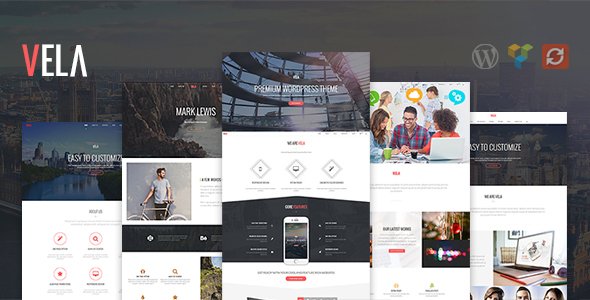
Stuck on your Vela WordPress theme? Let's fix it.
No endless back-and-forth. Just send us the details and we'll get it done.
No obligation · Replies within 1 hour · Quote within 1 day
Setup · Customization · Bug fixes · WooCommerce integration
About Vela WP Theme
Vela is a multipurpose WordPress theme built by Wyde. It targets service businesses, agencies, and portfolio sites that need a clean layout without heavy page builder overhead. The theme ships with a drag-and-drop builder, pre-built demo content, and a header builder that covers most layout needs out of the box.
Wyde keeps the codebase relatively lean compared to many multipurpose competitors. Vela supports WooCommerce, has built-in mega menu functionality, and comes with a library of section templates you can mix and match. It works well for businesses that want a polished site without commissioning a theme from scratch. That said, getting the most from Vela still takes time, particularly when deviating from the demo layouts or integrating third-party plugins.
Get matched with a Vela developer in under one day
Tell us about your Vela project. Small fixes, Vela theme customization, or a full website build, whatever you need, we've got it covered.
We'll connect you to the right Vela developers, define the scope, and get everything 100% clear.
You'll get one estimate, hire your preferred developer, and start collaborating.
Most Vela issues come down to one thing: time. Learning Wyde’s builder logic, tracking down a CSS conflict, or rebuilding a section that broke after an update takes hours you may not have. Codeable connects you with vetted WordPress developers who know themes like Vela well. You describe the problem, get a free estimate, and only move forward if the scope and price make sense. No guesswork, no generalist freelancers.
Pros
- Lean codebase compared to other Wyde multipurpose themes, keeping base page weight manageable
- Built-in header builder with sticky, transparent, and split header options that cover most use cases
- WooCommerce compatibility is solid with shop and product page templates included
- Multiple pre-built demo sites cover agency, portfolio, business, and service niches
- Mega menu included natively, no plugin required
Cons
- Customising outside the demo layouts requires CSS knowledge or a developer
- The page builder is proprietary to Wyde, so switching themes later means rebuilding content
- Documentation is thin in places, particularly for advanced header and footer configurations
- Some third-party plugin conflicts surface due to the theme's custom script loading order
- Demo import can be slow and occasionally incomplete, requiring manual cleanup
Who is Vela for?
Creative Agency
Vela suits agency sites well. The portfolio post type, project filtering, and clean grid layouts handle case study presentation without extra plugins. A Vela developer can extend the portfolio to include custom fields, filterable categories, or a lightbox gallery that matches the agency’s brand rather than the default demo styling.
Freelance Portfolio
Freelancers in design, photography, or development can build a strong portfolio with Vela’s grid and masonry layouts. The theme handles single-page scrolling formats cleanly. A Vela specialist can set up a contact form, booking integration, or client testimonial section that goes beyond what the demo provides out of the box.
Small Business Services
Service businesses like consultants, cleaners, or local tradespeople benefit from Vela’s service section templates, team member layouts, and pricing tables. The theme supports local SEO plugin integration without conflicts. A Vela developer can configure call-to-action sections and lead forms tailored to how service clients actually convert.
WooCommerce Store
Vela’s WooCommerce templates cover product pages, cart, and checkout with minimal extra styling. For shops needing custom product layouts, filtered categories, or upsell sections, a Vela developer can extend the theme’s shop templates without breaking update compatibility by working within a child theme structure.
Consulting Firm
Consulting firms need authority-signalling layouts: clear service breakdowns, team credentials, case studies, and a strong contact flow. Vela’s section library covers most of this. A Vela specialist can arrange and customise these sections to reflect the firm’s positioning rather than leaving it looking like an out-of-the-box demo site.

Customizing Vela
Vela’s Customizer options are solid but not unlimited. You can adjust typography, colours, header layouts, and footer columns without touching code. Where it gets complex is custom post types, non-standard page structures, or matching a brand that sits outside Vela’s default aesthetic.
A Vela expert can close that gap. Tasks like custom CSS overrides, child theme setup, header builder modifications, or integrating plugins the theme doesn’t natively support all benefit from someone who knows Wyde’s architecture. Hiring a Vela specialist also reduces the risk of updates breaking your customizations, since a developer can implement changes in a way that survives theme updates cleanly.
Recommended plugins for Vela
Vela integrates with WooCommerce, Contact Form 7, Mailchimp for WordPress, and most major SEO plugins. For stores or content-heavy sites, performance tuning matters. Vela loads a reasonable number of assets by default, but adding multiple plugins can slow things down. Proper caching, image optimization, and script management make a real difference. See our WordPress performance service for details.
On the SEO side, Vela pairs well with Yoast or Rank Math, but schema, breadcrumbs, and structured data still need correct configuration. Our WordPress SEO service covers that setup end to end.
Not sure which plugins to use? This WordPress plugins directory covers the most popular options with reviews and setup guides.
Vela common issues
Vela theme header not showing correctly on mobile
Mobile header issues in Vela usually come from conflicting breakpoint settings in the header builder or a CSS override from another plugin. Check the mobile header toggle settings in Vela’s Header Builder panel first. If a plugin is injecting styles that override the menu or logo display, use browser dev tools to identify the conflict. For persistent issues, our WordPress bug fixing service can isolate and resolve the conflict without disrupting your existing layout.
Vela WordPress theme slow loading after plugin install
Performance drops after a plugin install often mean script or style conflicts rather than the plugin itself. Vela loads its own scripts in a specific order, and some plugins queue assets that clash or duplicate functionality. Use a plugin like Query Monitor to identify what’s loading on affected pages. Deactivate plugins one at a time to isolate the cause. For a full audit, our WordPress bug fixing service covers script optimisation and conflict resolution.
Vela page builder layout broken after theme update
Broken layouts after a Vela update usually mean a customisation was made directly in the theme files rather than a child theme. When the update overwrites those files, the changes disappear. The fix involves either re-applying changes in a child theme or using Vela’s Customizer and custom CSS fields for non-structural changes. Going forward, all modifications should live in a child theme to survive future updates cleanly.
Vela WooCommerce shop page not displaying products
When the Vela shop page isn’t displaying products, the first checks are the WooCommerce page assignment under WooCommerce > Settings > Advanced and the product visibility settings. Also confirm that Vela’s WooCommerce compatibility files are active under the theme’s plugin compatibility settings. If products show in the backend but not the front end, a caching plugin may be serving a stale page. Clear all cache layers and test in an incognito window.
Vela FAQ
Vela works well for small business sites. It includes service templates, team sections, pricing tables, and contact layouts that cover typical small business needs. The demo content is close enough to production-ready that with some text and image swaps you can launch quickly. For anything beyond the demo structure, a Vela developer can customise without rebuilding from scratch.
Vela uses Wyde’s own drag-and-drop builder. It doesn’t natively support Elementor, and mixing page builders creates conflicts and bloat. If you need Elementor specifically, a different theme is a better starting point. A Vela specialist can usually achieve the same layout outcomes with the native builder, avoiding the compatibility problems that come with forcing Elementor into a theme built for a different system.
Go to Appearance > Import Demo Data after installing Vela and its required plugins. Make sure all required plugins are active before importing, otherwise some sections won’t render. The import can take several minutes. If images don’t appear, regenerate thumbnails using a plugin like Regenerate Thumbnails. Incomplete imports are common on slower hosting environments, so a staging environment with decent resources helps.
Yes. Vela includes WooCommerce-compatible templates for shop, product, cart, and checkout pages. It handles standard stores well. For custom product layouts, advanced filtering, or checkout modifications, a Vela developer can extend the theme’s WooCommerce templates through a child theme so customisations stay intact after updates.
FoxyConcept delivers Vela development through Codeable, a vetted WordPress developer network. Post your project, describe what you need, and receive a free estimate within 24 hours. There’s no obligation to proceed. It’s a straightforward way to get a Vela specialist without searching freelancer platforms or dealing with unvetted developers.
Hire a Vela WordPress Developer
Whether you need a Vela developer to build a site from a demo, customise an existing layout, or fix something that broke after an update, FoxyConcept delivers through Codeable’s vetted network. Work is scoped clearly before anything starts. Get a free estimate and see exactly what your project will cost before committing.
You'll need a free Codeable account so developers can ask questions and send their quotes.