Velo WordPress Theme
by sunrisetheme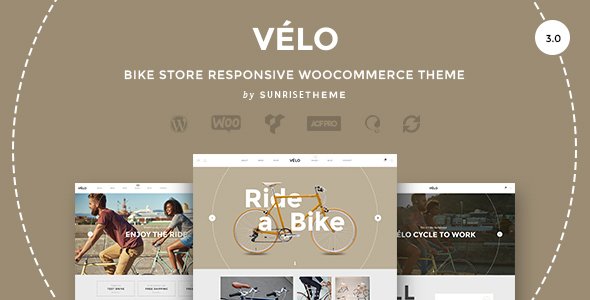
Stuck on your Velo WordPress theme? Let's fix it.
No endless back-and-forth. Just send us the details and we'll get it done.
No obligation · Replies within 1 hour · Quote within 1 day
Setup · Customization · Bug fixes · WooCommerce integration
About Velo WP Theme
Velo is a WordPress theme built by sunrisetheme, designed for cycling shops, bike rental businesses, and outdoor sports retailers. It ships with a clean, sport-focused layout that works well for both physical stores and online shops powered by WooCommerce.
The theme includes pre-built demo content, a custom homepage builder, and dedicated sections for product showcases, team profiles, and service listings. It is built on a solid page builder foundation, making it accessible to non-developers while still giving developers room to customize.
Velo targets a specific niche, and that focus shows in the design choices. Typography is bold, sections are spacious, and product cards are built to highlight gear. If you run a cycling-related business or an active lifestyle brand, Velo gives you a head start without requiring a full custom build.
Get matched with a Velo developer in under one day
Tell us about your Velo project. Small fixes, Velo theme customization, or a full website build, whatever you need, we've got it covered.
We'll connect you to the right Velo developers, define the scope, and get everything 100% clear.
You'll get one estimate, hire your preferred developer, and start collaborating.
Most Velo issues come from customizations that work at first but break during updates, or from plugin combinations the theme was not tested against. A developer who has worked with sunrisetheme templates knows where the fragile points are.
Through Codeable, you get access to vetted WordPress developers who can work on Velo without guesswork. Whether it is a layout fix, a WooCommerce extension, or a full homepage rebuild, the work gets done properly and stays stable. No junior freelancers, no forums, no waiting.
Pros
- Purpose-built for cycling and outdoor sports businesses, reducing setup time significantly
- Comes with WooCommerce-ready product sections and pre-styled shop pages
- Demo content imports cleanly and gives a realistic starting point
- Bold sport-focused typography and layout suits active lifestyle branding
- Compatible with major page builders, making layout edits accessible
Cons
- Niche design makes it harder to repurpose for unrelated industries
- Limited layout options for the blog section compared to dedicated magazine themes
- Some advanced WooCommerce features require additional plugins not included
- Customizer options are fairly basic and deep changes need custom CSS or a developer
- Documentation from sunrisetheme is minimal for edge-case customizations
Who is Velo for?
Cycling Shops
Velo was designed with cycling retail in mind. The product grid layout handles bike listings well, and the WooCommerce integration means you can manage inventory, variants, and pricing without fighting the theme. Category pages are clean and the overall visual tone matches what cycling customers expect from a credible shop.
Bike Rental Services
For bike rental businesses, Velo’s service section and visual style translate naturally. Pair it with a booking plugin and you have a functional rental site. The homepage layout works well for showcasing available bikes by category. A developer can wire up availability calendars and pricing tables without rebuilding the whole site.
Outdoor Sports Retailers
Outdoor retailers selling gear beyond bikes can make Velo work with some adjustments. The product sections are generic enough to handle items like helmets, apparel, and accessories. The active lifestyle aesthetic fits brands selling to hikers, trail runners, or adventure sports enthusiasts alongside cyclists.
Cycling Tour Operators
Tour operators can use Velo’s visual energy to promote routes, packages, and experiences. The theme handles full-width imagery well, which suits destination-focused content. Adding a booking form and itinerary sections is straightforward with the right plugins and a developer who knows the template structure.
Sports Equipment Brands
Brands selling their own line of cycling or sports equipment get a professional product showcase without a heavy custom build. Velo’s typography and spacing make product photography look strong. Combined with WooCommerce and a proper performance setup, it handles brand stores reliably at small to medium catalog sizes.

Customizing Velo
Out of the box, Velo gives you the WordPress Customizer for basic settings like colors, fonts, and header layout. Most of the deeper work happens inside the page builder, where you can rearrange sections, swap images, and adjust content blocks.
Where things get more involved is custom post types, WooCommerce layout changes, and integrating third-party tools like booking plugins or custom product filters. That is where working with a Velo expert makes a real difference. A developer who knows the theme can modify templates cleanly, avoid conflicts, and keep your customizations upgrade-safe.
Common customization requests include custom mega menus, product page redesigns, homepage section rewrites, and adding features sunrisetheme did not include by default. These are all achievable without switching themes.
Recommended plugins for Velo
Velo works well with WooCommerce for product listings and checkout. You can add plugins for wishlist functionality, product comparison, or size guides without major compatibility issues.
For booking-based businesses like bike rentals, plugins such as WooCommerce Bookings or Amelia slot in reasonably well. Performance tuning matters here too, especially if you are running a large product catalog. WordPress performance optimization can significantly reduce load times on image-heavy cycling pages.
If you are running content marketing alongside your shop, pairing Velo with proper WordPress SEO work helps the theme’s structured layout work harder in search results.
Not sure which plugins to use? This WordPress plugins directory covers the most popular options with reviews and setup guides.
Velo common issues
Velo theme homepage not displaying correctly after update
Homepage display issues after a Velo update usually come from a conflict between the theme’s page builder widgets and an updated template file. Start by switching to a default WordPress theme temporarily to isolate whether the issue is theme-side or plugin-side. Clear your cache first. If the layout was built with Elementor or WPBakery, check whether those plugins also received updates recently. A WordPress bug fixing service can trace the conflict and restore the layout without losing your content.
WooCommerce product page layout broken in Velo theme
WooCommerce product page layout breaks in Velo most often when WooCommerce updates its template files and the theme’s custom overrides fall out of sync. Check your WooCommerce system status for outdated template warnings. If you see any, those templates need to be updated to match the current WooCommerce version. This is a technical task that requires careful merging of template changes. A developer can handle it without losing your custom styling.
Velo theme mobile menu not working
A broken mobile menu in Velo is usually a JavaScript conflict with another plugin. Open your browser console and look for JS errors on mobile. Common culprits are poorly coded sliders, cookie plugins, or older jQuery implementations. Deactivate plugins one at a time to find the conflict. If the menu was customized with CSS or a plugin like Max Mega Menu, check whether a recent update changed class names or event handlers that your customization depended on.
Velo theme slow loading on product pages
Slow product pages in Velo typically come from unoptimized images, render-blocking scripts, or too many HTTP requests from loaded plugins. Run the page through Google PageSpeed Insights and look at the specific recommendations. Image compression, lazy loading, and a caching plugin solve most of it. If you are on shared hosting with a large catalog, the server itself may be the bottleneck. Proper WordPress performance optimization addresses all these layers systematically.
Velo FAQ
Yes, Velo is built with WooCommerce compatibility in mind. It includes pre-styled shop pages, product grids, and cart and checkout layouts. You may need minor CSS adjustments for custom WooCommerce extensions, but the core shopping experience works without modification. For complex setups like product configurators or custom checkout flows, a developer familiar with Velo and WooCommerce will save time.
Velo is generally compatible with Elementor, and many users build their pages with it. That said, some of sunrisetheme’s built-in sections and custom widgets may behave differently inside Elementor compared to the native page builder. If you are starting fresh, building entirely in Elementor is cleaner. Mixing native Velo sections with Elementor blocks can create layout inconsistencies that need attention.
After activating Velo, most sunrisetheme themes offer a one-click demo import through a bundled import plugin. Go to Appearance, then the theme’s import panel, and follow the steps. Make sure required plugins are installed first or the import will be incomplete. Always run demo imports on a fresh install to avoid conflicts with existing content. Back up your site before importing on an existing build.
Technically yes, but practically it takes more work. Velo’s design language is sport and cycling-focused. Using it for a restaurant, law firm, or consultancy means fighting the visual defaults. You would spend more time stripping out cycling-specific elements than building what you actually need. For unrelated industries, a more neutral theme is a better starting point.
Support for Velo from sunrisetheme is typically provided through ThemeForest comments or a dedicated support forum if purchased there. Response times vary and complex customization questions are often out of scope for theme support. For ongoing help, WordPress maintenance through a dedicated developer is more reliable than waiting on theme author responses for every issue.
Hire a Velo WordPress Developer
If your Velo site needs work, whether that is a bug, a new feature, or a full redesign of a section, a specialist gets it done faster and cleaner than trial and error. Post your project and get matched with a Velo developer within 24 hours. Get a free estimate with no obligation to hire. The process is straightforward and the estimate costs nothing.
You'll need a free Codeable account so developers can ask questions and send their quotes.