Versatile WordPress Theme
by GoodLayers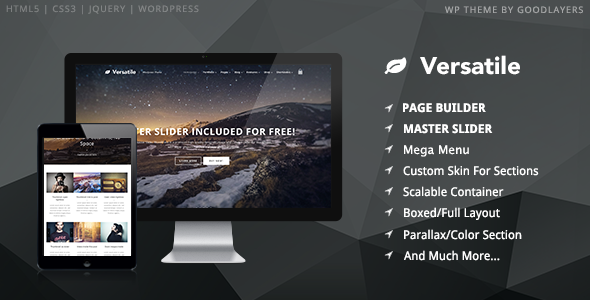
Stuck on your Versatile WordPress theme? Let's fix it.
No endless back-and-forth. Just send us the details and we'll get it done.
No obligation · Replies within 1 hour · Quote within 1 day
Setup · Customization · Bug fixes · WooCommerce integration
About Versatile WP Theme
Versatile is a multipurpose WordPress theme built by GoodLayers, the team behind the popular Travelo and Rezidor themes. It ships with GoodLayers’ own page builder, a library of pre-built demo layouts, and a large set of design options accessible directly from the WordPress customizer.
The theme targets agencies, freelancers, and businesses that want full visual control without touching code. Layouts cover portfolios, corporate sites, landing pages, and blogs. It supports WooCommerce, WPML, and most popular plugins out of the box.
GoodLayers has maintained Versatile through multiple WordPress core updates, and the theme includes regular compatibility patches. It is a solid choice for projects that need design flexibility without a steep learning curve for clients managing their own content.
Get matched with a Versatile developer in under one day
Tell us about your Versatile project. Small fixes, Versatile theme customization, or a full website build, whatever you need, we've got it covered.
We'll connect you to the right Versatile developers, define the scope, and get everything 100% clear.
You'll get one estimate, hire your preferred developer, and start collaborating.
Most Versatile problems come from customizations applied without understanding GoodLayers’ framework, or from plugin conflicts introduced over time. A vetted Versatile developer on Codeable has already worked through these issues on live projects. You get an accurate estimate before any work starts, no hourly guesswork, and a developer who knows the theme’s quirks rather than learning on your site.
Pros
- GoodLayers' page builder integrates tightly with the theme, avoiding the layout breakage common when using third-party builders with Versatile
- Large library of pre-built demo pages covering corporate, portfolio, blog, and landing page layouts, all importable in one click
- WooCommerce support is built in with dedicated product page options, not bolted on as an afterthought
- WPML compatible out of the box, making multilingual projects straightforward to set up
- GoodLayers provides regular updates and has maintained theme compatibility through major WordPress core versions
Cons
- GoodLayers' proprietary page builder creates vendor lock-in, making it difficult to migrate content to another theme later
- The admin options panel is large and can overwhelm clients who need to manage their own site
- Page builder elements load additional scripts and styles that require performance tuning for fast scores on Core Web Vitals
- Documentation is functional but sparse on advanced customization topics, leaving developers to work through the framework independently
- Child theme setup is necessary for safe customization but not clearly guided in the official documentation
Who is Versatile for?
Creative Agency Portfolio
Versatile’s portfolio post types and filterable grid layouts make it a practical choice for agencies showing case studies and project work. A Versatile developer can extend the portfolio with custom taxonomies, add lightbox options, and create filtered archive pages that match the agency’s branding without modifying core files.
Corporate Business Site
The theme includes corporate demo layouts with team sections, service pages, and testimonial blocks. A Versatile specialist can restructure these into a custom header with navigation megamenus, integrate contact forms, and connect CRM tools, giving businesses a professional site that their team can update independently.
WooCommerce Store
Versatile’s WooCommerce integration covers product pages, category archives, and cart styling. A developer familiar with both the theme and WooCommerce can customize product templates, add custom fields, and extend the checkout flow beyond what the default theme options expose in the admin panel.
Freelancer or Consultant Site
Freelancers and consultants need a focused site that converts visitors without unnecessary complexity. Versatile’s landing page demos provide a starting point, and a Versatile developer can tighten the layout, wire up lead capture forms, and ensure the page loads quickly on mobile where most traffic lands first.
Multi-Purpose Landing Pages
Versatile supports multiple distinct landing page layouts within a single installation, making it suitable for marketing campaigns or product launches. Each page can use a different header and footer configuration. A specialist can set up these page-level overrides and connect them to analytics or A/B testing tools.

Customizing Versatile
Versatile ships with dozens of customizer settings, but real customization goes deeper than sliders and color pickers. A Versatile expert can build custom page templates, register new page builder elements, override GoodLayers’ framework files correctly using child themes, and write custom CSS that does not break on updates.
Common requests include restructuring the header layout, building out mega menus, customizing the WooCommerce product pages beyond what the theme options allow, and wiring up custom post types to page builder sections. These tasks require understanding how GoodLayers structures its framework, not just using the admin panel.
Working with a skilled Versatile developer saves time and avoids the common mistake of editing theme core files directly, which breaks everything on the next update.
Recommended plugins for Versatile
Versatile works alongside most major WordPress plugins without conflicts. For performance, pairing it with a caching layer and an image optimization plugin is straightforward, though GoodLayers’ page builder does add script weight that needs careful handling. A developer familiar with WordPress performance optimization can audit and reduce load times significantly.
On the SEO side, Versatile is compatible with Yoast and Rank Math. Schema output and heading structure sometimes need manual correction depending on the demo you start from. A specialist in WordPress SEO can audit the theme’s output and fix structural issues that affect rankings.
Not sure which plugins to use? This WordPress plugins directory covers the most popular options with reviews and setup guides.
Versatile common issues
Versatile page builder layout broken after WordPress update
Layout breaks after a WordPress update usually mean a GoodLayers framework file is conflicting with a changed WordPress function or a plugin that updated at the same time. Start by disabling all non-GoodLayers plugins to isolate the conflict. If the layout restores, re-enable plugins one at a time. If the break persists, check whether you edited theme core files directly. Those edits are overwritten on update. A proper fix means moving changes to a child theme. For persistent or unclear issues, professional WordPress bug fixing is the fastest path to resolution.
Versatile theme slow loading speed and poor Core Web Vitals
Versatile’s page builder loads its own script and style files on every page, including elements not used on that specific page. This inflates page weight and hurts Time to Interaction scores. The fix involves conditionally loading assets, combining files where safe, and setting up server-level caching. Image optimization and a CDN also make a significant difference. These changes require editing how the theme enqueues assets, which should be done in a child theme. A developer who knows GoodLayers’ enqueue structure can do this without breaking page builder functionality. See our WordPress bug fixing service for performance-related repairs.
GoodLayers Versatile custom CSS not saving or getting overridden
Custom CSS added through the Versatile options panel sometimes fails to save due to nonce expiration, caching plugins writing a stale stylesheet, or a PHP memory limit cutting off the save request. Check your PHP error log first. If caching is the cause, purge all caches after saving. For reliable custom CSS that survives updates, move styles into the child theme’s stylesheet rather than relying on the theme options field. This also prevents your CSS from being wiped if the options reset during an update.
Versatile WooCommerce product page styling not working correctly
WooCommerce product page styling issues in Versatile usually come from the theme’s WooCommerce template files being outdated relative to the current WooCommerce version. GoodLayers maintains these overrides in the theme, but they can fall behind after a WooCommerce major release. Check the WooCommerce system status screen for outdated template warnings. Updating template files to match the current WooCommerce version, while preserving GoodLayers’ styling, requires manual file comparison and should be done by a Versatile developer familiar with both codebases.
Versatile FAQ
Yes. GoodLayers has continued releasing updates for Versatile to maintain compatibility with current WordPress versions. Check the theme’s changelog on ThemeForest for the most recent release date. If your installed version is significantly behind the current release, update via ThemeForest or the Envato Market plugin before troubleshooting any issues.
You can install Elementor alongside Versatile, but the two page builders will conflict if used on the same page. Most developers recommend picking one or the other. Switching an existing Versatile site from GoodLayers’ builder to Elementor requires rebuilding all page content, as the shortcode-based output from GoodLayers does not convert automatically.
Create a new folder in your themes directory, add a style.css with the correct header declaring the parent theme as ‘versatile’, and add a functions.php that enqueues the parent stylesheet. GoodLayers does not ship a pre-built child theme, so this needs to be done manually or via a plugin like Child Theme Configurator. All custom code and CSS should go into the child theme files.
Versatile is listed as WPML compatible on the WPML compatibility page. String translation, page translation, and the language switcher all work with the theme. Some GoodLayers page builder elements may require manual string registration in WPML’s String Translation module. A Versatile specialist can handle full multilingual setup including RTL language support if needed.
Rates vary depending on the scope and the developer’s experience. On Codeable, vetted Versatile developers typically quote fixed-price estimates per project rather than open-ended hourly rates. You post your project, describe what you need, and receive an estimate before committing. There is no charge for the estimate and no obligation to hire.
Hire a Versatile Developer for Your WordPress Project
Whether you need a full custom build on Versatile, a specific feature added, or an existing site repaired, working with a specialist makes the difference. FoxyConcept connects you with vetted Versatile developers through Codeable, where you post your project, receive a clear estimate, and only pay if you decide to move forward. Get a Free Estimate and describe what you need. No obligation, no risk.
You'll need a free Codeable account so developers can ask questions and send their quotes.