Vestige WordPress Theme
by imithemes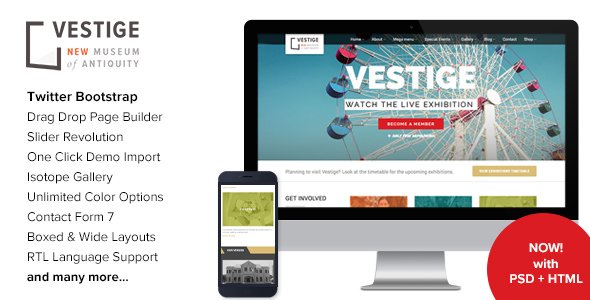
Stuck on your Vestige WordPress theme? Let's fix it.
No endless back-and-forth. Just send us the details and we'll get it done.
No obligation · Replies within 1 hour · Quote within 1 day
Setup · Customization · Bug fixes · WooCommerce integration
About Vestige WP Theme
Vestige is a WordPress theme by iMithemes built for portfolio and agency sites. It leans heavily on full-screen visuals, bold typography, and minimal layout structures that let creative work speak for itself.
The theme ships with multiple demo layouts covering photography, design studios, and freelancer portfolios. Each demo is importable in one click, giving you a usable starting point without building from scratch.
Vestige uses the WPBakery Page Builder for layout control, which keeps content editing accessible for non-coders. It also supports GSAP-based animations, smooth page transitions, and parallax effects out of the box. If you run a creative agency or freelance studio and want a polished visual presentation without a heavy page builder dependency, Vestige is worth a close look.
Get matched with a Vestige developer in under one day
Tell us about your Vestige project. Small fixes, Vestige theme customization, or a full website build, whatever you need, we've got it covered.
We'll connect you to the right Vestige developers, define the scope, and get everything 100% clear.
You'll get one estimate, hire your preferred developer, and start collaborating.
Vestige looks straightforward until you try to bend it away from its default demos. Animation timing, portfolio filtering logic, and WPBakery grid customisation all have quirks that take time to figure out alone.
Working with a vetted developer through Codeable means you get someone who already knows where those edge cases live. No trial and error on a live site. You describe what you need, get a clear estimate, and the work gets done properly the first time. That is a much shorter path than debugging unfamiliar theme code yourself.
Pros
- Full-screen hero sections with smooth GSAP-powered page transitions that feel polished on high-end portfolio sites
- One-click demo importer with multiple distinct layouts covering photography, agency, and freelancer use cases
- WPBakery Page Builder included, giving non-developers layout control without writing code
- Strong parallax and scroll animation support built directly into the theme without extra plugins
- Clean portfolio post type with filterable grid and lightbox support ready to use out of the box
Cons
- Relies on WPBakery, which locks your content into shortcodes that are difficult to migrate to Gutenberg later
- Animation-heavy design adds JavaScript weight that requires deliberate performance work to keep load times fast
- Limited native ecommerce support makes WooCommerce integration more involved than on purpose-built shop themes
- Theme update frequency from iMithemes has been inconsistent, which can cause compatibility issues with newer WordPress versions
- Documentation is thin in places, making advanced customisation harder to do without developer support
Who is Vestige for?
Photography Portfolio
Vestige’s full-screen image layouts and lightbox portfolio grid make it a natural fit for photographers. Gallery pages load without clutter, and the parallax scrolling adds depth to image-heavy presentations. A developer can extend the portfolio post type to include EXIF data, location tags, or client attribution fields specific to your photography workflow.
Creative Agency Website
Agency sites need to present case studies, services, and team members clearly. Vestige’s multi-section page layouts handle this well, and the smooth page transitions add professionalism. Custom WPBakery modules or child theme adjustments let a developer match the site exactly to an agency’s existing brand guidelines without fighting the default demo styles.
Freelance Designer Portfolio
For freelancers, Vestige’s minimal design keeps focus on work samples rather than the theme itself. The portfolio filtering lets visitors sort projects by type or industry. A developer can add a contact form integrated with a CRM, set up a case study template, and configure basic SEO so the portfolio ranks for relevant searches in your location.
Motion Graphics Studio
Motion studios need to embed video prominently without slowing the site. Vestige supports full-screen video backgrounds in hero sections and clean video embed layouts within portfolio entries. A developer familiar with the theme can optimise how those video assets load, keeping performance acceptable while maintaining visual impact on the project pages.
Branding Consultancy
Branding consultancies need strong typography and clear service presentation. Vestige’s bold heading styles and spacious layouts suit this well. Custom work typically involves adjusting the service page structure, adding a client logo section, and setting up a lead capture flow that connects inquiries directly to the team’s preferred project management or CRM tool.

Customizing Vestige
Vestige gives you a solid starting point, but most serious sites need customisation beyond swapping colors and uploading a logo. That is where a Vestige expert saves you real time.
Custom post type layouts, modified portfolio grid behaviour, adjusted animation triggers, and header variations all require direct theme file edits or targeted CSS. Doing this without breaking existing styles or the JavaScript layer takes experience with how iMithemes structures Vestige specifically.
A developer familiar with Vestige can also set up child theme architecture so your changes survive updates, integrate third-party plugins without visual conflicts, and tune WPBakery components to match your brand precisely. If you have a specific design direction in mind that the demo layouts do not cover, custom development is the fastest way to get there.
Recommended plugins for Vestige
Vestige works well with several plugin categories that extend its native functionality. Contact Form 7 and WPForms both integrate cleanly for lead capture. WPML adds multilingual support for international studios.
For agencies tracking leads, pairing Vestige with a CRM plugin like FluentCRM keeps everything inside WordPress. WooCommerce can be added for selling digital products or services, though the theme is not primarily built for ecommerce.
Site speed matters here too. Vestige’s animation layer can add weight, so pairing it with proper WordPress performance optimisation keeps load times competitive. For visibility, structured WordPress SEO work helps portfolio pages rank for relevant search terms.
Not sure which plugins to use? This WordPress plugins directory covers the most popular options with reviews and setup guides.
Vestige common issues
Vestige theme portfolio page not showing posts
This usually comes down to a permalink or portfolio post type registration problem. Go to Settings > Permalinks and click Save without changing anything to flush rewrite rules. If the portfolio still does not display, check that the portfolio post type template in your active theme or child theme has not been overridden. Plugin conflicts, particularly with other CPT plugins, can also prevent posts from displaying correctly. If the issue persists, a WordPress bug fixing service can isolate the cause quickly.
Vestige WordPress page transitions not working
Vestige’s page transitions rely on specific JavaScript initialisation. If they stop working, the most common causes are a JavaScript conflict with a caching plugin, a script loading order change after a plugin update, or a missing dependency after a WordPress core update. Disable caching plugins temporarily and check the browser console for JS errors. If you see errors referencing Barba.js or the iMithemes scripts, the conflict is in the asset loading order and needs developer attention to fix properly.
Vestige theme slow loading after adding content
Vestige loads GSAP, parallax scripts, and sometimes video backgrounds, which adds significant JavaScript weight. Start by enabling lazy loading on images, moving render-blocking scripts to the footer, and setting up proper browser caching. If you are using a page builder with nested rows and animations on every section, that compounds the issue. A focused WordPress performance audit will identify exactly which assets are causing the largest delays and how to address them without breaking the theme’s visual effects.
Vestige WPBakery layout broken after WordPress update
WPBakery layout breaks after WordPress updates are usually caused by shortcode rendering changes or a CSS conflict introduced by the update. First, check if iMithemes released a theme update that addresses compatibility. If not, inspect the broken element in the browser dev tools to identify which CSS rule is overriding the layout. In some cases the WPBakery version bundled with Vestige is outdated and needs manual updating. Avoid updating core plugins on a live site without testing on staging first. Ongoing WordPress maintenance covers this kind of pre-update testing.
Vestige FAQ
Vestige is built around WPBakery Page Builder, not the Gutenberg block editor. Most of its layout features rely on WPBakery shortcodes. You can technically use the block editor for basic text content, but the theme’s full feature set is only accessible through WPBakery. If Gutenberg compatibility is a priority, this is a real limitation worth considering before committing to Vestige.
WooCommerce can be installed on a Vestige site, but the theme does not include native WooCommerce templates. Product and shop pages will inherit basic WooCommerce styles, which often conflict with Vestige’s design. Getting a clean, on-brand WooCommerce setup on Vestige requires custom template files and CSS adjustments. It is workable but not a simple activate-and-go process without developer involvement.
Vestige includes a one-click demo importer accessible from the theme options panel. Before importing, install all required plugins listed in the theme setup wizard. The import process pulls in demo content, images, menus, and widget settings. Note that demo images are often placeholders and not included due to licensing. A fresh WordPress install gives the cleanest import result and avoids conflicts with existing content.
Vestige is listed as WPML-compatible by iMithemes. In practice, translating WPBakery-built pages through WPML requires using the WPML String Translation and WPBakery integration. Most text strings in page builder modules are translatable, but some theme-level strings may need manual registration. A multilingual Vestige setup typically needs developer configuration to work reliably across all site sections.
Migrating content to Vestige from another theme involves rebuilding page layouts in WPBakery since your existing content structure likely will not transfer cleanly. Posts and custom post types migrate straightforwardly, but designed pages need to be reconstructed. If you are also changing hosting as part of the move, a proper WordPress migration service handles the file and database transfer before the theme rebuild begins.
Hire a Vestige WordPress Developer
Whether you need a full Vestige build from one of the demo imports or targeted fixes to an existing site, working with an experienced developer makes the difference between a site that looks close and one that looks exactly right.
FoxyConcept matches you with a vetted Vestige developer through Codeable. You get a free estimate with no obligation to hire. Submit your project and get a free estimate today.
You'll need a free Codeable account so developers can ask questions and send their quotes.