Volt WordPress Theme
by SaurabhSharma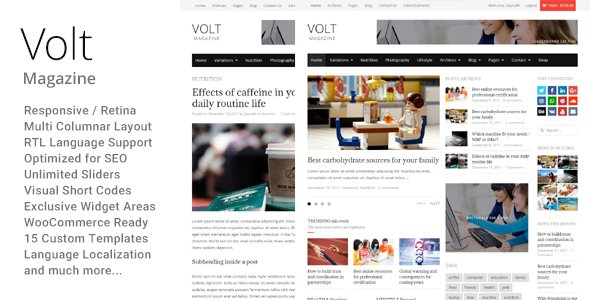
Stuck on your Volt WordPress theme? Let's fix it.
No endless back-and-forth. Just send us the details and we'll get it done.
No obligation · Replies within 1 hour · Quote within 1 day
Setup · Customization · Bug fixes · WooCommerce integration
About Volt WP Theme
Volt is a free WordPress theme by SaurabhSharma built on Bootstrap 5. It targets small businesses, freelancers, and portfolio sites that want a clean, minimal layout without loading unnecessary code. The theme ships with a customizer-ready setup, multiple header styles, and a handful of inner page templates. It works well with popular page builders and does not require a companion plugin to function properly.
The codebase is straightforward, which makes it easy to extend without fighting the theme’s structure. Styling is handled through Bootstrap utility classes, so developers familiar with that framework can move quickly. If you need a lightweight starting point that does not carry the bloat of multipurpose themes, Volt is a practical choice worth looking at.
Get matched with a Volt developer in under one day
Tell us about your Volt project. Small fixes, Volt theme customization, or a full website build, whatever you need, we've got it covered.
We'll connect you to the right Volt developers, define the scope, and get everything 100% clear.
You'll get one estimate, hire your preferred developer, and start collaborating.
Most Volt customization requests are straightforward for an experienced developer but time-consuming for someone unfamiliar with Bootstrap 5 or WordPress theme architecture. Codeable connects you with vetted Volt specialists who have handled these projects before. You post your project, get a clear estimate within 24 hours, and only proceed if the scope and cost make sense. No commitment until you are ready.
Pros
- Built on Bootstrap 5, so developers can extend it quickly without writing layouts from scratch
- Lightweight codebase with no forced companion plugins keeping page load low by default
- Customizer integration covers colors, typography, and layout toggles without needing code changes
- Compatible with major page builders like Elementor and works cleanly with WooCommerce
- Free to use with no locked features behind a premium upsell gate
Cons
- Limited inner page templates means custom layouts require developer work or a page builder
- No built-in schema markup or structured data, which requires a separate SEO plugin setup
- Support relies on the WordPress.org forums rather than a dedicated ticket system
- Advanced WooCommerce styling is not included and needs custom CSS or a child theme
- Update frequency has been inconsistent, which can create compatibility gaps with newer WordPress versions
Who is Volt for?
Freelancer Portfolio
Volt’s minimal layout and clean Bootstrap grid work well for freelancers who need a portfolio site that looks professional without visual clutter. A Volt developer can set up custom post types for case studies, configure a filterable gallery, and make sure contact forms route correctly without disrupting the theme’s structure.
Small Business Website
Service businesses with a handful of pages, a contact form, and a Google Maps embed fit Volt’s template set without forcing workarounds. A Volt specialist can extend the customizer options, add local schema markup, and configure a caching plugin so the site loads fast on mobile connections where most local searches happen.
Agency Landing Page
Agencies running campaign-specific landing pages benefit from Volt’s Bootstrap foundation because custom sections can be built quickly without fighting the theme. A Volt expert can create reusable template parts, wire up form integrations, and strip out non-essential scripts to push conversion-focused pages toward faster load times.
WooCommerce Store
Volt works as a WooCommerce base but needs developer attention to look right. Product pages, cart styling, and checkout flow all require custom CSS or template overrides in a child theme. A Volt developer familiar with WooCommerce hooks can handle this without touching core theme files, keeping updates safe.
Personal Blog
For bloggers who want a clean reading experience without sidebar clutter, Volt delivers a readable single-post layout. A Volt specialist can add a custom author box, configure related posts logic, and integrate a newsletter opt-in without relying on heavy plugins that slow down each page load.

Customizing Volt
Out of the box, Volt covers the basics through the WordPress Customizer. You can swap colors, upload a logo, adjust typography, and toggle sections on the homepage. That gets most simple sites across the line without touching code.
Deeper changes require a Volt expert. Custom post type layouts, WooCommerce integration, sidebar logic, and child theme setup all need developer input to avoid breaking updates. A Volt specialist can also rework the Bootstrap grid for non-standard layouts, integrate custom fonts properly, and clean up any CSS specificity issues that stack up when clients override styles through the Customizer. SaurabhSharma built a clean foundation here, but custom work still needs careful handling.
Recommended plugins for Volt
Volt pairs well with caching and optimization plugins since the theme itself loads light. Plugins like WP Rocket or LiteSpeed Cache push performance further, and a Volt developer can configure them correctly so nothing conflicts with Bootstrap’s asset loading. Read more about that on our WordPress performance service page.
For SEO, Volt does not include structured data or schema markup by default. Pairing it with Rank Math or Yoast and configuring them properly makes a measurable difference. Our WordPress SEO optimisation service covers that setup end to end.
Not sure which plugins to use? This WordPress plugins directory covers the most popular options with reviews and setup guides.
Volt common issues
Volt theme homepage not showing correctly after update
This usually happens when an update resets customizer settings or when a child theme is not in place. Check whether your homepage is still set as a static page under Settings > Reading. If the layout has collapsed, inspect the page template assigned to it. For persistent homepage breakage after updates, our WordPress bug fixing service can diagnose and restore the layout without data loss.
Volt WordPress theme custom CSS not applying
Custom CSS added through the Customizer can be overridden by Bootstrap’s inline styles or plugin stylesheets loading at higher specificity. Use browser dev tools to identify which rule is winning. Moving custom styles to a child theme stylesheet with increased specificity usually resolves this. If the issue is tied to a plugin conflict, our WordPress bug fixing service can trace the source and fix it cleanly.
Volt theme slow loading on mobile
Volt loads Bootstrap 5 assets by default, and if additional plugins are also enqueuing their own copies of Bootstrap or jQuery, the page ends up with duplicated scripts. Use a plugin like Query Monitor to identify redundant enqueues. Combining this with a caching configuration and image optimization typically resolves mobile load time issues without needing to rework the theme itself.
Volt theme not compatible with Elementor
Volt is generally compatible with Elementor, but conflicts arise when Elementor’s container layouts clash with Volt’s Bootstrap grid on specific page templates. Switching the affected page to the Elementor Canvas or Full Width template removes the theme’s structural wrapper and lets Elementor control the layout fully. If widget styling still looks off, a child theme CSS override targeting Elementor’s generated classes resolves it.
Volt FAQ
Yes, Volt is available for free on the WordPress.org theme directory. There is no premium version or paid upgrade path. All features included in the theme are accessible without any payment. If you need functionality beyond what the theme provides out of the box, a Volt developer can extend it through a child theme without altering the original files.
Volt was developed by SaurabhSharma and is listed under that author profile on the WordPress.org theme directory. Support is handled through the official WordPress.org support forums for the theme. For complex customization or bug fixes beyond what forum support covers, working with a vetted Volt specialist is the faster option.
Volt is WooCommerce compatible, but the out-of-the-box styling for shop pages, product layouts, and the cart is basic. You will likely need custom CSS or template overrides in a child theme to get the store looking polished. A Volt developer familiar with WooCommerce hooks can handle this without touching the parent theme files.
Yes, Volt works with Elementor, Beaver Builder, and other major page builders. Conflicts occasionally occur with the Bootstrap grid on certain templates. Using the full-width or canvas page template removes the theme wrapper and gives page builders clean control over the layout. A Volt specialist can configure this setup correctly from the start.
Create a new folder in your wp-content/themes directory, add a style.css file with the Theme Name and Template headers pointing to Volt, then add a functions.php file that enqueues the parent theme stylesheet. Activate the child theme from Appearance > Themes. All customizations go in the child theme, which protects your changes when Volt updates.
Hire a Volt WordPress Developer
Whether you need a Volt expert for a one-off customization or ongoing development work, the process is simple. Post your project through our free estimate page and get matched with a vetted Volt developer within 24 hours. You will receive a clear cost estimate before any work begins. No obligation, no risk, and no chasing freelancers on job boards.
You'll need a free Codeable account so developers can ask questions and send their quotes.