Voyager WordPress Theme
by Evolve-Themes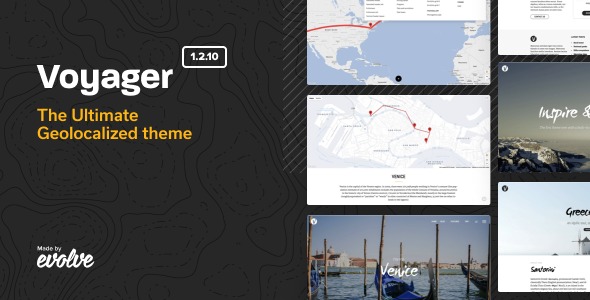
Stuck on your Voyager WordPress theme? Let's fix it.
No endless back-and-forth. Just send us the details and we'll get it done.
No obligation · Replies within 1 hour · Quote within 1 day
Setup · Customization · Bug fixes · WooCommerce integration
About Voyager WP Theme
Voyager is a free WordPress theme built by Evolve-Themes. It targets creative professionals and small businesses that want a clean, image-forward layout without spending money on a premium product. The theme ships with a full-width header slider, widget-ready sidebars, and a layout that works for portfolios, blogs, and simple business sites.
Evolve-Themes has a solid reputation for well-coded free themes, and Voyager follows that pattern. It is built on a custom framework, supports WooCommerce, and is translation-ready out of the box. The Customizer gives you control over colors, fonts, and layout options without touching code. It is a dependable starting point, though heavier customization will require either a child theme or developer help.
Get matched with a Voyager developer in under one day
Tell us about your Voyager project. Small fixes, Voyager theme customization, or a full website build, whatever you need, we've got it covered.
We'll connect you to the right Voyager developers, define the scope, and get everything 100% clear.
You'll get one estimate, hire your preferred developer, and start collaborating.
Voyager is a solid free theme, but free themes have limits. If your project needs a custom layout, a child theme, or plugin integrations that do not work out of the box, you need a developer who has worked inside Evolve-Themes templates before. Through Codeable, you get matched with vetted WordPress developers who know exactly where Voyager’s structure works in your favor and where to work around it. No guesswork, no forums, just direct expert help.
Pros
- Free with no upsell to a paid version required for basic use
- Full-width header slider built in, no extra plugin needed
- WooCommerce compatible out of the box
- Translation-ready with .pot file included
- Clean, lightweight code base compared to many multipurpose free themes
Cons
- Limited typography controls in the Customizer, custom fonts require code or a plugin
- The built-in slider adds page weight and slows load time if not optimized
- No dedicated page builder support, layouts are fairly fixed without custom CSS
- No official premium upgrade path if you outgrow the free version
- Support is community-based only, no guaranteed response time from the developer
Who is Voyager for?
Freelance Portfolio
Voyager’s clean grid layout and full-width imagery work well for designers, illustrators, and developers who want to show work without clutter. The homepage slider doubles as a rotating project showcase. A Voyager developer can add a custom portfolio post type and filter to give clients a proper browsable gallery.
Local Service Business
Plumbers, electricians, consultants, and similar businesses get a professional-looking site fast with Voyager. The sidebar widget areas handle contact details, opening hours, and calls to action cleanly. Pair it with Contact Form 7 and a maps plugin and the site covers most local business needs without extra cost.
Travel Blog
Voyager suits travel bloggers because the header image area makes destination photography the first thing visitors see. The blog layout is readable and handles long-form posts well. Adding a custom category filter or destination index takes developer work but fits naturally within the theme’s template structure.
Small Online Store
WooCommerce loads without major style conflicts on Voyager, making it a workable base for a small product catalog. The theme handles shop, single product, and cart pages acceptably. A developer can tighten up the WooCommerce styling to match the rest of the design if the default integration looks rough.
Photography Site
Full-width layouts and minimal UI chrome let photos breathe, which is exactly what photography sites need. Voyager handles image-heavy pages without requiring a premium gallery plugin. For professional photographers who need lightbox galleries, client proofing, or print ordering, a developer can integrate the right tools cleanly.

Customizing Voyager
Voyager exposes most of its settings through the WordPress Customizer. You can adjust the header layout, change background colors, switch between sidebar positions, and upload a custom logo. The built-in slider accepts images and text overlays, making it easy to set up a homepage without a page builder.
Beyond those defaults, you will hit limits quickly. Custom typography, layout restructuring, or integrating a specific plugin cleanly usually means writing CSS or editing template files. A Voyager expert can build a child theme, add custom post types, rework the header, or wire up Advanced Custom Fields to give you exactly the structure your site needs without touching core theme files.
Recommended plugins for Voyager
Voyager works with most major WordPress plugins without conflicts. WooCommerce integration is supported, so adding a shop is straightforward. Contact Form 7, Yoast SEO, and WPML all run cleanly alongside it.
If you want to push performance further, pairing Voyager with a caching plugin and image optimization tool makes a real difference since the theme loads a full-width slider by default. You can also explore our WordPress performance service or WordPress SEO service to get more out of the theme once the core setup is done.
Not sure which plugins to use? This WordPress plugins directory covers the most popular options with reviews and setup guides.
Voyager common issues
Voyager theme slider not showing on homepage
The homepage slider in Voyager only appears when the front page is set to a static page in Settings > Reading. If you are using the latest posts as the homepage, the slider will not display. Assign a static page as the front page, then go to the Customizer and add slides under the slider section. Also confirm that the images meet the minimum recommended dimensions or the slider may show blank areas.
Voyager WordPress theme footer not customizing
Voyager’s footer widget areas appear only when widgets are added to them. Go to Appearance > Widgets and add at least one widget to a Footer Widget zone. The footer text, copyright line, and credit link are controlled in the Customizer under Site Identity or Footer options depending on the version. If changes are not saving, a caching plugin may be serving an old version of the page. Clear your cache after each change.
Voyager theme WooCommerce styling broken
Voyager was not built with WooCommerce-specific styles, so some elements like product grids, buttons, and the cart page can look mismatched. The fastest fix is adding targeted CSS in the Customizer’s Additional CSS field. For deeper style conflicts, building a child theme and creating a woocommerce.css file gives you control without touching the parent theme. Our WordPress bug fixing service can handle this cleanly.
Voyager theme child theme not loading styles correctly
If your Voyager child theme is not applying styles, the most common cause is an incorrect @import or missing wp_enqueue_style call in functions.php. Modern child themes should enqueue the parent stylesheet using wp_enqueue_scripts rather than relying on @import in the CSS header. Check that your child theme’s Template: header in style.css exactly matches the parent theme folder name, which is case-sensitive.
Voyager FAQ
Yes, Voyager is completely free. It is available directly from the WordPress theme directory at wordpress.org. There is no paid or premium version. Evolve-Themes offers other paid themes, but Voyager itself has no upsell. You can use it on as many sites as you want without any licensing cost.
Voyager is built by Evolve-Themes, a theme development company that has published several free and premium WordPress themes. They have been active in the WordPress theme space for a number of years and maintain a portfolio of themes available on their own site and through the wordpress.org directory.
Voyager is not officially built for page builders, but Elementor and similar tools can work on a basic level since they use shortcodes or blocks within the content area. Full-width page builder layouts may require a blank page template. The theme does not include a native builder, so complex drag-and-drop layouts are better served with a builder-first theme.
Yes, you can switch an existing WordPress site to Voyager. Content, posts, and pages will transfer, but widgets, menus, and theme-specific settings will need to be reconfigured. If your current site uses custom templates or shortcodes tied to another theme, those will break. A planned migration reduces the risk. See our WordPress migration service for help.
Voyager has not received frequent updates in recent years. It still functions on current versions of WordPress, but it has not been updated as regularly as actively maintained themes. Check the changelog on the wordpress.org listing before using it on a new project, and consider a WordPress maintenance plan to monitor compatibility over time.
Hire a Voyager WordPress Developer
Whether you need a child theme built, a layout reworked, or a plugin integrated cleanly into Voyager, a specialist will get it done faster and without breaking your site. Post your project and get a free estimate within 24 hours through Codeable’s vetted developer network. No obligation to hire. Get your free estimate here and describe exactly what you need.
You'll need a free Codeable account so developers can ask questions and send their quotes.