Wavy WordPress Theme
by EstudioPatagon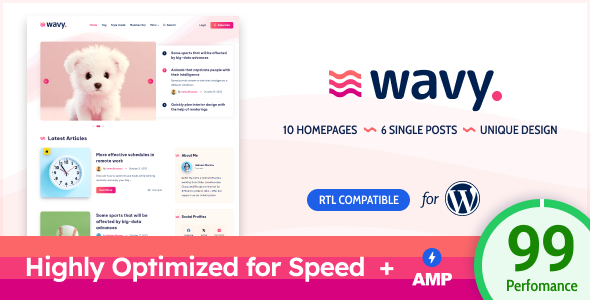
Stuck on your Wavy WordPress theme? Let's fix it.
No endless back-and-forth. Just send us the details and we'll get it done.
No obligation · Replies within 1 hour · Quote within 1 day
Setup · Customization · Bug fixes · WooCommerce integration
About Wavy WP Theme
Wavy is a WordPress theme built by EstudioPatagon, a developer studio known for clean design and solid code. The theme is built around a fluid, organic aesthetic with curved section dividers, smooth scroll effects, and a modern layout system that suits creative and agency-style websites.
Under the hood, Wavy uses the Elementor page builder, giving you drag-and-drop control over every section. It ships with multiple pre-built demos covering agencies, portfolios, and product landing pages. The theme is responsive by default, optimised for speed, and compatible with popular WordPress plugins. EstudioPatagon maintains the theme actively, with updates addressing compatibility and performance. If you want a polished, visually distinct site without starting from scratch, Wavy gives you a strong foundation.
Get matched with a Wavy developer in under one day
Tell us about your Wavy project. Small fixes, Wavy theme customization, or a full website build, whatever you need, we've got it covered.
We'll connect you to the right Wavy developers, define the scope, and get everything 100% clear.
You'll get one estimate, hire your preferred developer, and start collaborating.
Wavy has enough flexibility to build almost any creative or business site, but the gap between a demo import and a finished professional site is real. Getting the curved layouts, custom sections, and plugin integrations working together takes experience with both the theme and Elementor. Through Codeable, you get matched with vetted WordPress developers who have hands-on experience with themes like Wavy. No guesswork, no freelancer roulette. Just developers who can get the work done properly.
Pros
- Distinctive curved section dividers that stand out from flat, grid-heavy themes
- Built on Elementor, so page editing is visual and doesn't require code
- Multiple niche-specific demo sites included, covering agencies, portfolios, and SaaS
- Actively maintained by EstudioPatagon with regular compatibility updates
- Clean, well-structured code that doesn't bloat page load times unnecessarily
Cons
- Heavily dependent on Elementor, which creates plugin lock-in and can slow down the editor
- The wavy/curve aesthetic is very specific and may not suit all brand directions
- Demo imports sometimes require manual cleanup to remove placeholder content fully
- Limited built-in WooCommerce styling means extra work for shop pages
- Advanced customisations outside Elementor controls require knowledge of CSS and theme files
Who is Wavy for?
Creative Agencies
Wavy suits agency websites that need to look different without a full custom build. The curved dividers and animated scroll effects give service pages a premium feel. Agencies can use the included demos as a base and customise sections for their specific offering, team layout, and case study structure without writing code from scratch.
Freelance Portfolios
Freelancers in design, development, or photography benefit from Wavy’s portfolio-focused layouts. The theme handles project grids, full-width image sections, and client testimonials cleanly. It gives individual practitioners a polished online presence that feels custom without the cost of a fully bespoke theme build.
SaaS and App Landing Pages
Product landing pages built with Wavy can highlight features, pricing tables, and calls to action using Elementor’s section tools. The organic design style helps SaaS sites avoid the generic feel of template-heavy builders. Wavy works well for single-product or single-service pages where the goal is converting visitors.
Digital Marketing Consultants
Consultants who sell strategy, SEO, or advertising services can use Wavy’s demo content as a direct starting point. The theme supports lead generation layouts with form embeds, service breakdowns, and social proof sections. Combined with a proper SEO setup, it works as a complete client acquisition site.
Event and Conference Sites
Event sites need clear structure: dates, speakers, schedules, and registration. Wavy’s section-based layout handles this well with Elementor. Curved dividers help separate content blocks visually without needing complex design work. Countdown timers and form plugins integrate cleanly for ticketing or registration capture.

Customizing Wavy
Wavy gives you a solid starting point, but most sites need work beyond swapping colours and uploading a logo. Customising Elementor-based themes like Wavy can get complicated fast, especially when you need custom post types, conditional layouts, or integration with third-party tools.
A Wavy expert can rebuild demo content to match your brand, create custom Elementor templates, adjust the curve effects between sections, and handle things like custom header behaviour or sticky navigation. If you need WooCommerce styling, membership integration, or a multilingual setup, that work goes beyond what the theme panel offers. Hiring someone who knows Wavy specifically saves hours of trial and error and avoids breaking the layout in the process.
Recommended plugins for Wavy
Wavy pairs well with several plugin categories. For forms, Gravity Forms and WPForms both work cleanly. WooCommerce can be added for product or service sales, though some custom CSS may be needed to match the Wavy styling. For SEO, the theme is compatible with Yoast and Rank Math — pairing it with a proper WordPress SEO setup makes a real difference. On the performance side, caching plugins like WP Rocket and image optimisation tools integrate without conflict. If you want to push load times further, a structured WordPress performance optimisation pass is worth doing after your site is built.
Not sure which plugins to use? This WordPress plugins directory covers the most popular options with reviews and setup guides.
Wavy common issues
Wavy theme sections not displaying correctly after update
Section display problems after an update usually point to a conflict between the Wavy theme version and the installed version of Elementor or Elementor Pro. First, check that both are updated to their latest compatible versions. Clear all caches, including server-side caching if applicable. If sections still break, deactivate other plugins one by one to isolate a conflict. Persistent layout issues after updates often need a developer to review the Elementor template structure. Our WordPress bug fixing service can handle this quickly.
Wavy demo import failing or showing blank pages
Failed demo imports in Wavy are commonly caused by PHP memory limits, upload size restrictions, or a timeout during the import process. Increase memory_limit, max_execution_time, and upload_max_filesize in your PHP settings or ask your host to do it. If the import completes but pages are blank, Elementor’s data may not have transferred correctly. Try regenerating CSS via Elementor’s Tools panel. If problems persist, a manual import or developer assistance is the fastest path forward.
Wavy theme slow to load on mobile
Wavy loads Elementor assets, custom fonts, and animation libraries that can add weight on mobile. Start by running the site through PageSpeed Insights to identify the specific bottlenecks. Compress images, enable lazy loading, and use a caching plugin like WP Rocket. Disable unused Elementor widgets via Elementor’s settings panel. If the curve animations are causing render-blocking, a developer can conditionally disable them on mobile viewports. A structured WordPress performance review will surface the full list of issues.
Wavy header not sticking or menu not working on scroll
Sticky header issues in Wavy are usually caused by custom CSS from another plugin overriding the theme’s header behaviour, or Elementor Pro’s header settings conflicting with the Wavy header template. Check the Elementor header template conditions first. If using Wavy’s built-in header, verify the sticky option is enabled in the theme’s customiser panel. For menu scroll issues, a JavaScript conflict is often the cause. Deactivate plugins that add scripts to the header and test. A developer can trace the conflict directly.
Wavy FAQ
Yes. Wavy is built to work with both the free Elementor plugin and Elementor Pro. Some of the more advanced demo layouts use Pro features like custom header and footer builders, theme builder conditions, and popup functionality. If you’re using the free version of Elementor, those specific features won’t be available, but the core page layouts will still function correctly.
Technically Wavy will activate without Elementor, but the theme is designed around it. Without Elementor, none of the demo templates will render correctly and you’ll be working with a bare WordPress theme. The visual layouts, section curves, and pre-built content all depend on Elementor being installed and active. It’s not a practical setup to run Wavy without it.
Wavy is compatible with WooCommerce and will display shop and product pages without breaking the site layout. However, the theme doesn’t include deep WooCommerce-specific styling, so shop pages, cart, and checkout will use WooCommerce’s default appearance. Getting those pages to visually match the rest of your Wavy site usually requires custom CSS or developer work.
Wavy includes a one-click demo importer accessible from the WordPress dashboard under the theme’s settings panel. Select the demo you want, click import, and the theme will pull in pages, content, and Elementor templates. Your server needs adequate PHP memory and upload limits for the import to complete. Some demos import faster than others depending on the amount of media included.
Yes, but it’s not a simple switch. Moving an existing site to Wavy means rebuilding pages in Elementor using the theme’s layout system, which is a manual process. Your content can stay in WordPress, but the design needs to be rebuilt. If you also need to move hosts or domains during this process, a proper WordPress migration handled by a developer avoids data loss or downtime.
Hire a Wavy WordPress Developer
Whether you need a Wavy site built from scratch, a demo customised to your brand, or a specific feature added, working with an experienced developer saves time and avoids costly mistakes. Our developers know Elementor, EstudioPatagon themes, and the WordPress ecosystem inside out. Get a free estimate with no obligation. You’ll hear back within 24 hours and can decide whether to move forward. Completely risk-free.
You'll need a free Codeable account so developers can ask questions and send their quotes.