WebOn WordPress Theme
by Mikado-Themes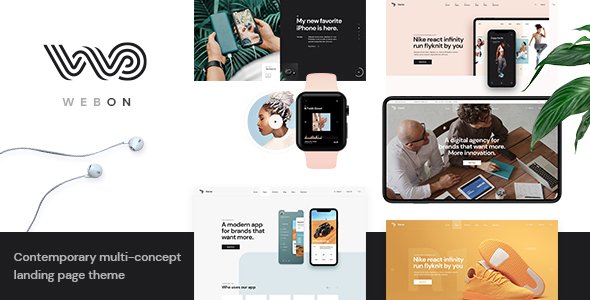
Stuck on your WebOn WordPress theme? Let's fix it.
No endless back-and-forth. Just send us the details and we'll get it done.
No obligation · Replies within 1 hour · Quote within 1 day
Setup · Customization · Bug fixes · WooCommerce integration
About WebOn WP Theme
WebOn is a multipurpose WordPress theme built by Mikado-Themes, a studio known for polished design and consistent theme quality. It ships with a large collection of pre-built demo sites covering agencies, portfolios, corporate sites, and creative businesses. Each demo is fully importable in one click, giving you a real starting point rather than a blank canvas.
The theme is built on Mikado’s own framework and pairs with Elementor for page building. It includes the Mikado Core plugin, which unlocks additional widgets, shortcodes, and post types. Typography controls, header builder, and WooCommerce support are all built in. WebOn targets businesses and freelancers who want a professional site without building everything from scratch. It is available on ThemeForest and is regularly updated to stay compatible with current WordPress versions.
Get matched with a WebOn developer in under one day
Tell us about your WebOn project. Small fixes, WebOn theme customization, or a full website build, whatever you need, we've got it covered.
We'll connect you to the right WebOn developers, define the scope, and get everything 100% clear.
You'll get one estimate, hire your preferred developer, and start collaborating.
WebOn has a lot of moving parts. Between the Mikado framework, Elementor, and the Core plugin, small conflicts can surface during updates or plugin additions. Working through Codeable means your project is handled by a vetted WordPress developer who has worked with themes like this before. No guesswork, no learning on your budget. You get a developer who can configure, customise, or fix WebOn correctly the first time. See our full WordPress development services for details.
Pros
- Large library of one-click importable demo sites across multiple industries
- Built-in header builder with multiple sticky and mobile layout options
- Native WooCommerce support with styled product and cart pages
- Regular updates from Mikado-Themes keeping it compatible with current WordPress versions
- Custom Elementor widgets via Mikado Core add portfolio, team, and pricing block types
Cons
- Requires the Mikado Core plugin for full functionality, creating a hard dependency
- Theme Options panel is large and can be overwhelming to navigate without prior Mikado experience
- Switching away from the theme later means losing Mikado-specific shortcodes and post types
- Demo import can pull in a lot of sample content and unused media that needs manual cleanup
- Some design elements are tied to the Mikado framework rather than Elementor, splitting where customisation happens
Who is WebOn for?
Creative Agency
WebOn includes several agency-specific demos with case study layouts, service grids, and team sections. The portfolio post type handles project showcasing well. Agencies can present their work cleanly without building custom post type structures from scratch, and the header builder gives enough flexibility to match a specific brand identity.
Freelance Portfolio
Freelancers benefit from WebOn’s portfolio templates and filterable project grids. The theme handles single-page-style layouts as well as multi-page setups, so it adapts to different presentation styles. Contact forms and social integrations are straightforward to add. It is a solid base without requiring advanced WordPress knowledge to get something live.
Small Business Website
Small businesses get a professional result quickly using one of WebOn’s pre-built business demos. Service pages, about sections, and contact layouts are all included. The theme handles local business needs well without needing expensive custom development. Updates from Mikado-Themes mean the site stays secure and compatible over time with minimal maintenance overhead.
WooCommerce Store
WebOn’s WooCommerce integration covers shop pages, product templates, cart, and checkout styling. The design stays consistent between content pages and the store, which is a common problem with generic themes. Adding a shop to an existing WebOn site is straightforward. For performance tuning on a busy store, pairing it with proper caching is recommended.
Corporate or Professional Services
Corporate sites need clear information hierarchy and a trustworthy look. WebOn’s corporate demos include service listing pages, team bios, and structured homepage layouts. The theme handles multi-page corporate structures cleanly. It is a practical choice for law firms, consultancies, financial services, and similar businesses that need a polished site without heavy custom development.

Customizing WebOn
WebOn gives you a lot of control through its Theme Options panel, but the sheer volume of settings can be disorienting at first. The header builder alone has multiple layout styles, sticky options, and mobile breakpoint controls. Elementor handles most page-level design, while the Mikado Core plugin adds custom widgets specific to this theme.
Custom post types for portfolios and team members are included, but styling them to match a specific brand takes more than just picking a demo. Font pairing, spacing overrides, and color scheme adjustments often require digging into theme options rather than Elementor settings. A WebOn expert will know exactly where each setting lives and can move quickly without trial and error, saving you hours of configuration time.
Recommended plugins for WebOn
WebOn works with WooCommerce out of the box, making it a practical choice for shops that also need strong content pages. It also integrates cleanly with popular SEO plugins. If you want to push site speed further, pairing WebOn with a caching layer and image optimisation setup is worth doing early. Visit our WordPress performance service or WordPress SEO optimisation service for help with both. The Mikado Core plugin is required for full functionality, so factor that dependency into any long-term maintenance plan.
Not sure which plugins to use? This WordPress plugins directory covers the most popular options with reviews and setup guides.
WebOn common issues
WebOn demo import not working
Demo import failures in WebOn are usually caused by server timeout limits or a PHP memory cap being too low. The import tries to pull images, content, and settings in one process, which is resource-heavy. Check with your host to increase max_execution_time and memory_limit. Also confirm the Mikado Core plugin is active before starting the import. If problems persist, our WordPress bug fixing service can handle it directly.
WebOn header not showing correctly on mobile
WebOn’s mobile header is controlled through a separate section of the header builder inside Theme Options, not through Elementor. If the mobile menu or logo is misaligned, you need to check the mobile header settings specifically. Common fixes include adjusting the mobile logo size, setting the correct breakpoint, and checking the hamburger menu style. These settings are separate from the desktop header, which catches a lot of people off guard.
Mikado Core plugin conflict with WebOn after update
When WebOn updates and the Mikado Core plugin does not update alongside it, or vice versa, you can see layout breaks, missing widgets, or PHP notices. Always update both together. Check the ThemeForest changelog before updating to see if a new Core version is required. If you have already updated and something broke, deactivating then reactivating the Core plugin resolves it in some cases. For persistent issues, our bug fixing service can diagnose the conflict.
WebOn portfolio post type not displaying
The portfolio post type in WebOn is registered by the Mikado Core plugin, not the theme itself. If portfolio items are not showing, the first check is whether the Core plugin is active. After reactivating it, go to Settings and flush your permalinks by saving them again. If you imported content before the plugin was active, the post type may not have registered correctly and you may need to re-import or recreate the entries.
WebOn FAQ
Yes, WebOn is built to work with Elementor. Most page-level design is handled through Elementor, while theme-wide settings like headers, footers, and typography are controlled through Mikado’s Theme Options panel. Some custom widgets are added via the Mikado Core plugin and appear inside Elementor’s widget panel once that plugin is active.
Yes. The Mikado Core plugin is required for WebOn to function fully. It registers custom post types like portfolio and team members, adds theme-specific Elementor widgets, and handles shortcodes used across the demos. Running WebOn without it will result in missing features and broken layouts. Always keep the plugin active and updated alongside the theme.
Yes, WebOn includes WooCommerce support with styled templates for shop, product, cart, and checkout pages. The design stays consistent with the rest of the site rather than falling back to default WooCommerce styles. It is a practical choice for businesses that need both content pages and an online store in the same theme.
Go to Mikado Themes inside your WordPress dashboard after installing WebOn and the Core plugin. From there you will find the demo importer. Select a demo and choose whether to import content, widgets, and settings. Make sure your server has enough memory and execution time before starting. The process can take a few minutes depending on your hosting environment.
Migrating an existing site to WebOn means rebuilding your pages using Elementor and the Mikado framework, since your current content structure will not map directly to WebOn’s templates. Posts and basic pages carry over, but custom layouts need to be recreated. For a smooth transition, our WordPress migration service can handle the technical side without data loss.
Hire a WebOn Expert Developer
Whether you need a full WebOn site built from a demo, custom design work on top of the theme, or fixes to something that broke after an update, we can help. Projects are matched to experienced WordPress developers within 24 hours through Codeable. You get a free estimate before committing to anything. Get your free estimate today and tell us exactly what you need.
You'll need a free Codeable account so developers can ask questions and send their quotes.