Wedding WordPress Theme
by nicdark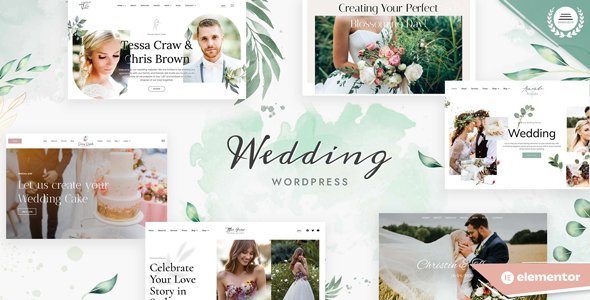
Stuck on your Wedding WordPress theme? Let's fix it.
No endless back-and-forth. Just send us the details and we'll get it done.
No obligation · Replies within 1 hour · Quote within 1 day
Setup · Customization · Bug fixes · WooCommerce integration
About Wedding WP Theme
Wedding is a WordPress theme by nicdark built for wedding planners, photographers, and venues. It ships with a visual drag-and-drop page builder, pre-built demo content, and a layout designed around the specific needs of wedding businesses: galleries, countdown timers, RSVP forms, pricing tables, and team sections.
The theme is coded to nicdark’s usual standards, which means clean markup, regular updates, and compatibility with WooCommerce for selling packages or prints. It supports multiple header styles, Google Fonts, and custom color palettes, so you can match the look to a client’s brand without touching code. It works well out of the box but benefits from a developer’s hand when requirements go beyond the basics.
Get matched with a Wedding developer in under one day
Tell us about your Wedding project. Small fixes, Wedding theme customization, or a full website build, whatever you need, we've got it covered.
We'll connect you to the right Wedding developers, define the scope, and get everything 100% clear.
You'll get one estimate, hire your preferred developer, and start collaborating.
Most WordPress developers can install a theme. Fewer understand how to build a wedding business site that actually converts. The developers on Codeable are vetted, experienced with nicdark themes, and work on fixed-scope projects with transparent pricing. No bidding wars, no guesswork on quality. You post your project, get matched with a Wedding developer within 24 hours, and receive a free estimate before committing to anything.
Pros
- Pre-built demo content installs in one click, reducing setup time significantly
- Built-in countdown timer and RSVP section blocks are purpose-built for wedding use cases
- WooCommerce compatible for selling photography packages, venue bookings, or digital products
- Clean, well-documented code from nicdark makes child theming and developer handoffs straightforward
- Multiple header layouts and sticky nav options work well for image-heavy branding
Cons
- Relies on a bundled page builder, which can create lock-in if you later want to switch editors
- Gallery performance degrades on mobile without additional optimisation for large image sets
- Limited built-in booking functionality requires third-party plugins for real appointment management
- Demo content import occasionally fails on stricter hosting environments, requiring manual setup
- Typography customisation through the theme panel is limited compared to dedicated font plugins
Who is Wedding for?
Wedding Photographers
Photographers need a site that showcases work without slowing down on mobile. Wedding handles portfolio galleries well, and with proper image optimisation a developer can set up album-based galleries, client proofing sections, and package pricing pages that are fast and easy to navigate on any device.
Wedding Venues
Venues often need multi-page layouts covering different spaces, catering menus, and availability enquiry forms. A Wedding developer can build out these sections using the theme’s existing blocks while integrating a booking enquiry workflow that routes leads directly to a CRM or email management tool.
Wedding Planners
Wedding planners juggle multiple clients and need a site that communicates professionalism clearly. The theme’s team sections, testimonial layouts, and timeline blocks suit planning businesses well. A specialist can extend these with filterable project portfolios, consultation booking forms, and service package pages.
Bridal Boutiques
Bridal boutiques benefit from Wedding’s clean product layout and WooCommerce compatibility. A developer can configure the shop for dress collections, set up appointment booking for fittings, and customise the checkout flow for in-store collection or alterations services specific to bridal retail.
Florists and Decorators
Florists and decorators need strong visual presentation with clear service categories. Wedding’s gallery and portfolio blocks handle this well. A Wedding specialist can build filterable portfolio pages by arrangement type, add enquiry forms per service, and connect the site to an Instagram feed for live portfolio updates.

Customizing Wedding
Out of the box, Wedding gives you a solid starting point. But most wedding businesses need more than a demo import. A Wedding expert can wire up custom RSVP workflows, integrate third-party booking systems like Calendly or a dedicated wedding planning tool, and build out multi-page venue showcases with filtered galleries.
Customization work often includes adjusting the grid layout for portrait-heavy photography, fine-tuning mobile breakpoints for ceremony countdown sections, and connecting contact forms to CRM tools. If you’re running the site for a venue with multiple packages, a Wedding specialist can set up WooCommerce with the right product structure and checkout flow. nicdark’s theme options panel covers the basics, but anything custom requires someone who knows the codebase well.
Recommended plugins for Wedding
Wedding pairs well with a focused plugin stack. For galleries, Envira Gallery or FooGallery add lightbox features and album grouping. RSVP and guest management can be handled with plugins like RSVPMaker or custom-built forms via Gravity Forms.
If you’re running paid packages or digital downloads, WooCommerce slots in without conflict. For visibility in search results, structured markup and page-level optimisation matter, especially for local wedding venue searches. See our WordPress SEO optimisation service for that work. Site speed is also critical for image-heavy wedding sites, and our WordPress performance service covers caching, image compression, and CDN setup.
Not sure which plugins to use? This WordPress plugins directory covers the most popular options with reviews and setup guides.
Wedding common issues
Wedding theme demo import not working
Demo import failures on the Wedding theme usually come down to server memory limits or PHP timeout settings. Set max_execution_time to at least 300 seconds and memory_limit to 256M in your php.ini or via the hosting control panel. If the import still fails, try importing demo content in parts rather than all at once. Some hosts block large XML imports, so a manual approach via the WordPress importer tool may be needed.
Wedding theme countdown timer showing wrong time
The countdown timer in Wedding pulls from the date you set in the theme options or page builder block. If it’s showing the wrong time, check the timezone setting under Settings > General in WordPress and make sure it matches the event’s local timezone. If the timer is JavaScript-based, a caching plugin may be serving stale output. Clear all cache layers, including any server-side cache, and test in an incognito window.
Wedding theme contact form not sending emails
When contact forms stop sending on Wedding, the root cause is almost always the WordPress mail function failing. Install a transactional email plugin like WP Mail SMTP and connect it to a reliable sending service such as SendGrid or Mailgun. Check spam folders first to rule out delivery issues. If you need help diagnosing persistent form failures, our WordPress bug fixing service covers this kind of issue directly.
Wedding theme gallery not loading on mobile
Gallery loading issues on mobile with the Wedding theme are usually caused by uncompressed images or a JavaScript conflict with a lazy-loading plugin. Install a plugin like ShortPixel to compress existing uploads, and check the browser console for JS errors. If you’re using a caching plugin, make sure it’s not deferring the gallery scripts incorrectly. Testing with all plugins deactivated except the gallery tool will isolate the cause quickly.
Wedding theme page builder content disappeared after update
If page builder content vanished after a Wedding theme or plugin update, the most likely cause is a version mismatch between the bundled page builder and its associated plugin. Go to Plugins and check whether the page builder plugin needs a separate update. If content is missing from the database, restore from a recent backup immediately. For ongoing protection, set up automated daily backups through your host or a plugin like UpdraftPlus.
Wedding theme WooCommerce shop page layout broken
WooCommerce layout breaks in Wedding often happen when the theme’s stylesheet doesn’t fully account for WooCommerce template changes introduced in newer versions. Start by checking if WooCommerce is prompting you to update its template files through the System Status page. A child theme override for the affected templates is the cleanest fix. If the layout is broken sitewide across shop, product, and cart pages, our WordPress bug fixing service can diagnose and resolve it.
Wedding theme custom fonts not loading
Custom fonts failing to load in Wedding are usually caused by a Content Security Policy header blocking external font requests, or a caching layer serving an old stylesheet. If you’re using Google Fonts through the theme options, check that the font names are entered exactly as they appear on Google Fonts. For self-hosted fonts, confirm the font files are correctly enqueued in the child theme’s functions.php and that file paths are correct relative to the theme directory.
Wedding theme header logo not displaying correctly
Logo display problems in the Wedding theme are commonly caused by uploading a file that’s too large for the designated header area, or by a custom CSS rule overriding the logo dimensions. Go to Appearance > Customize > Site Identity and re-upload the logo at the recommended size. If it still looks wrong, inspect the header element using browser developer tools to find any conflicting CSS rules. A max-width override in the child theme stylesheet is usually the quickest fix.
Wedding theme RSVP form not saving responses
RSVP forms not saving responses in Wedding are typically a database write permission issue or a conflict with a security plugin blocking POST requests. First, check that the form plugin has the correct database table permissions. Then temporarily disable any WAF or security plugin and test the form. If a security plugin is blocking the submission, whitelist the form’s action URL within the plugin settings. For complex form integrations, our WordPress bug fixing service can trace the exact failure point.
Wedding theme slow loading on image-heavy pages
Image-heavy pages on Wedding need a layered approach to load fast. Start with a CDN like Cloudflare or BunnyCDN to offload static assets. Compress all uploaded images using ShortPixel or Imagify. Enable lazy loading for images below the fold, which WordPress does natively since version 5.5. Also check whether the page builder is outputting redundant CSS and JS on every page, and use a plugin like Asset CleanUp to remove unused scripts on specific templates.
Wedding FAQ
Yes. Wedding includes portfolio and gallery sections that suit photography businesses well. For best results, pair it with a dedicated gallery plugin and compress images before uploading. A developer can also configure custom album structures and client-facing gallery pages if the built-in blocks don’t cover your specific workflow.
The Wedding theme doesn’t include a native booking system, but it integrates cleanly with plugins like Bookly, Amelia, or Simply Schedule Appointments. A Wedding developer can connect one of these to your contact or enquiry forms and configure automated confirmation emails so the booking process runs without manual follow-up.
Wedding by nicdark uses its own bundled page builder. It’s not built specifically around Elementor, though basic Elementor usage is often possible alongside it. Mixing builders can create conflicts, so if you need Elementor, a developer should assess compatibility first and may recommend building in one editor only to avoid CSS conflicts and layout issues.
The RSVP section in Wedding is typically a pre-built template block you drop into a page. You’ll need to connect it to a form plugin like Gravity Forms or WPForms for data collection. Configure the form fields for guest name, attendance confirmation, and dietary requirements, then set up email notifications so responses reach the right inbox automatically.
Yes. The theme’s multi-section layouts handle venue features, capacity details, and photo galleries well. A Wedding specialist can extend it with pricing tables, availability enquiry forms, and downloadable venue packs. If you need online booking with real-time availability, a third-party booking plugin integrated by a developer is the right approach.
Wedding is built with responsive layouts, but image-heavy pages can still perform poorly on mobile without additional work. Proper image sizing, lazy loading, and breakpoint adjustments for the gallery and countdown sections are often needed. Testing on real devices across different screen sizes after setup will surface any layout issues that need CSS corrections.
Start with image compression using a plugin like ShortPixel, then add a caching layer with WP Rocket or W3 Total Cache. A CDN helps significantly for image-heavy sites. You should also audit which scripts the theme loads on each page type and remove unused assets. For a thorough performance audit, see our WordPress performance service.
Migrating to the Wedding theme involves transferring content, rebuilding layouts in the new page builder, and reconfiguring forms and integrations. It’s not a one-click switch, especially if your current site has custom functionality. A developer can manage the full migration without downtime. For the technical side of moving servers or domains, see our WordPress migration service.
Wedding is translation-ready and works with WPML and Polylang for multilingual setups. For bilingual wedding sites serving different cultural communities, a developer should configure the language switcher, translate theme strings, and ensure forms and gallery labels display correctly in each language. Auto-translation plugins can handle initial content but usually need human review.
Theme and plugin updates should be tested in a staging environment before applying to the live site. Wedding theme updates from nicdark occasionally include template changes that affect custom layouts. A maintenance plan that includes staged updates, backups, and uptime monitoring keeps the site stable. Our WordPress maintenance service covers all of this on an ongoing basis.
Hire a Wedding WordPress Developer
Whether you need a full build from a demo import, a custom booking integration, or ongoing edits to an existing Wedding site, the right developer makes a measurable difference. Work is scoped upfront so there are no surprises. Get a Free Estimate and get matched with a vetted Wedding WordPress expert within 24 hours, no obligation to hire.
You'll need a free Codeable account so developers can ask questions and send their quotes.