WildCommunity WordPress Theme
by Diabolique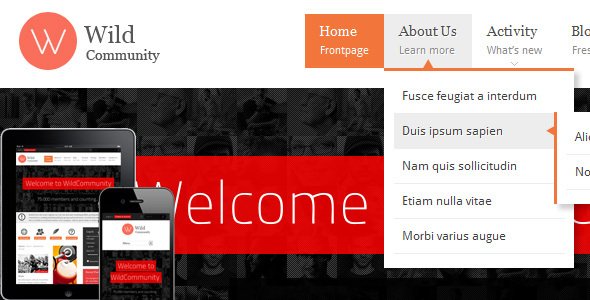
Stuck on your WildCommunity WordPress theme? Let's fix it.
No endless back-and-forth. Just send us the details and we'll get it done.
No obligation · Replies within 1 hour · Quote within 1 day
Setup · Customization · Bug fixes · WooCommerce integration
About WildCommunity WP Theme
WildCommunity is a WordPress theme built by Diabolique, designed specifically for online communities, forums, and membership-based websites. It pairs tightly with BuddyPress and bbPress, giving you the core tools to build activity feeds, member profiles, private messaging, and discussion boards without heavy custom development.
The theme ships with a clean, modern layout that works across devices. It includes pre-built page templates for member directories, group pages, and forum listings. Diabolique has focused the design on social interaction, so the UI prioritises content from other users rather than static pages. If you’re building a niche community, a private network for a brand, or a public forum around a shared interest, WildCommunity gives you a solid structural starting point without needing to code a theme from scratch.
Get matched with a WildCommunity developer in under one day
Tell us about your WildCommunity project. Small fixes, WildCommunity theme customization, or a full website build, whatever you need, we've got it covered.
We'll connect you to the right WildCommunity developers, define the scope, and get everything 100% clear.
You'll get one estimate, hire your preferred developer, and start collaborating.
WildCommunity sits at the intersection of theme design and complex plugin configuration. BuddyPress alone has dozens of components, and getting them to work cleanly inside Diabolique’s template structure takes real experience. The developers available through Codeable have worked on community and membership sites extensively. They know where WildCommunity’s defaults fall short and how to extend them without creating fragile customisations that break on the next theme update.
Pros
- Built specifically for BuddyPress and bbPress, so community features integrate cleanly without extra configuration
- Ships with dedicated templates for member directories, group pages, and activity feeds
- Mobile-responsive layout that holds up well on community-heavy pages with lots of dynamic content
- Customizer support covers most visual changes without touching code
- Active support from Diabolique with documentation covering BuddyPress component setup
Cons
- Deep customisation of BuddyPress templates requires PHP knowledge and understanding of the theme's override structure
- Design options in the Customizer are more limited compared to multipurpose themes with page builder support
- Performance can degrade noticeably on sites with large member bases without proper caching and query optimisation
- WooCommerce integration is not a core focus, so building a commerce-plus-community setup needs additional work
- Styling updates between theme versions occasionally require minor CSS fixes if you have custom overrides in place
Who is WildCommunity for?
Niche Interest Communities
WildCommunity works well for groups built around a shared hobby, profession, or interest. Members can create profiles, join topic-specific groups, post in forums, and follow activity feeds. The theme’s layout keeps social interaction front and centre, which suits communities where engagement between members is the main product.
Paid Membership Sites
Pair WildCommunity with MemberPress or Paid Memberships Pro to gate community access behind a subscription. Members get profile pages, private messaging, and group access based on their membership tier. Diabolique’s template structure supports this model without requiring a full platform rebuild.
Brand Private Networks
Brands running private networks for customers, advocates, or staff benefit from WildCommunity’s group and messaging features. You can restrict registration, control who sees what content, and create separate spaces for different audience segments. It keeps the community inside your own WordPress install rather than a third-party platform.
Educational Cohort Platforms
Course creators running cohort-based programmes can use WildCommunity to build the social layer alongside tools like LearnDash or LifterLMS. Students join groups tied to their cohort, discuss lessons in forums, and connect through member profiles. The theme handles the community experience that most LMS plugins lack natively.
Local Community Hubs
Local organisations, neighbourhood groups, and regional clubs can use WildCommunity to build a digital home for their members. Event announcements, discussion forums, and member directories give people a reason to return regularly. The theme scales down comfortably for smaller communities without feeling overbuilt.

Customizing WildCommunity
WildCommunity exposes most visual settings through the WordPress Customizer, covering colours, typography, header layout, and sidebar behaviour. You can adjust the member card design, control what profile fields display publicly, and configure group visibility options from the admin panel.
Beyond surface-level changes, deeper customisation requires template overrides and custom CSS or PHP work. Adjusting BuddyPress component templates, adding custom profile field groups, or integrating WooCommerce memberships into the community flow all need developer input. A WildCommunity expert understands how Diabolique has structured the theme’s template hierarchy and where to make changes safely, without breaking BuddyPress compatibility on future updates. Getting this right from the start saves significant rework later.
Recommended plugins for WildCommunity
WildCommunity works well with BuddyPress add-ons like BuddyBoss Platform, PeepSo, and GamiPress for gamification. For paid communities, pairing it with MemberPress or Paid Memberships Pro is a natural fit. bbPress handles threaded forum discussions natively within the theme’s styling.
If site speed becomes an issue as your community grows, caching and database optimisation matter more on community sites than standard blogs. You should also consider SEO structure for public-facing profile and group pages. Both WordPress performance and SEO optimisation become critical at scale.
Not sure which plugins to use? This WordPress plugins directory covers the most popular options with reviews and setup guides.
WildCommunity common issues
WildCommunity BuddyPress profile pages not displaying correctly
Profile display problems usually come from a conflict between WildCommunity’s BuddyPress templates and a BuddyPress version update. Check whether your active theme template files are outdated by comparing them against the current BuddyPress template stack. Clearing your cache and deactivating third-party BuddyPress add-ons one by one will help isolate the cause. If the issue persists, a WordPress bug fixing specialist can trace the exact template conflict quickly.
WildCommunity activity feed loading slowly or timing out
Activity feed slowdowns on WildCommunity sites are almost always a database query problem. As your member base grows, BuddyPress activity queries hit large tables without proper indexing. Enable object caching with Redis or Memcached, and review whether your hosting environment supports persistent connections. Reviewing WordPress performance at the server and query level is the right fix rather than adjusting theme settings.
WildCommunity group pages showing wrong template after update
After a WildCommunity or BuddyPress update, group pages sometimes revert to a default BuddyPress template if your custom overrides weren’t maintained correctly. Check your child theme’s BuddyPress template folder structure and confirm the file paths match the updated BuddyPress template hierarchy. Regenerate any cached pages and test in a staging environment before pushing fixes to production.
WildCommunity member directory layout broken on mobile
Member directory layout breaks on mobile are typically caused by CSS conflicts between WildCommunity’s grid styles and a plugin adding its own stylesheet. Open browser developer tools on the broken element to identify which CSS rule is overriding the layout. Adding targeted CSS overrides in your child theme usually resolves it. If the layout is fundamentally broken after a theme update, check Diabolique’s changelog for any grid structure changes.
WildCommunity FAQ
Diabolique maintains WildCommunity with BuddyPress compatibility as a priority, but there can be a short gap after major BuddyPress releases before the theme is updated to match. Always test updates on a staging site first. Checking Diabolique’s changelog before updating BuddyPress on a live community is good practice.
WildCommunity is built around BuddyPress. Without it, you lose the core features the theme is designed for, including member profiles, groups, and activity feeds. You can technically run it as a standard blog theme, but you’d be ignoring most of what makes WildCommunity worth using in the first place.
Yes. WildCommunity includes styling for bbPress forum pages and integrates with BuddyPress’s bbPress component for member-linked forum activity. Forum topics, replies, and user profiles connect cleanly within the theme’s layout. It’s one of the more reliable theme and forum plugin combinations available for WordPress community sites.
Custom profile fields are managed through BuddyPress under Users > Profile Fields in the WordPress admin. WildCommunity displays these fields on member profile pages automatically. For conditional fields, field groups tied to membership levels, or custom display logic, you’ll need developer help to extend the default BuddyPress field system.
WildCommunity can work on WordPress Multisite, particularly when combined with BuddyPress in network mode. However, configuration is more complex and requires careful planning around user roles, network activation, and shared profile data. A developer familiar with both WildCommunity and Multisite setups is advisable before going that route.
Hire a WildCommunity Developer
If you need help setting up, customising, or extending WildCommunity, working with a specialist saves time and avoids mistakes that are expensive to unpick later. Post your project and get matched with a vetted WildCommunity developer within 24 hours. Get a free estimate with no obligation to hire. You describe the work, receive a clear quote, and decide from there.
You'll need a free Codeable account so developers can ask questions and send their quotes.