Woffice WordPress Theme
by WofficeIO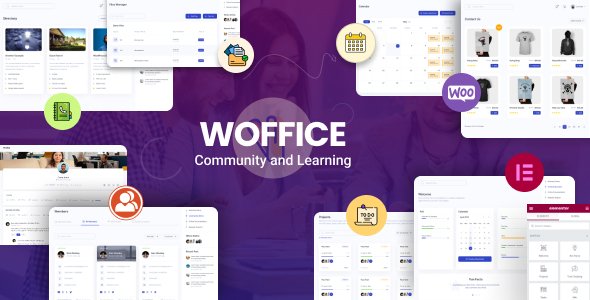
Stuck on your Woffice WordPress theme? Let's fix it.
No endless back-and-forth. Just send us the details and we'll get it done.
No obligation · Replies within 1 hour · Quote within 1 day
Setup · Customization · Bug fixes · WooCommerce integration
About Woffice WP Theme
Woffice is a premium WordPress intranet and extranet theme built by WofficeIO. It targets companies and teams that need a private, internal platform without buying standalone intranet software. Out of the box it ships with project management, team directories, wikis, event calendars, and a customisable dashboard.
The theme integrates tightly with BuddyPress and BuddyBoss, giving you social features like activity feeds, groups, and private messaging. It also supports LearnDash and LifterLMS for internal training portals. Role-based access control lets you restrict pages and content by user type, which is one of the main reasons businesses choose Woffice over a general-purpose theme.
Setup is more involved than a standard business theme. The feature set is wide, the admin panel is dense, and getting everything configured correctly usually takes time and WordPress knowledge.
Get matched with a Woffice developer in under one day
Tell us about your Woffice project. Small fixes, Woffice theme customization, or a full website build, whatever you need, we've got it covered.
We'll connect you to the right Woffice developers, define the scope, and get everything 100% clear.
You'll get one estimate, hire your preferred developer, and start collaborating.
Woffice is not a theme you configure in an afternoon. The combination of BuddyPress, role permissions, project tools, and custom shortcodes means there are many places for things to break or be set up incorrectly. A vetted Woffice developer through Codeable can scope your project, flag problems early, and deliver a working intranet rather than a half-configured one. Codeable matches you with specialists who have done this before, so you are not paying someone to learn the theme on your project.
Pros
- Covers project management, wikis, events, and team directories in a single theme without needing multiple plugins
- Deep BuddyPress and BuddyBoss integration gives you a proper social intranet layer with activity feeds and groups
- Role-based access control is built into the theme, not bolted on via a separate plugin
- LearnDash and LifterLMS compatibility makes it suitable for internal training and onboarding portals
- Active development history with regular updates and a dedicated support forum from WofficeIO
Cons
- Initial setup is significantly more complex than a standard WordPress theme and takes real time to configure correctly
- The admin panel is dense and can overwhelm users who are not familiar with WordPress settings
- Heavy reliance on shortcodes makes content portable only within Woffice, causing problems if you switch themes later
- Performance can degrade on shared hosting once BuddyPress activity, groups, and project data accumulate
- Some design elements look dated compared to modern SaaS intranet tools and require custom CSS to modernise
Who is Woffice for?
Corporate Intranet for SMEs
Small and mid-sized companies use Woffice to replace scattered tools like Slack channels, shared drives, and email threads. The theme brings HR documents, announcements, project boards, and staff directories under one login. A Woffice developer can map your company structure to user roles so each department only sees what is relevant to them.
Client Portal and Extranet
Agencies and consultancies use Woffice to give clients a private portal for project updates, file sharing, and communication. The extranet mode restricts access so each client sees only their own data. Setting this up correctly requires careful role and access configuration, which is where a Woffice specialist adds real value.
Internal Training Platform
With LearnDash or LifterLMS integrated, Woffice becomes an internal LMS for onboarding new staff or delivering compliance training. Courses can be assigned by role, progress tracked per user, and certificates issued on completion. A Woffice developer can connect your existing HR data to automate enrolment and reporting.
Nonprofit or Community Hub
Nonprofits and membership organisations use Woffice to build private community spaces with forums, event calendars, and resource libraries. BuddyPress groups let you segment members by chapter, interest, or volunteer role. The open-source WordPress base keeps costs lower than proprietary community platforms.
Agency Project Management Portal
Digital agencies run client projects through Woffice using its built-in task boards, timelines, and file attachments. Giving clients limited portal access reduces email back-and-forth. A Woffice specialist can extend the project module with custom fields or connect it to time-tracking and invoicing plugins.

Customizing Woffice
Woffice ships with a front-end customiser and a dedicated theme options panel. You can adjust colours, typography, sidebar layouts, and dashboard widget positions without touching code. Most visual changes are straightforward.
Where things get complicated is access control. Setting up role-based restrictions across pages, groups, and custom post types requires careful planning. Woffice also uses custom shortcodes extensively, so building out wiki pages, project boards, or member directories means learning its own shortcode library.
A Woffice expert can map your organisational structure to the theme’s permission system correctly from the start, integrate your existing plugins, and build custom modules where the theme falls short. Getting the initial architecture right avoids a lot of rework later. If you need something beyond what the theme options allow, a Woffice developer can extend it cleanly without breaking update compatibility.
Recommended plugins for Woffice
Woffice works alongside several plugins that expand what your intranet can do. BuddyPress and BuddyBoss add social networking layers. LearnDash and LifterLMS handle internal training. WooCommerce integration supports internal stores or paid membership access.
For public-facing portals, WordPress performance optimisation matters more than most Woffice users realise. A slow intranet kills adoption. Caching, database optimisation, and proper hosting configuration all apply here. If your Woffice site is also indexed or semi-public, WordPress SEO optimisation can help the right pages rank. Pairing the theme with a solid plugin stack and tuned hosting makes a significant difference to day-to-day usability for your team.
Not sure which plugins to use? This WordPress plugins directory covers the most popular options with reviews and setup guides.
Woffice common issues
Woffice menu not showing for certain user roles
This is almost always a role permission setting inside the Woffice panel. Navigate to Woffice Settings and review the Access Restriction section. Each menu item can be tied to specific roles. If you recently changed a user’s role or added a custom role via a plugin, Woffice may not recognise it automatically. Map custom roles explicitly in the settings. If the issue persists after checking permissions, a plugin conflict may be overriding role capabilities.
Woffice project module not loading or showing blank page
A blank project page usually points to a PHP memory limit being hit or a JavaScript error blocking the module from rendering. Check your browser console for JS errors first. Then raise your PHP memory limit to at least 256MB in wp-config.php. If the page loads for admins but not regular users, the problem is a permission setting on the Projects post type inside Woffice access controls. Our WordPress bug fixing service can diagnose this quickly.
BuddyPress activity feed not displaying in Woffice
When the BuddyPress activity feed is empty or missing in Woffice, start by confirming BuddyPress is active and that the Activity component is enabled under BuddyPress settings. Woffice has a dedicated BuddyPress settings tab where you can assign the activity page. If the page assignment is lost after an update, reassign it. A theme or plugin update sometimes resets these page mappings, so check after every Woffice update.
Woffice login redirect not working after user logs in
Woffice has a login redirect setting under Woffice Settings that points users to a specific page after login. If this is set correctly but still not working, another plugin is likely intercepting the redirect. Common culprits are WooCommerce, membership plugins, and security plugins. Deactivate plugins one by one to isolate the conflict. You can also set redirects using a dedicated login redirect plugin that runs at a higher priority than the theme.
Woffice wiki pages returning 404 error
404 errors on wiki pages almost always mean your permalink structure is stale. Go to Settings, Permalinks, and save without changing anything. This flushes rewrite rules. If the issue returns after a Woffice update, it means the theme’s custom post type rewrite rules are not being registered correctly. Check that the Woffice wiki module is enabled in theme settings. If problems continue, use our WordPress bug fixing service to resolve the rewrite conflict.
Woffice dashboard widgets not saving position changes
Dashboard widget positions in Woffice are saved per user via AJAX. If positions are not saving, check whether your browser is blocking the AJAX request. Open the browser console, drag a widget, and look for a failed network request. A security plugin or CDN may be blocking the wp-admin AJAX endpoint. Whitelist the admin AJAX URL in your security plugin. Also confirm the logged-in user has the correct Woffice dashboard access level assigned to their role.
Woffice slow loading with many users and BuddyPress active
Woffice with BuddyPress active puts significant load on the database, particularly the activity and notifications tables. Enable object caching using Redis or Memcached, and configure a full-page cache that excludes logged-in users. Review slow query logs to identify which BuddyPress queries are the bottleneck. In some cases, disabling unused BuddyPress components reduces load noticeably. See our WordPress bug fixing service for a full performance audit on intranet setups.
Woffice user registration form not sending confirmation email
Woffice uses WordPress’s built-in wp_mail function for registration emails. If emails are not arriving, WordPress is not the problem, the server mail configuration is. Install an SMTP plugin such as WP Mail SMTP and connect it to a transactional email service like SendGrid or Mailgun. Test sending immediately after setup. Also check spam folders and confirm the Woffice registration email template has not been accidentally cleared in theme settings.
Woffice access restriction not working on custom post types
Woffice’s access restriction system covers standard pages well but can miss custom post types registered by third-party plugins. To restrict a custom post type, you need to either use the Woffice access API or add a restriction via a code snippet in your child theme that hooks into the theme’s permission check. Relying on the page-level restriction settings alone will not cover archive or single views of custom post types. A Woffice developer can implement this cleanly.
Woffice child theme changes not applying after update
If your child theme changes vanish after a Woffice update, the parent theme’s styles are likely loading after your child theme stylesheet, overriding your rules. Check your child theme’s functions.php to confirm the parent stylesheet is enqueued correctly using wp_enqueue_scripts with a dependency on the parent handle. Also verify you are not modifying parent theme template files directly. Any template overrides should exist as copies inside your child theme folder structure.
Woffice FAQ
Yes, it is one of the few WordPress themes built specifically for intranet use rather than adapted from a general business theme. It handles team directories, project management, wikis, and access control in a single package. The trade-off is a steeper setup curve compared to simpler themes. For teams with specific intranet requirements, it is a practical choice provided you configure it correctly.
Woffice is compatible with BuddyBoss Platform. BuddyBoss is a fork of BuddyPress with a more polished interface and additional features. Most BuddyPress-compatible features in Woffice carry over. You will need to map BuddyBoss pages inside Woffice settings after setup. Some minor styling inconsistencies may appear and require a small amount of custom CSS to resolve.
Woffice is sold on Envato Market. Pricing follows the standard ThemeForest model with a regular licence for a single site and an extended licence for commercial use. Prices vary but typically sit in the $59 to $79 range for a regular licence. An active Envato subscription is required for continued theme updates and support access after the initial support period ends.
Yes. Woffice supports extranet mode, which allows external users such as clients or partners to log in and access a restricted area without seeing internal staff content. Setting up the permission boundaries between internal and external users requires careful role configuration. A Woffice specialist can structure this so clients only see their own projects and files.
Woffice has built-in LearnDash compatibility. Course listings, lessons, and quizzes can be displayed within the Woffice dashboard layout. You can also restrict access to courses by user role using Woffice’s permission system. This makes it practical for internal training portals where different departments or job levels need access to different course sets.
WofficeIO continues to release updates as of the time of writing. The theme has been on the market for several years and has an established update history. Check the ThemeForest changelog tab for the most recent release dates before purchasing. Support is provided through the Envato support system with a time-limited support period included in the purchase price.
Yes. A vetted Woffice developer can handle full setup, BuddyPress or BuddyBoss integration, role and permission configuration, and custom feature development. Working through a platform like Codeable means you are matched with someone who has direct experience with the theme. Get a Free Estimate to describe your project and get matched with a specialist.
Woffice has a built-in access restriction system under Woffice Settings. You can set individual pages to be visible only to specific roles. For post types and dynamic content, restrictions are configured separately within the theme panel. Custom roles created by third-party plugins need to be explicitly mapped in the settings, as Woffice does not automatically detect roles added after installation.
Woffice itself migrates like any other WordPress theme. The main things to check after migration are permalink flushing to fix any 404 errors on wiki or project pages, and SMTP email configuration if your new host handles outgoing mail differently. If you used server-specific caching or security rules on the old host, review those on the new environment. A WordPress migration service can handle this cleanly.
Woffice officially recommends BuddyPress or BuddyBoss Platform for social features, LearnDash or LifterLMS for learning management, and WooCommerce for commerce features. For forms, it works with standard WordPress form plugins. For maintenance and security, standard plugins like UpdraftPlus for backups and Wordfence for security apply. A WordPress maintenance plan keeps the full stack updated and monitored.
Hire a Woffice Expert Developer
Whether you need a full Woffice intranet built from scratch, a broken feature fixed, or a custom integration with your existing tools, working with a specialist saves time and avoids the common configuration mistakes that plague Woffice setups. Our vetted Woffice developers have hands-on experience with the theme’s permission system, BuddyPress integration, and custom module development.
Get a Free Estimate and describe your project. No obligation, no upfront cost.
You'll need a free Codeable account so developers can ask questions and send their quotes.