Writing WordPress Theme
by A-Works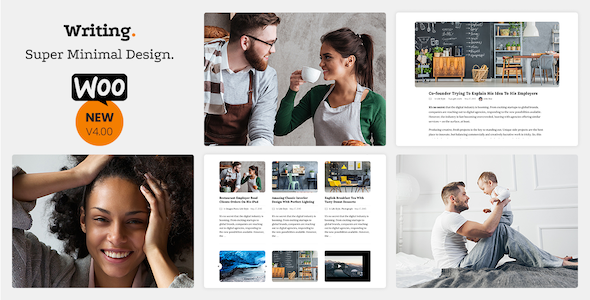
Stuck on your Writing WordPress theme? Let's fix it.
No endless back-and-forth. Just send us the details and we'll get it done.
No obligation · Replies within 1 hour · Quote within 1 day
Setup · Customization · Bug fixes · WooCommerce integration
About Writing WP Theme
Writing is a WordPress theme built by A-Works, designed specifically for authors, bloggers, and content-focused websites. It ships with a clean, distraction-free layout that puts text front and center. Typography choices are deliberate, line spacing is generous, and the reading experience on mobile holds up without extra configuration.
The theme supports the WordPress block editor out of the box, so building pages with the Writing theme does not require a separate page builder. It includes customizable header and footer areas, multiple post layout options, and widget-ready sidebars. Color and font controls are available through the WordPress Customizer. For anyone running a personal blog, literary magazine, or portfolio for written work, Writing delivers a focused starting point without unnecessary visual clutter.
Get matched with a Writing developer in under one day
Tell us about your Writing project. Small fixes, Writing theme customization, or a full website build, whatever you need, we've got it covered.
We'll connect you to the right Writing developers, define the scope, and get everything 100% clear.
You'll get one estimate, hire your preferred developer, and start collaborating.
A-Works themes are well-structured, but every site hits a point where stock controls are not enough. A Writing developer on Codeable has already worked inside this theme’s codebase. They know where the customization hooks are, how the template hierarchy is organized, and which changes belong in a child theme versus a plugin. Codeable vets every developer before they take on work, so you are not posting a job and hoping for the best. You get matched with someone qualified for your specific project.
Pros
- Typography and line spacing are optimized for long-form reading without extra CSS
- Full compatibility with the WordPress block editor, no page builder required
- Lightweight codebase keeps baseline load times low
- Multiple post layout options built in, including full-width and sidebar variants
- Clean, minimal design that works across niches without heavy restyling
Cons
- Customizer options are limited compared to multipurpose themes, advanced changes require code
- No built-in mega menu or complex navigation support
- WooCommerce integration is minimal and needs custom work for a polished storefront
- Limited bundled demo content makes initial setup slower for new users
- Header layout options are restricted to a single style without custom template work
Who is Writing for?
Personal Blog
The Writing theme suits personal blogs well. The layout keeps focus on post content, and the typography settings handle long reads without straining the eye. Category archives and a clean post grid make it easy for readers to browse back through older content. A Writing specialist can add a custom homepage or featured post section if the default layout needs adjustment.
Author Portfolio
Authors who want to showcase books, a biography, and a blog in one place will find Writing a solid foundation. The minimal design does not compete with the content. A custom page template for book listings or a press page can be added by a Writing developer without touching the core theme files.
Literary Magazine
Literary magazines need consistent typography, clear contributor bylines, and readable archives. Writing handles all of that at the theme level. Custom category templates, a submissions page, and issue-based post grouping are all realistic additions for a Writing expert to build on top of the base theme.
Freelance Writer Website
Freelance writers need a site that shows work samples and drives contact inquiries. The Writing theme provides a clean reading experience for portfolio pieces. Adding a services page, a contact form, and a testimonials section is straightforward work for a Writing specialist familiar with the template structure.
Journalism or News Site
News and journalism sites need fast load times, clear category navigation, and a layout that handles breaking stories and evergreen content equally. Writing’s clean base is a good starting point. A Writing developer can add a custom archive layout, a breaking news bar, or category-specific templates to match editorial needs.

Customizing Writing
The Writing theme covers the basics through the Customizer: site identity, colors, typography, and layout toggles. That handles most surface-level adjustments. But if you need something beyond what the controls expose — a custom author bio layout, a category-specific template, or a branded landing page that deviates from the default post grid — you will need to go deeper into the theme files or create a child theme.
A Writing expert can handle that without breaking future updates. Custom post templates, hook-based layout changes, and CSS that actually targets the right elements rather than overriding everything — these are tasks where hiring a Writing specialist pays off quickly. A-Works themes follow a consistent code structure, which makes targeted customization straightforward for a developer already familiar with the theme architecture.
Recommended plugins for Writing
Writing works well as a standalone theme, but a few additions make a real difference. An SEO plugin is almost always worth adding for content-heavy sites. If your setup needs tuning beyond plugin defaults, take a look at our WordPress SEO optimisation service.
On the speed side, Writing loads light, but image-heavy posts, embedded media, and third-party scripts can drag that down. Caching, lazy loading, and a CDN are the usual fixes. Our WordPress performance service covers that end-to-end. Both are straightforward additions to a Writing-based site.
Not sure which plugins to use? This WordPress plugins directory covers the most popular options with reviews and setup guides.
Writing common issues
Writing theme featured image not showing on single posts
This usually comes down to the featured image not being set on the post, or the theme’s image size not matching what WordPress generated at upload. Check that the image is assigned on the post edit screen. If it still does not show, run a thumbnail regeneration using a plugin like Regenerate Thumbnails. If the issue persists across multiple posts, check the single.php template for the correct the_post_thumbnail() call. Our WordPress bug fixing service can diagnose this quickly.
Writing theme fonts not loading correctly
Font issues in Writing usually trace back to a caching plugin serving an old stylesheet, a CDN stripping the font request, or a Google Fonts API change. Clear all caches first. If the fonts are still missing, check the browser console for blocked requests. Self-hosting the fonts using a plugin like OMGF is a reliable fix that removes the dependency on external requests entirely.
Writing theme sidebar disappearing on mobile
The Writing theme hides the sidebar on smaller screens by default through a CSS media query. If it is disappearing at a breakpoint you do not want, find the relevant rule in the theme stylesheet and adjust the breakpoint in a child theme. Do not modify the parent theme directly. If the sidebar is missing at all screen sizes, check that the sidebar is registered and that widgets are assigned to it in the WordPress Customizer.
Writing theme custom logo not displaying in header
If the custom logo is not showing, go to Appearance, Customize, Site Identity and confirm the logo is uploaded and saved. If it shows in the Customizer preview but not on the live site, a caching issue is the most likely cause. Clear your caching plugin and any server-level cache. If the logo displays at the wrong size, the theme may need a custom logo width set via add_theme_support in a child theme’s functions file.
Writing theme categories page showing wrong posts
A category page showing wrong posts often points to a conflict with a custom query in a plugin, a pagination bug, or a category assigned incorrectly to posts. Check the category slug matches what is in the URL. If you have a custom homepage set, confirm that the posts page is also set correctly under Settings, Reading. Our WordPress bug fixing service can trace query conflicts that are harder to pin down manually.
Writing theme social icons not appearing
Social icons in Writing are typically added through a menu assigned to the social links menu location, or through a widget area. If the menu location exists but icons are not showing, confirm that the menu is assigned to the correct location under Appearance, Menus. Some icon sets require a specific URL format to match the platform. Check the theme documentation for the supported social link format.
Writing theme comments section not showing
If comments are not showing on posts, check two things first. Go to Settings, Discussion and confirm that comments are open by default. Then check the individual post to make sure comments are enabled for that specific post. If both are correct and comments still do not appear, check the theme’s comments.php template and confirm that comments_template() is called in single.php. A plugin conflict can also suppress the comments section.
Writing theme full-width page template not working
If the full-width page template is selected but the sidebar is still showing, clear all caches first. If that does not resolve it, check whether a plugin is injecting the sidebar globally. The Writing theme’s full-width template removes the sidebar at the template level, so a plugin overriding the template hierarchy can cause this. Inspect the page source to confirm which template is being loaded. Our WordPress bug fixing service handles template hierarchy conflicts.
Writing theme menu not saving changes
Menu changes not saving is usually a permissions issue or a JavaScript error in the admin. Open the browser console while saving and check for any JS errors. Try disabling plugins one at a time to find a conflict. If you are on a managed hosting plan, some configurations restrict certain admin requests. Saving the menu after clearing browser cache and disabling ad blockers also resolves this in some cases.
Writing theme breaking after WordPress update
Theme breakage after a WordPress update usually means a function used in the theme was deprecated or removed in the new version. Check the WordPress debug log by setting WP_DEBUG to true in wp-config.php. The error message will point to the specific file and function. If you are not running a child theme, updates to the parent theme can also overwrite customizations. A Writing developer can audit the codebase and make it update-safe.
Writing FAQ
Yes. The Writing theme’s clean layout and typographic focus work well for author sites. You can use it for a blog, a bio page, and a book showcase. If you need a custom book listings page or a press kit section, a Writing specialist can build those as custom templates without altering the core theme files.
The Writing theme is built for the native WordPress block editor. Elementor will technically run alongside it, but the theme was not designed with page builder compatibility in mind. You may get layout conflicts between the theme’s default styles and the builder’s output. Using the block editor is the more stable approach for this theme.
The cleanest method is to use a plugin like Google Fonts Typography or to self-host the font files and enqueue them in a child theme’s functions.php. Avoid editing the parent theme’s stylesheet directly. If you need a specific font pairing that requires more precise control, a Writing developer can set that up correctly in a child theme.
Writing supports WordPress’s native author archive pages and displays author information on posts. For a full multi-author setup with contributor profiles, submission workflows, or author-specific landing pages, you will need a plugin or custom template work. A Writing expert can build those additions without compromising the theme’s reading-focused design.
Writing has minimal WooCommerce styling built in. Basic WooCommerce pages will function, but the visual integration is not polished out of the box. If you need a bookstore or any kind of product listing that looks consistent with the rest of the theme, custom WooCommerce template overrides in a child theme are the right approach.
Create a folder in wp-content/themes, add a style.css file with a header that references the Writing theme as the parent using the Template field, and add a functions.php that enqueues the parent stylesheet. That is the minimum required setup. From there, you can override templates and add custom styles without touching the parent theme files.
Check the theme’s changelog on the A-Works website or its WordPress.org listing for the last tested version. Most actively maintained themes support the current WordPress release. If you are on a newer version of WordPress and seeing errors, check the debug log first. A Writing developer can update compatibility issues if the theme has not been recently patched.
Start with image optimization, a caching plugin, and lazy loading for media. Writing’s base is already lightweight, so most speed issues come from added plugins or unoptimized images rather than the theme itself. For a full audit and fix, our WordPress performance service covers everything from server configuration to front-end delivery.
Your content lives in the WordPress database, not in the theme files, so switching themes does not delete posts, pages, or media. You may lose some widget configurations and theme-specific Customizer settings. Review your menus and sidebar widgets after switching. If you are moving from a different host as well, our WordPress migration service handles the full transfer safely.
Codeable is the most reliable option. Every developer on the platform is vetted, and you can post your Writing theme project and get a fixed-price estimate within 24 hours. For specific customization work, bug fixes, or a full build, a Writing specialist matched through Codeable will have relevant experience with this theme’s codebase.
Hire a Writing Theme Expert
Whether you need layout changes, custom post templates, performance fixes, or a full build on top of the Writing theme, a vetted Writing developer can scope the work and get it done correctly. No patched-together code, no broken updates later. Get a Free Estimate and describe your project. You will hear back within 24 hours with a clear plan and a fixed price.
You'll need a free Codeable account so developers can ask questions and send their quotes.