Xtocky WordPress Theme
by themepiko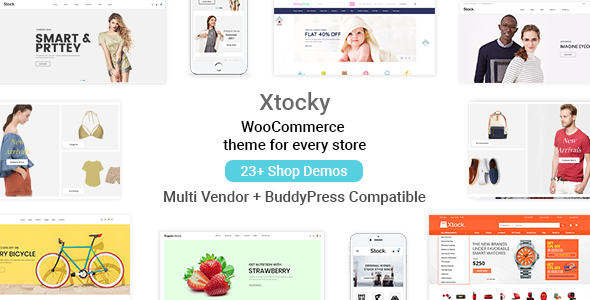
Stuck on your Xtocky WordPress theme? Let's fix it.
No endless back-and-forth. Just send us the details and we'll get it done.
No obligation · Replies within 1 hour · Quote within 1 day
Setup · Customization · Bug fixes · WooCommerce integration
About Xtocky WP Theme
Xtocky is a WooCommerce theme by themepiko built specifically for online stores. It ships with a clean, product-focused layout and a modular homepage builder that lets you arrange sections without touching code. The theme supports Ajax cart, wishlist functionality, quick view, and product filtering — all features a serious shop needs from day one.
It works well for fashion, electronics, home goods, and general retail stores. The design leans minimal, keeping the focus on products rather than decoration. Built-in RTL support and translation-ready files make it a practical choice for international shops. Performance is reasonable out of the box, and it integrates tightly with the most-used WooCommerce plugins. If you run a product-heavy store and want a theme that does most of the heavy lifting, Xtocky covers a lot of ground without requiring custom development for standard features.
Get matched with a Xtocky developer in under one day
Tell us about your Xtocky project. Small fixes, Xtocky theme customization, or a full website build, whatever you need, we've got it covered.
We'll connect you to the right Xtocky developers, define the scope, and get everything 100% clear.
You'll get one estimate, hire your preferred developer, and start collaborating.
Xtocky is capable, but getting a store fully dialed in takes real WooCommerce and theme knowledge. FoxyConcept delivers that work through Codeable, a network of vetted WordPress developers. Every developer on the platform is pre-screened, so you’re not gambling on quality. You post your project, get matched with the right person, and receive a clear estimate before committing to anything. Whether you need a full custom build on Xtocky or targeted fixes, the process is straightforward.
Pros
- Includes Ajax cart, quick view, and product filtering without needing extra plugins
- Modular homepage builder makes layout changes fast without page builder bloat
- RTL and translation-ready out of the box, useful for multilingual stores
- Tight WooCommerce integration means standard shop features work reliably
- Clean minimal design keeps focus on products and avoids visual clutter
Cons
- Customizer options are limited — deeper changes require template edits or child theme work
- Theme updates can occasionally break customizations made directly to theme files
- Elementor compatibility is partial; some sections need manual adjustment after integration
- Support from themepiko can be slow during high-volume periods on ThemeForest
- Default performance needs work — unoptimized images and scripts can slow load times on larger catalogs
Who is Xtocky for?
Fashion and Apparel Stores
Xtocky handles fashion stores well. The product quick view and Ajax wishlist are standard expectations in this space, and both work without extra plugins. Size and color variation swatches display cleanly on product cards. A developer can extend the lookbook-style layouts to match your brand and configure filters by size, color, and category for a smoother browsing experience.
Electronics and Gadget Shops
Electronics stores need strong filtering and comparison features. Xtocky’s built-in Ajax filters work well for spec-heavy categories. Quick view reduces friction for customers scanning multiple products. A developer can add tabbed product specs, comparison tables, and custom attribute display to make technical products easier to evaluate before purchase.
Home and Furniture Retail
Home and furniture stores benefit from Xtocky’s clean grid layouts and large image support. The theme handles portrait and landscape product photography without cropping issues. A developer can build room-based category structures, add zoom and gallery features for detailed product shots, and configure shipping calculators relevant to large-item delivery.
Multi-category General Stores
Multi-category stores need flexible navigation and homepage layouts. Xtocky’s modular homepage lets you feature different departments in distinct sections. An experienced developer can build mega menus, category-specific banners, and cross-sell logic that guides customers through a broad catalog without the store feeling disorganized or overwhelming.
Beauty and Cosmetics Brands
Beauty brands need polished product pages and strong visual identity. Xtocky’s minimal base is easy to brand with custom typography and color palettes. A developer can add ingredient list layouts, shade selector swatches, before-and-after image sections, and subscription product options for repeat-purchase items like skincare and makeup.

Customizing Xtocky
Xtocky gives you a decent starting point, but most stores need changes that go beyond the theme options panel. The built-in customizer handles colors, fonts, header layout, and homepage sections. For anything more specific — custom product page layouts, unique category structures, checkout flow changes, or brand-specific design work — you need someone who knows the theme’s codebase.
An Xtocky expert can modify templates without breaking WooCommerce compatibility, add custom hooks, and extend the theme cleanly so updates don’t wipe your changes. If you’ve hit the edge of what the theme settings allow, or if your store has grown past a generic layout, working with a developer who has hands-on Xtocky experience saves time and avoids the broken-layout headaches that come from DIY template edits. The difference between a functional store and one that converts well often comes down to these targeted customizations.
Recommended plugins for Xtocky
Xtocky works well with WooCommerce’s core plugin stack. YITH plugins for wishlist, compare, and product bundles slot in without conflicts. WooCommerce Subscriptions, Stripe, and major payment gateways are all supported. For page building beyond the homepage, Elementor works alongside the theme, though some sections need adjustment.
If store speed is a concern, pairing Xtocky with proper WordPress performance optimization — caching, image compression, and a CDN — makes a real difference for conversion rates. For stores targeting organic traffic, structured product data and on-page work handled through WordPress SEO optimization can improve rankings significantly.
Not sure which plugins to use? This WordPress plugins directory covers the most popular options with reviews and setup guides.
Xtocky common issues
Xtocky product filter not working after update
Filter breaks after updates are usually caused by a conflict between the theme’s filter script and a caching plugin, or a jQuery version mismatch introduced by another plugin. Start by clearing all caches and testing with plugins disabled one by one. If the filter relies on custom attributes, check that those attributes are marked as filterable in WooCommerce settings. Persistent issues after an update often need a developer to patch the template. Our WordPress bug fixing service can identify and resolve this quickly.
Xtocky homepage sections not saving in customizer
Customizer sections failing to save in Xtocky is often a PHP memory limit issue or a conflict with a security plugin blocking REST API requests. Check your server’s PHP memory limit — 256MB is the recommended minimum. Also verify that the WordPress REST API is not being blocked by a firewall or security plugin like Wordfence. If you’re on managed hosting, contact your host about REST API restrictions. A developer can also check for corrupted theme option data in the database if the problem persists. Visit our bug fixing service for hands-on help.
Xtocky Ajax cart broken or not updating
A broken Ajax cart in Xtocky usually points to a JavaScript conflict with another plugin, or a caching layer serving a stale version of the cart fragment. Start by disabling caching plugins and testing. If the cart works without cache, configure your caching plugin to exclude cart and checkout pages. Conflicts with payment plugins or popup builders are also common culprits. Check the browser console for JavaScript errors to narrow down the source. If the issue appeared after adding a new plugin, that’s your first suspect to deactivate and test.
Xtocky slow loading with large product catalog
Slow load times with a large catalog in Xtocky are almost always an image and script loading problem. The theme loads product images on category pages without lazy loading by default in older versions. Enable lazy loading, compress images with a tool like ShortPixel, and implement a caching plugin with CSS and JS minification. A CDN makes a significant difference for image-heavy stores. For deeper optimization work, our WordPress performance service covers full audits and implementation for WooCommerce stores specifically.
Xtocky FAQ
Yes. Xtocky is built specifically for WooCommerce and includes features that most general WordPress themes lack — Ajax cart, quick view, product filtering, wishlist, and variation swatches. It follows WooCommerce template structure, which means most WooCommerce plugins integrate without issues. It’s a reasonable choice for small to mid-sized product catalogs that need a functional store without heavy custom development.
Xtocky has partial Elementor compatibility. You can use Elementor to build custom pages and some sections, but the theme’s own homepage builder handles native sections. Mixing both sometimes creates styling conflicts that need manual CSS fixes. For stores that want full Elementor control throughout the site, additional configuration and developer work is usually needed to keep things consistent.
Xtocky supports child themes. Create a new folder in your themes directory, add a style.css file with the correct template header pointing to Xtocky, and include a functions.php file that enqueues the parent theme’s stylesheet. Activate the child theme from the WordPress admin. Any customizations you make in the child theme will survive parent theme updates. themepiko may also provide a child theme starter on ThemeForest.
Xtocky doesn’t include multi-vendor functionality natively. You can pair it with a plugin like Dokan or WCFM Marketplace, but compatibility varies and the vendor dashboard pages may need styling work to match the theme. If a full marketplace is your goal, testing the specific plugin combination first is important. A developer familiar with both Xtocky and your chosen marketplace plugin can handle any integration gaps.
Official support for Xtocky comes through the ThemeForest comments section and themepiko’s support system. Response times vary. For urgent fixes or customization work that goes beyond what theme support covers, working with an independent WordPress developer is faster and more flexible. Our WordPress maintenance service includes ongoing support for theme issues alongside regular updates and backups.
Hire an Xtocky Developer
Need an Xtocky developer who knows WooCommerce inside out? FoxyConcept handles everything from theme setup and customization to complex store features and performance work. Projects are delivered through Codeable’s vetted developer network — you get a free estimate with no obligation to proceed. Get a free estimate today and tell us what your store needs. No vague scopes, no surprises.
You'll need a free Codeable account so developers can ask questions and send their quotes.