Yogi WordPress Theme
by NooTheme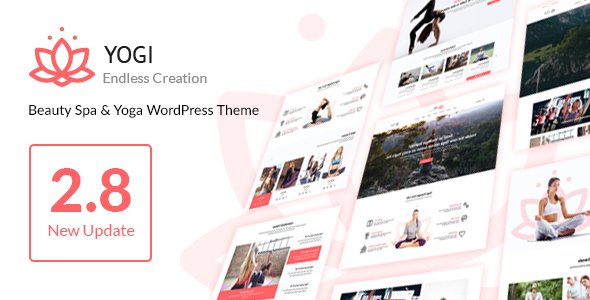
Stuck on your Yogi WordPress theme? Let's fix it.
No endless back-and-forth. Just send us the details and we'll get it done.
No obligation · Replies within 1 hour · Quote within 1 day
Setup · Customization · Bug fixes · WooCommerce integration
About Yogi WP Theme
Yogi is a WordPress theme built by NooTheme, designed specifically for yoga studios, wellness centers, and fitness instructors. It ships with a clean visual style, multiple homepage layouts, and tight integration with common booking and scheduling plugins.
The theme is built on a custom NooTheme framework and works alongside Elementor for drag-and-drop editing. It includes pre-built pages for class schedules, instructor profiles, pricing tables, and retreat listings. WooCommerce support is included for selling memberships or merchandise.
Yogi targets studio owners who want a polished, niche-specific starting point without building everything from scratch. It performs reasonably well out of the box, though like most multipurpose-adjacent themes, it benefits from proper configuration and optimization before going live.
Get matched with a Yogi developer in under one day
Tell us about your Yogi project. Small fixes, Yogi theme customization, or a full website build, whatever you need, we've got it covered.
We'll connect you to the right Yogi developers, define the scope, and get everything 100% clear.
You'll get one estimate, hire your preferred developer, and start collaborating.
NooTheme’s Yogi has its own framework quirks, and Elementor customization only goes so far without PHP-level knowledge. If you need custom post types for classes, a modified booking flow, or a child theme built properly, a general WordPress developer will spend hours figuring out what a Yogi-experienced developer knows immediately.
Through Codeable, FoxyConcept matches you with vetted developers who have worked with Yogi and similar NooTheme products. You get a free estimate with no obligation, and work only starts when you’re ready to move forward.
Pros
- Purpose-built for yoga and wellness niches with relevant pre-built pages out of the box
- Elementor compatibility gives non-developers usable drag-and-drop editing without heavy coding
- Includes class schedule, instructor profile, and pricing table templates ready to customize
- WooCommerce integration works for selling memberships, merchandise, or class passes
- Multiple homepage demo layouts let you pick a starting point close to your target design
Cons
- NooTheme's custom framework adds a learning curve for developers unfamiliar with their codebase
- Demo content import can be inconsistent, sometimes requiring manual cleanup after setup
- Page speed scores on default configuration tend to be average without additional optimization
- Theme updates from NooTheme are infrequent, which can create compatibility concerns over time
- Support from NooTheme is limited compared to larger theme marketplaces, with slower response times
Who is Yogi for?
Yoga Studios
Yogi was built with yoga studios in mind. The class schedule templates, instructor profile pages, and drop-in pricing layouts map directly to how most studios present their offerings. A developer can wire these up to live booking data and payment processing without rebuilding from scratch.
Wellness Coaches
Solo wellness coaches need a site that looks credible and converts visitors into bookings. Yogi’s clean layout and service-focused page templates work well here. Pairing it with a booking plugin and a properly configured contact flow gives coaches a professional setup without a large budget.
Pilates and Fitness Centers
Pilates and general fitness businesses share enough structure with yoga studios that Yogi’s templates transfer well. Class listings, trainer profiles, and membership pricing pages all apply. The WooCommerce integration handles class pass purchases or monthly membership billing.
Retreat and Workshop Organizers
Retreat organizers need event pages, application forms, itinerary layouts, and sometimes deposit payment flows. Yogi’s base templates combined with The Events Calendar and WooCommerce cover most of this. A developer can extend the layout to handle retreat-specific details like location maps and schedule breakdowns.
Online Yoga Membership Sites
For instructors selling online video content or gated class libraries, Yogi works as a front end paired with MemberPress or a similar membership plugin. The visual style supports video-heavy layouts, and a developer can configure access tiers, payment plans, and content restriction without switching themes.

Customizing Yogi
Yogi gives you a solid foundation, but most studio owners want something that reflects their brand specifically, not just the demo. That means custom color schemes, adjusted typography, reworked class schedule layouts, and sometimes additional functionality like online booking or member-only content areas.
A Yogi expert can handle all of that without the usual trial-and-error. Whether you need a custom Elementor template built from the Yogi base, a tailored instructor profile system, or a modified class timetable that pulls live data, working with someone who knows NooTheme’s framework saves significant time.
FoxyConcept connects you with developers who have hands-on experience with Yogi and understand how to extend it without breaking the theme’s core structure.
Recommended plugins for Yogi
Yogi pairs well with several plugins that expand its functionality for wellness businesses. The Events Calendar handles class scheduling cleanly. WooCommerce with WooCommerce Bookings adds reservation and payment flows. MemberPress or Restrict Content Pro work for membership-gated content.
For performance, additional configuration is needed beyond Yogi’s defaults. Caching, image optimization, and proper script loading make a real difference. SEO plugins like Rank Math or Yoast integrate without conflicts.
If you want to push further, our WordPress performance service and SEO optimization service are good next steps after your Yogi site is live.
Not sure which plugins to use? This WordPress plugins directory covers the most popular options with reviews and setup guides.
Yogi common issues
Yogi theme class schedule not displaying correctly
Schedule display issues in Yogi usually come from plugin conflicts or misconfigured custom post types. Check whether The Events Calendar or your booking plugin is conflicting with Yogi’s built-in schedule component. Deactivate plugins one at a time to isolate the conflict. If you customized the schedule template, verify the child theme override is pointing to the correct file. Our WordPress bug fixing service can diagnose this quickly.
Yogi WordPress theme slow loading on mobile
Yogi loads several scripts and stylesheets by default that are not always needed on every page. On mobile, this creates noticeable delay. Start by enabling a caching plugin and deferring non-critical JavaScript. Compress images and switch to a faster hosting environment if needed. NooTheme’s framework doesn’t always load assets conditionally, so a developer may need to manually clean up script enqueueing in the child theme.
Yogi theme Elementor widgets not working after update
NooTheme releases Elementor-specific widget packs alongside Yogi. After a major Elementor update, these widgets sometimes break due to deprecated API calls. First, ensure both Yogi and any NooTheme companion plugins are on their latest versions. If the issue persists, check the browser console for JavaScript errors. A developer familiar with Yogi’s widget structure can patch incompatibilities without waiting on a NooTheme update.
Yogi NooTheme demo import fails or shows blank page
Yogi’s demo import requires the One Click Demo Import plugin and enough PHP memory to process large XML files. A blank page after import usually means a memory limit or timeout issue. Set WP_MEMORY_LIMIT to at least 256M in wp-config.php and increase your server’s max execution time. If the import still fails, manual content setup is faster than repeated attempts. A developer can replicate the demo layout without using the import tool.
Yogi FAQ
Yes. Yogi is built with Elementor compatibility as a core feature. NooTheme also provides custom Elementor widgets specific to Yogi for class schedules, instructor profiles, and pricing tables. That said, after major Elementor version updates, some widgets may need attention. Keeping both Elementor and Yogi updated together reduces compatibility problems.
Yes, but Yogi alone doesn’t handle memberships. You’ll need a plugin like MemberPress, Restrict Content Pro, or LearnDash if you’re selling video courses. Yogi handles the front-end design and WooCommerce handles payments. A developer can configure the full stack so members get the right access after purchase.
Yes. Yogi includes WooCommerce support for selling class passes, merchandise, or memberships. The styling integrates with Yogi’s design without requiring heavy CSS overrides. For more advanced setups like subscriptions or bookings, WooCommerce extensions are needed and may require developer configuration.
Create a folder in wp-content/themes/ named something like yogi-child. Add a style.css file with the correct Template: yogi header and a functions.php that enqueues the parent stylesheet. Activate the child theme from the WordPress dashboard. All customizations go into the child theme to survive Yogi updates.
Yes. Moving your content to Yogi is a theme switch, not a full migration. Your posts, pages, and media stay in place. You’ll need to rebuild your page layouts in Elementor using Yogi’s templates. If you’re also changing hosting at the same time, our WordPress migration service handles the full move cleanly.
Hire a Yogi WordPress Developer
Whether you need a full Yogi setup, custom feature development, or fixes to an existing build, FoxyConcept can help. Projects are delivered through Codeable, a vetted network of WordPress specialists. You get a free estimate within 24 hours and zero obligation to hire.
Post your project and describe what you need. A developer with direct Yogi experience will review it and send a clear quote. Get your free estimate here and get matched today.
You'll need a free Codeable account so developers can ask questions and send their quotes.