Youko WordPress Theme
by mwtemplates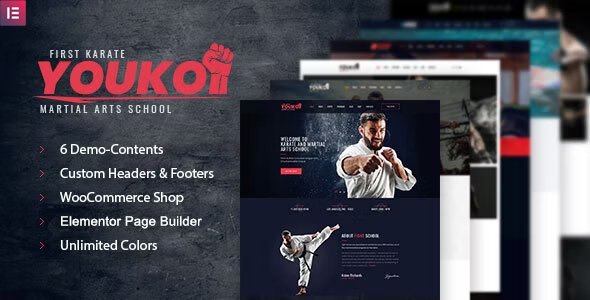
Stuck on your Youko WordPress theme? Let's fix it.
No endless back-and-forth. Just send us the details and we'll get it done.
No obligation · Replies within 1 hour · Quote within 1 day
Setup · Customization · Bug fixes · WooCommerce integration
About Youko WP Theme
Youko is a WordPress theme developed by mwtemplates, built for clean, minimal portfolio and agency sites. It ships with a page builder compatible layout, smooth scroll effects, and a structured homepage that works well out of the box without heavy configuration.
The theme targets creative professionals and small studios that want a polished front-end without writing code. It supports custom widgets, multiple header styles, and basic WooCommerce compatibility for shops that need a simple storefront alongside their portfolio.
Youko leans toward visual presentation. The typography is clean, spacing is generous, and the overall aesthetic suits photographers, designers, and digital agencies. It is not the most feature-heavy theme on the market, but for its intended use case, the structure holds up well across screen sizes.
Get matched with a Youko developer in under one day
Tell us about your Youko project. Small fixes, Youko theme customization, or a full website build, whatever you need, we've got it covered.
We'll connect you to the right Youko developers, define the scope, and get everything 100% clear.
You'll get one estimate, hire your preferred developer, and start collaborating.
Most Youko issues come down to one thing: modifications made directly to theme files that break on the next update. A proper Youko developer builds on top of the theme using child themes and documented hooks, so your site does not regress every time mwtemplates pushes a patch.
Through Codeable, you get access to vetted WordPress developers who have worked with themes like Youko in real project contexts. Post your project, get an estimate within 24 hours, and only move forward if the scope and price work for you. No obligation, no guesswork.
Pros
- Clean, minimal design that works well for portfolios and agency sites without needing heavy customisation
- Responsive layout holds up reliably across mobile, tablet, and desktop without significant CSS fixes
- WordPress Customizer integration covers basic branding changes quickly without touching code
- Lightweight compared to multipurpose themes, which keeps initial page load times manageable
- WooCommerce compatible out of the box for simple product listings alongside portfolio content
Cons
- Limited inner page templates mean most non-homepage layouts require a page builder or custom development
- Documentation from mwtemplates is sparse, making troubleshooting slower for non-developers
- Advanced typography control is limited without adding a third-party plugin or custom CSS
- No built-in mega menu support, which is a gap for larger sites with complex navigation needs
- Update cadence from mwtemplates has been inconsistent, creating uncertainty around long-term support
Who is Youko for?
Photography Portfolio
Youko’s image-forward layout and generous whitespace make it a natural fit for photographers. Full-width sections let photos breathe, and the grid structure works well for organising work by category or project. A developer can extend the portfolio post type to support custom filtering or lightbox integrations that go beyond the theme defaults.
Creative Agency
Small agencies use Youko as a starting point for client-facing sites that need to look professional without a long build time. The homepage sections cover services, team, and contact in a logical flow. Custom work typically involves adjusting the color system to match brand guidelines and adding a case study template for detailed project pages.
Freelance Designer
Freelancers running solo design or development practices get solid mileage from Youko’s clean aesthetic and portfolio layout. The theme handles the basics without bloat. Common additions include a custom contact form setup, testimonial section, and a blog structured to support SEO-driven content marketing alongside the portfolio.
Small Product Shop
Youko’s WooCommerce compatibility works for shops selling a focused range of products alongside portfolio or agency content. The default shop templates are functional but plain. A developer can restyle product pages, cart, and checkout to match the theme’s visual language and improve conversion on key steps in the purchase flow.
Digital Studio
Digital studios offering branding, UI, or development services use Youko’s structured layout to present services and work in a way that feels intentional. The theme’s minimal frame is easy to push in a more distinctive direction with custom typography, a refined color palette, and section-level layout changes that differentiate the studio from template-looking competitors.

Customizing Youko
Youko works with the WordPress Customizer for most surface-level changes: colors, fonts, logo, and header layout. For deeper modifications, you will need to work with child themes or custom CSS to avoid losing changes on updates.
If you need custom page templates, unique section layouts, or plugin integrations beyond what the theme supports natively, hiring a Youko expert saves significant time. A developer familiar with mwtemplates themes knows where the theme hooks are, how the template hierarchy is structured, and the fastest way to extend functionality without breaking the existing design.
Things like custom post type integration, advanced animation control, or modified footer layouts are straightforward for an experienced Youko developer but time-consuming for someone working with the theme for the first time.
Recommended plugins for Youko
Youko pairs well with Elementor or WPBakery for building out inner pages beyond the default templates. For ecommerce, WooCommerce works with the theme but may need CSS adjustments on product and cart pages.
Yoast SEO and Rank Math both run cleanly alongside Youko with no known conflicts. If site speed is a concern, pairing the theme with a caching plugin and an optimised image pipeline makes a noticeable difference. You can read more about WordPress performance improvements and WordPress SEO optimisation for specifics on extending what Youko delivers out of the box.
Not sure which plugins to use? This WordPress plugins directory covers the most popular options with reviews and setup guides.
Youko common issues
Youko theme header not showing on mobile
This usually comes down to a z-index conflict or the mobile menu toggle not initialising properly. Check the browser console for JavaScript errors first. If a plugin is loading a conflicting script, disabling plugins one at a time will isolate it. If the header is simply not visible, check whether a custom CSS rule is setting display: none or visibility: hidden on the header element at a mobile breakpoint. Our WordPress bug fixing service can resolve this quickly if you are not comfortable debugging.
Youko custom CSS changes disappearing after update
Youko does not ship with a built-in custom CSS field that persists through updates. If you are adding CSS directly to the theme’s stylesheet, it will be overwritten on every update. The fix is to use either a child theme or the Additional CSS field in the WordPress Customizer, which stores changes in the database rather than the theme files. Going forward, no theme file should be edited directly without a child theme in place. See our WordPress maintenance service for ongoing protection against update-related issues.
Youko WooCommerce product page layout broken
Youko’s WooCommerce support is basic, and some default WooCommerce templates do not inherit the theme’s spacing or grid styles correctly. The most common issues are on single product pages and the cart. Adding targeted CSS to correct padding, button styles, and image sizing is usually enough for most cases. If the layout is significantly broken, the theme may be missing a woocommerce.css override file. A developer can add the correct template files in a child theme to bring the shop pages in line with the rest of the site.
Youko contact form not sending emails
Email delivery in WordPress is handled by PHP mail by default, which many hosting providers block or deprioritise. If your Youko contact form is not sending, the first step is installing an SMTP plugin like WP Mail SMTP and connecting it to a transactional email service. This is not a Youko-specific problem but affects many WordPress sites. Check your spam folder first, then verify SMTP credentials if you have already set it up. If the form itself is not submitting, check for JavaScript errors that may be blocking the form handler from firing.
Youko FAQ
mwtemplates has released updates for Youko but the cadence has been irregular. Before committing to Youko for a new project, check the theme’s changelog on ThemeForest or WordPress.org to confirm recent activity. For existing Youko sites, keeping the theme updated is important for security and compatibility, even if updates are infrequent. An ongoing maintenance plan can handle this automatically.
Youko is generally compatible with Elementor for building inner pages. The theme’s homepage sections are typically not built in Elementor natively, so you may need to recreate or supplement them using the page builder. Most users find it practical to use Elementor for service, about, and contact pages while leaving the homepage template largely as-is. Minor CSS adjustments are sometimes needed to align Elementor’s container widths with the theme’s grid.
To create a child theme for Youko, make a new folder in wp-content/themes/ named something like youko-child. Add a style.css file with the required header comment referencing Youko as the parent template, then add a functions.php that enqueues the parent stylesheet. Activate the child theme from the WordPress dashboard. Any CSS or template file overrides go in the child theme folder and will not be affected by parent theme updates.
Youko supports WooCommerce but it is not a dedicated ecommerce theme. For simple shops selling a small number of products alongside portfolio or agency content, it works fine with some CSS adjustments. For stores with complex product structures, multiple categories, or high-volume transactions, a purpose-built WooCommerce theme is a better starting point. You can extend Youko’s shop functionality with developer help, but it requires more custom work than a native ecommerce theme.
Youko uses Google Fonts and exposes some font options through the WordPress Customizer. Navigate to Appearance > Customize and look for typography settings. If the options available do not cover what you need, you can load a different Google Font by adding the enqueue call to a child theme’s functions.php and overriding the font-family in CSS. For precise control over headings, body text, and UI elements separately, custom CSS targeting each element class gives the most flexibility.
Hire a Youko Developer
Need help customising Youko, fixing a layout issue, or building out new functionality on top of the theme? Our developers have hands-on experience with mwtemplates themes and know how to work with Youko’s structure cleanly.
Post your project through our free estimate form and get matched with a qualified Youko developer within 24 hours. You will receive a clear scope and price before any work begins. Completely risk-free.
You'll need a free Codeable account so developers can ask questions and send their quotes.