Yozi WordPress Theme
by ApusTheme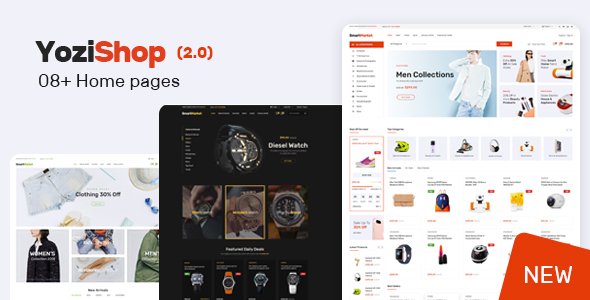
Stuck on your Yozi WordPress theme? Let's fix it.
No endless back-and-forth. Just send us the details and we'll get it done.
No obligation · Replies within 1 hour · Quote within 1 day
Setup · Customization · Bug fixes · WooCommerce integration
About Yozi WP Theme
Yozi is a WooCommerce theme built by ApusTheme, designed specifically for online stores selling fashion, electronics, or multi-category products. It ships with a drag-and-drop page builder, multiple pre-built shop layouts, and a mobile-first design approach that keeps product pages fast and clean.
The theme includes Ajax cart functionality, a sticky header, mega menus, and product quick-view out of the box. ApusTheme also bundles Revolution Slider and several premium plugins at no extra cost, which makes it a practical starting point for store owners who want a polished result without building everything from scratch.
Yozi works well with the major WooCommerce extensions and supports WPML for multilingual stores. It is a solid choice for mid-size eCommerce projects where visual presentation and product filtering are priorities.
Get matched with a Yozi developer in under one day
Tell us about your Yozi project. Small fixes, Yozi theme customization, or a full website build, whatever you need, we've got it covered.
We'll connect you to the right Yozi developers, define the scope, and get everything 100% clear.
You'll get one estimate, hire your preferred developer, and start collaborating.
Yozi has a lot of built-in functionality, but getting it to behave like a custom store takes real WooCommerce knowledge. ApusTheme’s template structure, combined with WPBakery shortcodes and custom post types, can be difficult to extend cleanly without introducing technical debt.
A vetted Yozi developer on Codeable will know where the theme’s defaults end and where custom code needs to start. That means cleaner work, fewer plugin conflicts, and a store that holds up as your catalog grows. You get a free estimate before committing to anything.
Pros
- Ships with multiple one-click demo imports covering fashion, electronics, and furniture niches
- Ajax product filtering and quick-view are included without needing extra plugins
- Bundles Revolution Slider and several premium plugins at no added cost
- Supports WPML for multilingual WooCommerce stores
- Mobile-first layout with a sticky header and optimized product grid performance
Cons
- WPBakery shortcode dependency makes switching page builders later a significant rebuild
- Theme Options panel uses Redux Framework, which can conflict with some plugin admin pages
- ApusTheme support response times can be slow outside business hours
- Custom checkout templates require PHP-level overrides and are not manageable from the panel
- Demo content import can pull in bloated media and placeholder widgets that need manual cleanup
Who is Yozi for?
Fashion and Apparel Stores
Yozi includes lookbook-style layouts and large banner sections that work well for clothing brands. The mega menu supports category images, making it easy to display seasonal collections. Size and color variation swatches display cleanly on product pages without extra plugins.
Electronics and Gadget Retailers
The theme’s grid and list view toggle, comparison table support, and detailed product specs layout suit electronics retailers. Ajax filtering by brand, price, and specification helps customers narrow down choices quickly without full page reloads.
Furniture and Home Decor Shops
Yozi’s wide-layout templates and large image support make it a practical fit for furniture stores where visual presentation matters. Room-scene product images display well, and the sticky cart keeps the purchase path short even on long-scroll product pages.
Multi-Vendor Marketplaces
With WC Vendors or Dokan added on top, Yozi can support a multi-vendor setup. The theme’s flexible header and category structure accommodate multiple seller storefronts. A developer will need to handle vendor-specific template overrides to keep the design consistent.
Beauty and Cosmetics Boutiques
Clean product card layouts and support for product video embeds make Yozi a workable choice for beauty brands. The wishlist functionality and upsell sections on product pages align well with how cosmetics customers typically browse and purchase.

Customizing Yozi
Yozi gives you a Theme Options panel built on the Redux Framework, covering typography, colors, header layouts, and footer configuration. You can switch between pre-built demos with a one-click importer and then adjust from there using Elementor or WPBakery, both of which are supported.
Where things get more complex is when you need custom product page templates, conditional cart logic, or a checkout flow that does not match the default setup. That is where working with a Yozi expert saves real time. A developer familiar with ApusTheme’s structure can override templates cleanly, avoid plugin conflicts, and extend the theme without breaking updates. If you want the store to behave exactly the way your business needs it to, custom development is usually the faster route.
Recommended plugins for Yozi
Yozi integrates well with the standard WooCommerce extension stack. Payment gateways like Stripe and PayPal work without extra configuration. WooCommerce Subscriptions, Bookings, and Product Bundles are all compatible.
For store performance, caching plugins like WP Rocket and image optimization tools pair well with Yozi, though you may need developer input to handle the theme’s slider and Ajax calls correctly. SEO plugins including Yoast and Rank Math work without conflict. For larger catalogs, a WordPress performance audit is worth considering alongside WooCommerce-specific indexing tools. If you also need better search visibility for product pages, a WordPress SEO strategy built around WooCommerce structured data will help.
Not sure which plugins to use? This WordPress plugins directory covers the most popular options with reviews and setup guides.
Yozi common issues
Yozi mega menu not showing on mobile devices
This usually comes down to a conflict between Yozi’s mobile menu script and a caching or minification plugin. Check whether the issue appears with caching disabled. If it does, the problem is likely in the theme’s JavaScript enqueue order. A developer can move the mobile menu trigger into a separate script handle and defer it correctly without breaking other interactions. If you are seeing this after a theme update, compare the functions.php enqueue calls with the previous version.
Yozi product quick-view not working after WooCommerce update
WooCommerce template changes in major releases frequently break quick-view modals in themes that load product templates via Ajax. Check the browser console for a 400 or 500 error on the Ajax request. The fix usually involves updating Yozi’s wc-quick-view.php template to match the current WooCommerce template structure. If you are not comfortable with PHP template overrides, a WordPress bug fixing service can resolve this quickly.
Yozi demo import not loading correctly or missing images
Incomplete demo imports in Yozi are often caused by PHP memory limits or execution timeouts on shared hosting. Set memory_limit to at least 256MB and max_execution_time to 300 in your php.ini or wp-config.php. If images are missing specifically, the import tool may have timed out during media fetching. You can re-run just the media import from the Appearance panel or manually upload the dummy images from the theme package.
Yozi Revolution Slider slowing down page load speed
Revolution Slider can add significant render-blocking JavaScript and CSS to your homepage. The first step is enabling lazy loading for slider images inside the slider’s global settings. Next, move the slider scripts to load in the footer rather than the head. If the slider is only on the homepage, exclude other pages from loading its assets entirely using a plugin like Asset CleanUp. For a full audit of what is slowing your Yozi store down, see the WordPress performance service.
Yozi FAQ
ApusTheme updates Yozi periodically to keep pace with WooCommerce changes, but there is often a gap after major WooCommerce releases. Before updating WooCommerce on a live store, check the Yozi changelog and test on a staging site. Template-based features like quick-view and variation swatches are the most likely to break after a WooCommerce version jump.
Yozi officially supports WPBakery Page Builder, which is bundled with the theme. Elementor can be installed and used for basic page editing, but the theme’s pre-built section shortcodes are WPBakery-specific. If you want to build primarily with Elementor, you will need to rebuild those sections. A developer can set this up cleanly from the start.
Yes, Yozi is WPML-compatible. The theme’s text strings can be registered and translated through WPML’s String Translation module. WooCommerce Multilingual handles product data. For a smooth multilingual setup, plan your URL structure and currency handling before installation, as changing these later adds significant rework.
Always use a child theme for any CSS or PHP customizations. If you have edited the parent theme files directly, those changes will be lost on update. Before updating Yozi, back up your site and test the update on staging. Check the changelog for template changes that might affect your overridden files in the child theme’s woocommerce folder.
Yes, moving an existing WooCommerce store onto Yozi is possible. Your product data, orders, and customer records transfer without issue. The work is mainly in rebuilding your page layouts inside Yozi’s structure and matching your previous design. A WordPress migration service can handle the technical side while a Yozi developer re-implements the front-end.
Hire a Yozi Developer for Your WooCommerce Store
Whether you need a full Yozi setup, a customized product page template, or fixes to an existing store, FoxyConcept connects you with developers who know the theme inside out. Work is delivered through Codeable, so you get a vetted professional, a clear scope, and no surprises.
Get a free estimate and describe what your store needs. You will hear back within 24 hours with a realistic plan and price, no obligation to proceed.
You'll need a free Codeable account so developers can ask questions and send their quotes.