Zota WordPress Theme
by thembay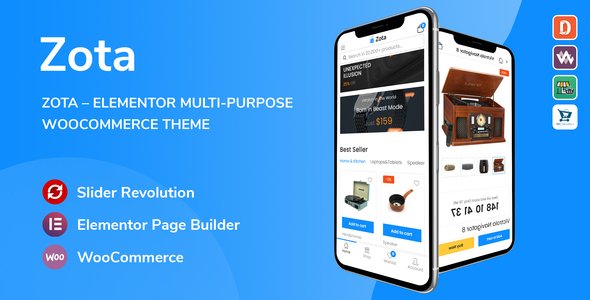
Stuck on your Zota WordPress theme? Let's fix it.
No endless back-and-forth. Just send us the details and we'll get it done.
No obligation · Replies within 1 hour · Quote within 1 day
Setup · Customization · Bug fixes · WooCommerce integration
About Zota WP Theme
Zota is a multipurpose WordPress theme developed by Thembay. It targets service-based businesses, agencies, and startups that need a clean, professional layout without building from scratch. The theme ships with multiple pre-built demos, a drag-and-drop page builder integration, and a header builder that gives you real control over the top of your site.
Zota is built on a lightweight base, which keeps initial load times reasonable compared to bulkier multipurpose themes. It supports WooCommerce, Contact Form 7, and the Elementor page builder. The demo importer lets you get a starter site running quickly. For businesses that want a polished online presence without heavy custom development, Zota covers the basics well. That said, deeper customization often requires developer input to get things looking exactly right.
Get matched with a Zota developer in under one day
Tell us about your Zota project. Small fixes, Zota theme customization, or a full website build, whatever you need, we've got it covered.
We'll connect you to the right Zota developers, define the scope, and get everything 100% clear.
You'll get one estimate, hire your preferred developer, and start collaborating.
Zota has enough moving parts that generic WordPress advice only gets you so far. A developer who has worked inside Thembay themes knows the child theme setup, the options framework, and the Elementor template hierarchy. Through Codeable, you get matched with vetted WordPress specialists who have verifiable track records. No junior developers, no bidding wars. You describe your project, get an honest estimate, and decide from there. For Zota work specifically, that experience gap between a generalist and a specialist shows up fast.
Pros
- Lightweight base compared to other multipurpose themes, which helps with initial load performance
- Multiple pre-built demos covering agency, business, and portfolio layouts
- Native Elementor support makes page editing accessible without custom code
- Header and footer builder included, no extra plugin needed for basic layout control
- WooCommerce styling is built in with dedicated shop and product page templates
Cons
- Demo content import can leave orphaned settings if not handled carefully before going live
- Theme options panel can feel disorganized when switching between multiple customization areas
- Update frequency from Thembay has been inconsistent, which creates compatibility concerns over time
- Limited community and documentation compared to major themes like Astra or GeneratePress
- Heavy use of Elementor widgets can slow the site down without deliberate performance optimization
Who is Zota for?
Digital Agencies
Zota’s agency demo layouts include team sections, service grids, and client logo displays that match what most digital agencies need on a homepage. The header builder handles multi-level navigation cleanly. A developer can strip the demo down to your actual services and content without rebuilding from zero.
Freelance Portfolios
The portfolio grid layouts in Zota work well for designers, photographers, and developers showcasing client work. Filtering by project type is supported. Pairing this with a contact section built in Elementor gives freelancers a functional site without needing a custom theme build.
Small Business Service Sites
Local service businesses, consultants, and trades companies can use Zota’s business demo as a starting point. The key sections are already there: headline, services, about, testimonials, and contact. The main task is replacing placeholder content and adjusting brand colors, which is straightforward with developer help.
WooCommerce Stores
Zota’s WooCommerce templates cover the shop listing page, single product layout, and cart. For straightforward product catalogues, this works without additional plugins. More complex stores with custom product fields or unusual checkout flows will need a developer to extend the templates correctly.
Startups and SaaS Landing Pages
Startups and early-stage SaaS products often need a focused landing page with a clear call to action, feature sections, and a pricing table. Zota’s section layouts support this structure. The theme handles single-page scrolling setups reasonably well when configured by someone who knows the builder.

Customizing Zota
Out of the box, Zota gives you a theme options panel, Elementor compatibility, and a header and footer builder. You can adjust colors, fonts, layout widths, and widget areas through the WordPress Customizer. Most surface-level changes are doable without code.
Where it gets more demanding is when your design needs to go beyond the pre-built demo layouts. Custom post type styling, non-standard header behavior, WooCommerce checkout modifications, and unique section builds all require more targeted work. A Zota expert will know where the theme’s templating structure sits, how to override styles cleanly without breaking updates, and how to extend Elementor widgets within the theme’s framework. Hiring someone with specific Zota experience saves time and avoids the trial-and-error that comes with unfamiliar theme architecture.
Recommended plugins for Zota
Zota works with the standard stack of WordPress plugins. Elementor Pro unlocks additional widgets that pair well with the theme’s section layouts. WooCommerce integration is built in, covering shop pages, product templates, and cart styling.
For performance, caching plugins like WP Rocket and image optimization tools make a measurable difference, especially if you’re running multiple Elementor sections. You can read more about WordPress performance optimization to understand what gains are realistic. If organic search matters to your business, pairing Zota with Yoast or Rank Math alongside a proper WordPress SEO setup is worth doing early rather than retrofitting later.
Not sure which plugins to use? This WordPress plugins directory covers the most popular options with reviews and setup guides.
Zota common issues
Zota theme header not displaying correctly on mobile
Mobile header issues in Zota usually come down to the responsive settings inside the header builder. Check each header element’s visibility toggle for tablet and mobile breakpoints. If the hamburger menu isn’t triggering, a JavaScript conflict with another plugin is often the cause. Temporarily switching to a default WordPress theme helps isolate whether the problem is theme-side or plugin-side. A persistent issue is worth routing through a WordPress bug fixing service to diagnose cleanly.
Zota Elementor sections not loading after theme update
After a Zota update, broken Elementor sections usually mean the theme’s custom Elementor widgets or style overrides have conflicting CSS. First, clear all caches. Then regenerate Elementor CSS by going to Elementor > Tools > Regenerate CSS. If sections still appear broken, deactivate all plugins except Elementor and check again. The root cause is often a version mismatch between the theme’s bundled scripts and the current Elementor release. A developer can resolve this in a test environment before it affects your live site.
Zota WooCommerce shop page layout broken
A broken WooCommerce shop layout in Zota is commonly caused by a missing or overridden template file. When WooCommerce updates its template structure and the theme hasn’t kept pace, styling breaks. Go to WooCommerce > Status > System Status and check for outdated templates flagged there. Updating or replacing those template files resolves most shop layout problems. If you’re unsure how to handle template overrides without breaking other pages, it’s worth getting help from someone familiar with WordPress theme and plugin conflicts.
Zota theme demo import failing or incomplete
Failed demo imports in Zota are often caused by server-side limits: PHP max execution time, memory limit, or max upload size being too low for the demo package. Ask your host to temporarily raise these values before reimporting. If the import runs but leaves pages blank or images missing, it’s usually an XML parsing issue or a missing required plugin. Install all required plugins listed in Zota’s documentation first, then retry the import on a clean WordPress install for best results.
Zota FAQ
Yes, Zota is built with Elementor compatibility as a primary feature. The theme includes custom Elementor widgets and section templates. Elementor Free works for most layouts, though some advanced widget features require Elementor Pro. You should always test Elementor updates on a staging site before applying them to a live Zota build, as widget conflicts do occasionally occur after major Elementor releases.
Zota includes WooCommerce support with custom templates for the shop archive, single product, cart, and checkout pages. Basic store setups work without additional plugins. More complex requirements, like custom product layouts or checkout modifications, will need developer involvement. Theme-specific WooCommerce template files can fall out of sync with WooCommerce updates, so keeping both updated together matters.
To install a Zota demo, upload the theme, activate it, then install the required plugins listed in the setup prompt. Navigate to the theme’s demo import panel and select the demo you want. The import process pulls in pages, content, and settings. Make sure your server has adequate PHP memory and execution time allocated beforehand. Importing onto a fresh WordPress install avoids conflicts with existing content.
Zota is manageable for non-developers at the surface level. Changing colors, fonts, text, and images through the Customizer and Elementor is accessible. Structural changes, custom post type layouts, or anything that requires touching template files will need developer help. If you want results beyond what the demo provides, working with a Zota specialist is more efficient than spending hours troubleshooting alone.
Thembay has released Zota updates, but the cadence is slower than larger theme shops. This is worth factoring in if you’re planning a long-term project. Compatibility with newer versions of WordPress core, WooCommerce, and Elementor can lag. For production sites, having a plan for ongoing WordPress maintenance is important to catch issues before they affect visitors.
Hire a Zota WordPress Developer
Whether you need a full Zota site built from a demo, custom section layouts, WooCommerce integration, or fixes that have been sitting on your to-do list, working with a developer who knows the theme makes a real difference. Work is delivered through Codeable, so you’re only working with vetted professionals. Get a free estimate and explain what you need. No commitment required.
You'll need a free Codeable account so developers can ask questions and send their quotes.