Zuhaus WordPress Theme
by Mikado-Themes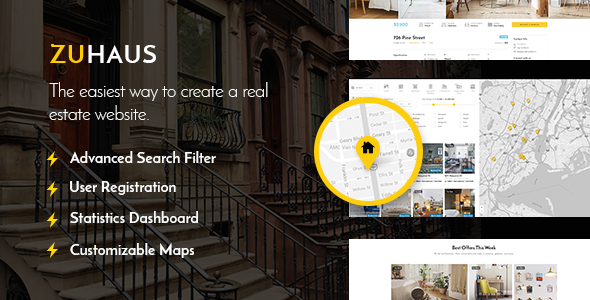
Stuck on your Zuhaus WordPress theme? Let's fix it.
No endless back-and-forth. Just send us the details and we'll get it done.
No obligation · Replies within 1 hour · Quote within 1 day
Setup · Customization · Bug fixes · WooCommerce integration
About Zuhaus WP Theme
Zuhaus is a real estate WordPress theme built by Mikado-Themes. It is designed specifically for property listings, agencies, and individual agents who need a clean, structured site that puts listings front and centre.
The theme ships with a property search widget, listing archive templates, agent profile pages, and a dedicated single property layout. It integrates with WP All Import for bulk property uploads and supports the free Real Homes or custom listing setups depending on your configuration.
Zuhaus is built on Mikado’s in-house framework, which means the page builder, options panel, and shortcode library all come bundled. You get a lot out of the box, but the tradeoff is a learning curve if you want to move beyond the demo content and build something custom.
Get matched with a Zuhaus developer in under one day
Tell us about your Zuhaus project. Small fixes, Zuhaus theme customization, or a full website build, whatever you need, we've got it covered.
We'll connect you to the right Zuhaus developers, define the scope, and get everything 100% clear.
You'll get one estimate, hire your preferred developer, and start collaborating.
Zuhaus is not a theme you fully unlock by reading documentation. Mikado’s options panel is deep, the template structure is non-standard, and real estate sites have specific requirements around search, filtering, and listing data. A developer who has worked with Zuhaus on Codeable knows where the common problems sit and how to solve them without rebuilding from scratch. You get faster results and fewer breakages than going it alone.
Pros
- Pre-built real estate templates cover listings, agents, and agency pages from day one
- Built-in property search with filters for price, location, type, and size
- Agent and agency profile pages included with contact form integration
- Google Maps and OpenStreetMap support without needing a third-party plugin
- Regular updates from Mikado-Themes with active ThemeForest support
Cons
- Mikado Options panel has a steep learning curve for non-technical users
- Demo content is heavy and requires cleanup before a site goes live
- Not built for Gutenberg-first workflows; relies on the bundled Visual Composer
- Page speed scores on default installs are below average without optimisation
- Customising listing templates requires PHP knowledge; no drag-and-drop for those layouts
Who is Zuhaus for?
Real Estate Agency Website
Zuhaus works well for agencies managing a large volume of residential listings. The built-in archive templates, agent assignment fields, and search filters give you a solid foundation. Agencies can assign listings to individual agents, display sold properties separately, and segment by neighbourhood or property type without custom development.
Independent Property Agent Portfolio
Independent agents can use Zuhaus to build a personal brand site with an active listings section. The agent profile template handles biography, contact details, and a linked listing archive. It presents well on mobile and gives solo agents a professional presence without needing a bespoke design from scratch.
Holiday Rental Listings Site
The theme’s listing structure supports custom fields, making it adaptable for short-term rental sites. You can display nightly rates, availability notes, and amenity lists using the custom field system. Pairing it with a booking plugin extends functionality for holiday rental operators who need inquiry or reservation forms on each property page.
Property Developer Project Showcase
Property developers launching new builds or multi-unit projects can use Zuhaus to showcase floor plans, specifications, and availability. The single listing template supports image galleries and custom field groups, so you can present each unit type clearly. It is a practical option for off-plan sales pages and development microsites.
Commercial Real Estate Listings
Commercial real estate brokers need listing pages that show square footage, lease terms, and zoning details alongside photography. Zuhaus handles this through custom fields without requiring a separate plugin. The search filters can be reconfigured to surface commercial-specific criteria, making it a workable choice for office, retail, and industrial listings.

Customizing Zuhaus
Customising Zuhaus goes well beyond swapping colours and fonts. The theme gives you control over header layouts, listing card styles, map integrations, and search filter configurations. Most of this lives inside the Mikado Options panel rather than the WordPress Customizer, so the workflow is different from what many WordPress users expect.
If you need a Zuhaus expert to set up a custom property submission form, connect an IDX feed, or rebuild the search filters to match a specific workflow, that work requires someone who knows how Mikado’s framework handles custom fields and template overrides.
A developer familiar with Zuhaus can also strip out unused demo content, tighten page load times, and make the listing templates match your agency’s branding without breaking theme updates.
Recommended plugins for Zuhaus
Zuhaus pairs well with plugins like Elementor for landing pages, WPML for multilingual property listings, and WooCommerce if you want to sell premium listing slots. For maps, the theme supports Google Maps and OpenStreetMap out of the box.
If site speed is a priority, a dedicated WordPress performance service can make a significant difference given Zuhaus loads several scripts by default. For agencies targeting local search, pairing Zuhaus with a WordPress SEO service helps listing pages rank for property-specific keywords.
Not sure which plugins to use? This WordPress plugins directory covers the most popular options with reviews and setup guides.
Zuhaus common issues
Zuhaus property search not returning results
This usually points to a conflict between the search widget settings and the custom fields attached to your listings. First, check that the fields used in the search form match the exact meta keys assigned to your property posts. A missing or mismatched field key returns zero results even when listings exist. Also verify that your listing post type is set to public and that search indexing is enabled. If the issue appeared after a plugin update, a WordPress bug fix can isolate the conflict quickly.
Zuhaus map not showing on listing pages
A missing map almost always comes down to an invalid or restricted Google Maps API key. Open the Mikado Options panel, go to the Google Maps section, and verify the key is entered correctly. Make sure the Maps JavaScript API and Geocoding API are both enabled in your Google Cloud Console for that key. If the map was working previously, check whether a billing or quota issue has triggered a restriction on the key. OpenStreetMap does not require a key and is a usable fallback.
Zuhaus theme slow page load speed
Zuhaus loads multiple scripts and styles by default, including Visual Composer assets that run even on pages that do not use the builder. Start by dequeuing unused scripts on listing pages and enabling lazy loading for property images. A caching plugin and a CDN will help, but the bigger gains come from auditing and removing redundant third-party scripts. If your Core Web Vitals scores are poor, a dedicated WordPress performance review is worth considering before making piecemeal changes.
Zuhaus listings not displaying after update
Listing pages going blank or throwing errors after a Zuhaus update typically means a template override in your child theme is now out of sync with the updated parent template. Check your child theme’s template files against the updated versions in the parent and merge any structural changes. If you are not using a child theme, a plugin or custom code snippet may be hooking into a function that has been renamed or removed. Disable plugins one by one to identify the conflict, then update the affected code.
Zuhaus FAQ
Zuhaus is built around Visual Composer, which ships bundled with the theme. You can install Elementor alongside it, but the native listing templates and property shortcodes are not built for Elementor’s editor. You can use Elementor on standard pages and posts, but the listing archive and single property templates will still rely on Mikado’s own builder and template system.
Yes, Zuhaus is listed as WPML compatible on ThemeForest. You can translate listing fields, page content, and the options panel strings using WPML’s String Translation module. Custom fields tied to property listings need to be registered with WPML manually. For agencies serving multiple language markets, this setup works but does require configuration time to get all fields translating correctly.
Yes. Zuhaus uses a standard custom post type for listings, which means you can import properties using WP All Import. Map your CSV or XML fields to the theme’s custom field keys during the import setup. For IDX or MLS feed integration, you will need a compatible IDX plugin or a developer to build a custom import routine that writes to the correct meta fields.
Mikado-Themes releases regular updates for Zuhaus and maintains compatibility with current WordPress versions. Always check the changelog on ThemeForest before updating, particularly after major WordPress releases. It is good practice to test updates on a staging site first, especially if you have custom template overrides or a heavily modified child theme.
Yes, but the complexity depends on your current setup. Moving listing data from another theme requires mapping custom fields to Zuhaus’s structure, which is usually done via WP All Import or a custom migration script. Design, menus, and widgets all need rebuilding in the new theme. For a reliable transition, a WordPress migration service can handle the data work and reduce the risk of losing listing content.
Hire a Zuhaus Developer
Need someone to set up Zuhaus, fix a listing issue, or build out custom property functionality? Post your project and get matched with a vetted Zuhaus developer within 24 hours. You get a free estimate with no obligation to proceed. Get your free estimate now and see exactly what the work involves before you commit.
You'll need a free Codeable account so developers can ask questions and send their quotes.